

v0.1.3
flutter_dialogflow
Flutter package for makes it easy to integrate dialogflow and support dialogflow v2
50Likes 15430-day downloads40Pub points
Platforms unavailable
Flutter package for makes it easy to integrate dialogflow and support dialogflow v2

English project snapshot. Visit GitHub for the latest content.

A new Flutter package.
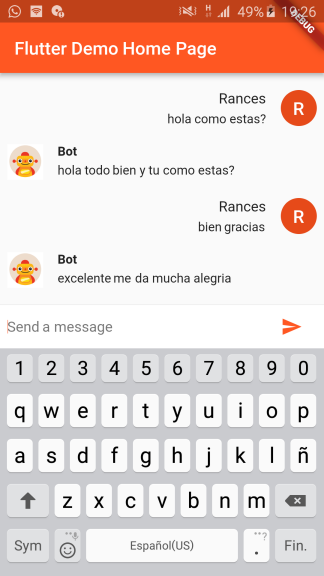
Thanks for the tutorials!
dependencies:
  flutter_dialogflow: ^0.1.0
$ flutter packages get
import 'package:flutter_dialogflow/flutter_dialogflow.dart';
import 'package:flutter_dialogflow/dialogflow_v2.dart';
  Dialogflow dialogflow = Dialogflow(token: "Your Token");
  AIResponse response = await dialogflow.sendQuery("Your Query");
  void Response(query) async {
    Dialogflow dialogflow = Dialogflow(token: "10178f9cb6cf12321asdf4aae75c87cd");
    AIResponse response = await dialogflow.sendQuery(query);
    print(response.getMessageResponse());
  }
flutter:
  uses-material-design: true
  assets:
    - assets/your_file_downloaded_google_cloud.json
import 'package:flutter_dialogflow/dialogflow_v2.dart';
  AuthGoogle authGoogle = await AuthGoogle(fileJson: "Asset Your File Json").build();
  // Select Language.ENGLISH or Language.SPANISH or others...
  Dialogflow dialogflow =Dialogflow(authGoogle: authGoogle,language: Language.ENGLISH);
  AIResponse response = await dialogflow.detectIntent("Your Query");
  AuthGoogle authGoogle = await AuthGoogle(fileJson: "assets/your_file_downloaded_google_cloud.json").build();
  Dialogflow dialogflow = Dialogflow(authGoogle: authGoogle,language: Language.ENGLISH);
  AIResponse response = await dialogflow.detectIntent("Hi!!!");
  print(response.getMessage())
Call function response.getListMessage()
response List<dynamic>
example
new CardDialogflow(response.getListMessage()[0]).title
Convert first item in CardDialogflow for worked easy
CardDialogflow have
- title
- subtitle
- imageUri
- List buttonss
    - each button have text and postback
Get a session id from your backend server after authentication.(Eg: OAuth Token)
Pass the session id a named parameter 'sessionId' to AuthGoogle function.
On the dialogflow fulfillment, access it inside `agent.session` (WebhookClient.session)
and apply your session logic

Example:
  AuthGoogle authGoogle = await AuthGoogle(fileJson: "assets/your_file_downloaded_google_cloud.json", sessionId: "YOUR_CUSTOM_SESSION_ID").build();
  Dialogflow dialogflow = Dialogflow(authGoogle: authGoogle,language: Language.ENGLISH);
  AIResponse response = await dialogflow.detectIntent("Hi!!!");
  print(response.getMessage())

Visit the repository: Flutter Dialogflow Web 🚀
Dependency list 5 items
{"sdk":"flutter"}^0.12.0+2^0.2.6—{"sdk":"flutter"}Start with your use case, compare repository activity, and check the original project before adopting it.
“A repository is the most basic element of GitHub.”
GitHub Docs — About repositories ↗