Search packages, repositories and app categories

Package detailsv0.1.3

flutter_dialogflow

Flutter package for makes it easy to integrate dialogflow and support dialogflow v2

30-day downloads
154
Likes
50
Pub points
40

Install package

flutter pub add flutter_dialogflow

Package Overview

Package selection guidance compiled from public package information, community data, and project usage.

A Flutter package that simplifies integration with Dialogflow, supporting Dialogflow v2. It enables developers to build conversational interfaces by connecting Flutter apps to Dialogflow agents for natural language understanding and intent recognition. The package handles communication with Dialogflow's API, allowing real-time interaction with chatbots powered by Dialogflow. It is designed for seamless use in Flutter applications across platforms, offering a straightforward way to implement AI-driven conversations without deep backend setup. Ideal for chatbot features in mobile apps.

Use cases

  • Integrating chatbots into mobile apps
  • Real-time user intent detection
  • Building customer support bots
  • Enabling voice or text-based interactions
  • Creating AI-powered virtual assistants

Key features

  • Supports Dialogflow v2
  • Simple API for Flutter
  • Real-time conversation handling
  • Cross-platform compatibility
  • Easy integration with Dialogflow agents

Suitable for

  • Developers building chatbot features
  • Apps requiring natural language processing
  • Mobile apps with AI-driven interactions
  • Teams using Dialogflow for NLP
  • Projects needing quick bot integration

Considerations

  • Requires Dialogflow agent setup
  • Depends on internet connectivity
  • Limited to Dialogflow v2
  • No built-in translation support
  • Authentication via service account keys

Original README

Original README snapshot from the linked source repository. Visit the repository for the latest content.

Dialogflow v1 & v2 for Flutter apps.

Dialogflow

:heart: Star :heart: the repo to support the project. Thanks!

A new Flutter package.

Awesome Tutorials

Thanks for the tutorials!

Installation

  • Add this to your package's pubspec.yaml file:
dependencies:
  flutter_dialogflow: ^0.1.0
  • You can install packages from the command line: with Flutter:
$ flutter packages get
  • Dialogflow v1 Import it Now in your Dart code, you can use:
 import 'package:flutter_dialogflow/flutter_dialogflow.dart';
  • Or Dialogflow v2 Import it Now in your Dart code, you can use:
 import 'package:flutter_dialogflow/dialogflow_v2.dart';

Usage

Dialogflow v1
  • Dialogflow register and create new Agent
  • Copy Api key (Token)
  • Code
  Dialogflow dialogflow = Dialogflow(token: "Your Token");
  AIResponse response = await dialogflow.sendQuery("Your Query");
  • Example
  void Response(query) async {
    Dialogflow dialogflow = Dialogflow(token: "10178f9cb6cf12321asdf4aae75c87cd");
    AIResponse response = await dialogflow.sendQuery(query);
    print(response.getMessageResponse());
  }
Dialogflow v2
  • Dialogflow](https://dialogflow.com/) register and create new Agent
  • Project Setup and Authentication
    • First of all, we need to create a Google Cloud Platform Project using Console Google Cloud
    • Create or select an existing GCP project.
    • From the GCP console, go to APIs and Services and click on credentials.
    • Click on Create credentials and choose Service account key.
    • Select your service account from the dropdown, choose JSON and click Create. This will download the JSON key to your computer. Save it securely.
    • We downloaded a JSON file with all our data.
  • In your project create folder assets(folder name recommended optional)
  • Move file json in your project in folder created
  • open file pubspec.yaml
flutter:
  uses-material-design: true
  assets:
    - assets/your_file_downloaded_google_cloud.json
  • Import dialogflow_v2
import 'package:flutter_dialogflow/dialogflow_v2.dart';
  • Code
  AuthGoogle authGoogle = await AuthGoogle(fileJson: "Asset Your File Json").build();
  // Select Language.ENGLISH or Language.SPANISH or others...
  Dialogflow dialogflow =Dialogflow(authGoogle: authGoogle,language: Language.ENGLISH); 
  AIResponse response = await dialogflow.detectIntent("Your Query");
  • Example
  AuthGoogle authGoogle = await AuthGoogle(fileJson: "assets/your_file_downloaded_google_cloud.json").build();
  Dialogflow dialogflow = Dialogflow(authGoogle: authGoogle,language: Language.ENGLISH);
  AIResponse response = await dialogflow.detectIntent("Hi!!!");
  print(response.getMessage())
  • Or Get List Message type Card
Call function response.getListMessage() 
response List<dynamic>
example 
new CardDialogflow(response.getListMessage()[0]).title
Convert first item in CardDialogflow for worked easy
CardDialogflow have
- title
- subtitle
- imageUri
- List buttonss
    - each button have text and postback
  • Or Setup custom authentication (session)
Get a session id from your backend server after authentication.(Eg: OAuth Token)
Pass the session id a named parameter 'sessionId' to AuthGoogle function.
On the dialogflow fulfillment, access it inside `agent.session` (WebhookClient.session)
and apply your session logic

Example:
  AuthGoogle authGoogle = await AuthGoogle(fileJson: "assets/your_file_downloaded_google_cloud.json", sessionId: "YOUR_CUSTOM_SESSION_ID").build();
  Dialogflow dialogflow = Dialogflow(authGoogle: authGoogle,language: Language.ENGLISH);
  AIResponse response = await dialogflow.detectIntent("Hi!!!");
  print(response.getMessage())

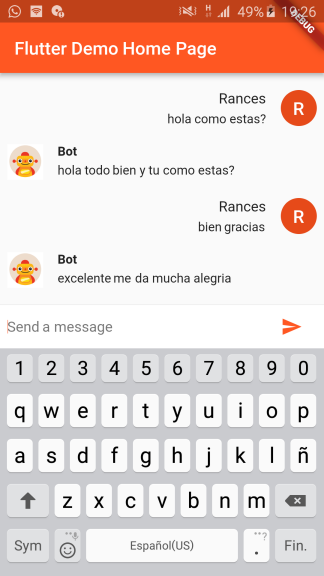
Demo

Dialogflow For Flutter Web

Visit the repository: Flutter Dialogflow Web 🚀

Categories

Dependencies

Dependency list 2 items

Source repository

Projects using this package

No data available yet.