

 v2.1.0
popup_menu
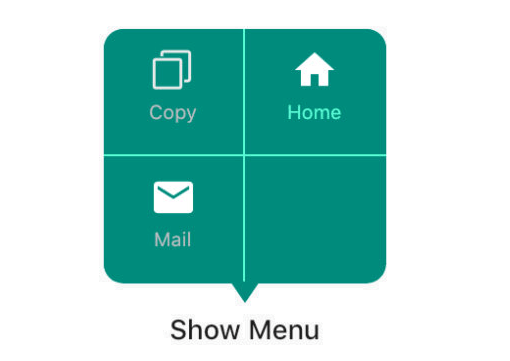
A Flutter popup menu.Writted with pure dart, supported both iOS and Android.
157Likes 2.4K30-day downloads135Pub points
AndroidiOSWebmacOSWindowsLinux
🔥A flutter popup menu. Pub enabled.

English project snapshot. Visit GitHub for the latest content.


This project was written completely in dart, and it supports both iOS and Android.


You can find the demo at the 'example' folder.
First, you should set the context at somewhere in you code. Like below:
PopupMenu.context = context;
PopupMenu menu = PopupMenu(
      items: [
        MenuItem(title: 'Copy', image: Image.asset('assets/copy.png')),
        MenuItem(title: 'Home', image: Icon(Icons.home, color: Colors.white,)),
        MenuItem(title: 'Mail', image: Icon(Icons.mail, color: Colors.white,)),
        MenuItem(title: 'Power', image: Icon(Icons.power, color: Colors.white,)),
        MenuItem(title: 'Setting', image: Icon(Icons.settings, color: Colors.white,)),
        MenuItem(title: 'Traffic', image: Icon(Icons.traffic, color: Colors.white,))],
      onClickMenu: onClickMenu,
      onShow: onShow,
      onDismiss: onDismiss);

menu.show(rect: rect);
or
PopupMenu menu = PopupMenu(
        backgroundColor: Colors.teal,
        lineColor: Colors.tealAccent,
        maxColumn: 3,
        items: [
          MenuItem(title: 'Copy', image: Image.asset('assets/copy.png')),
          MenuItem(
              title: 'Home',
              textStyle: TextStyle(fontSize: 10.0, color: Colors.tealAccent),
              image: Icon(
                Icons.home,
                color: Colors.white,
              )),
          MenuItem(
              title: 'Mail',
              image: Icon(
                Icons.mail,
                color: Colors.white,
              )),
          MenuItem(
              title: 'Power',
              image: Icon(
                Icons.power,
                color: Colors.white,
              )),
          MenuItem(
              title: 'Setting',
              image: Icon(
                Icons.settings,
                color: Colors.white,
              )),
          MenuItem(
              title: 'PopupMenu',
              image: Icon(
                Icons.menu,
                color: Colors.white,
              ))
        ],
        onClickMenu: onClickMenu,
        onDismiss: onDismiss);
    menu.show(widgetKey: btnKey2);
Dependency list 2 items
{"sdk":"flutter"}{"sdk":"flutter"}Start with your use case, compare repository activity, and check the original project before adopting it.
“A repository is the most basic element of GitHub.”
GitHub Docs — About repositories ↗