Search packages, repositories and app categories

popup_menu cover
Package detailsv2.1.0

popup_menu

A Flutter popup menu.Writted with pure dart, supported both iOS and Android.

AndroidiOSWebmacOSWindowsLinux
30-day downloads
2.4K
Likes
157
Pub points
135

Install package

flutter pub add popup_menu

Package Overview

Package selection guidance compiled from public package information, community data, and project usage.

A Flutter popup menu package built with pure Dart, offering a consistent and customizable dropdown menu experience across iOS and Android. It supports all major platforms including Web, macOS, Windows, and Linux, making it ideal for cross-platform applications. The menu is lightweight and easy to integrate, providing a native-like interaction without requiring platform-specific code. Designed for simplicity and flexibility, it enables developers to quickly add context-sensitive options to their UIs.

Use cases

  • Contextual actions in app interfaces
  • Quick access to settings or options
  • Form field enhancements
  • Navigation within a section
  • User preference selection

Key features

  • Cross-platform compatibility
  • Pure Dart implementation
  • Customizable appearance
  • Easy integration with existing widgets
  • Support for multiple platforms

Suitable for

  • Developers building cross-platform apps
  • UI designers needing consistent menus
  • Apps requiring lightweight popup functionality
  • Teams avoiding native platform code
  • Projects prioritizing simplicity and performance

Considerations

  • Limited to basic menu interactions
  • No built-in animations beyond standard transitions
  • May require custom styling for complex designs
  • Not suitable for large or nested menu structures
  • Depends on external dependencies for advanced features

Original README

Original README snapshot from the linked source repository. Visit the repository for the latest content.

pub package

This project was written completely in dart, and it supports both iOS and Android.

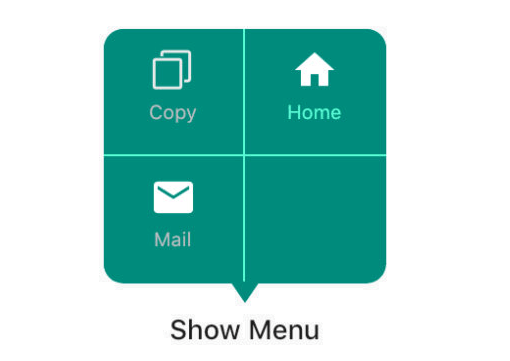
Screenshots

Todo

  • [ ] show/hide animation

Usage

You can find the demo at the 'example' folder.

First, you should set the context at somewhere in you code. Like below:

PopupMenu.context = context;
PopupMenu menu = PopupMenu(
      items: [
        MenuItem(title: 'Copy', image: Image.asset('assets/copy.png')), 
        MenuItem(title: 'Home', image: Icon(Icons.home, color: Colors.white,)), 
        MenuItem(title: 'Mail', image: Icon(Icons.mail, color: Colors.white,)), 
        MenuItem(title: 'Power', image: Icon(Icons.power, color: Colors.white,)),
        MenuItem(title: 'Setting', image: Icon(Icons.settings, color: Colors.white,)), 
        MenuItem(title: 'Traffic', image: Icon(Icons.traffic, color: Colors.white,))], 
      onClickMenu: onClickMenu, 
      onShow: onShow,
      onDismiss: onDismiss);

menu.show(rect: rect);


or

PopupMenu menu = PopupMenu(
        backgroundColor: Colors.teal,
        lineColor: Colors.tealAccent,
        maxColumn: 3,
        items: [
          MenuItem(title: 'Copy', image: Image.asset('assets/copy.png')),
          MenuItem(
              title: 'Home',
              textStyle: TextStyle(fontSize: 10.0, color: Colors.tealAccent),
              image: Icon(
                Icons.home,
                color: Colors.white,
              )),
          MenuItem(
              title: 'Mail',
              image: Icon(
                Icons.mail,
                color: Colors.white,
              )),
          MenuItem(
              title: 'Power',
              image: Icon(
                Icons.power,
                color: Colors.white,
              )),
          MenuItem(
              title: 'Setting',
              image: Icon(
                Icons.settings,
                color: Colors.white,
              )),
          MenuItem(
              title: 'PopupMenu',
              image: Icon(
                Icons.menu,
                color: Colors.white,
              ))
        ],
        onClickMenu: onClickMenu,
        onDismiss: onDismiss);
    menu.show(widgetKey: btnKey2);

Categories

Source repository

Projects using this package