


 v0.11.0
swipe_image_gallery
A scrollable, dismissable by swiping, zoomable gallery on which you can add a dynamic overlay.
101Likes 11.1K30-day downloads160Pub points
AndroidiOSWebmacOSWindowsLinux
A scrollable, dismissable by swiping, zoomable gallery for Flutter, on which you can add a dynamic overlay.

English project snapshot. Visit GitHub for the latest content.
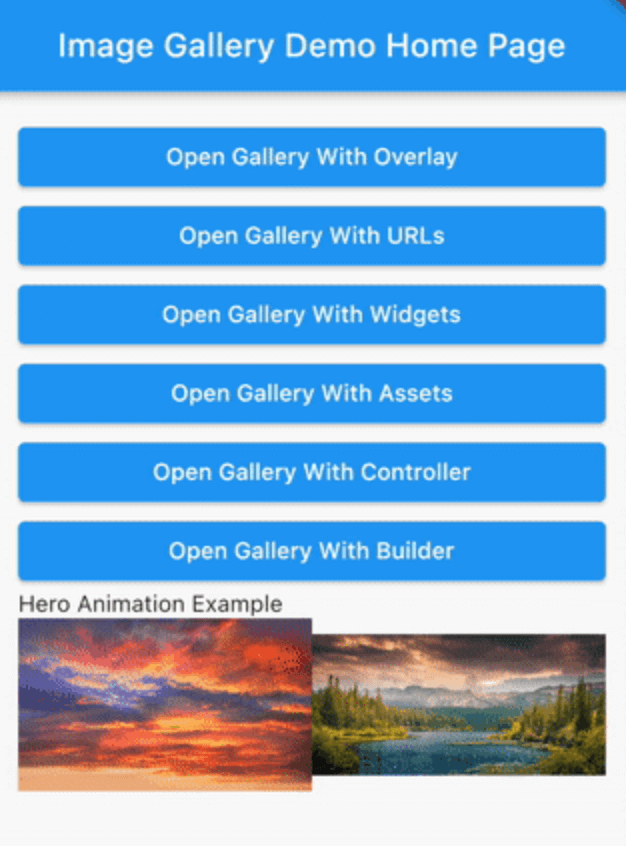
A scrollable, dismissable by swiping, zoomable gallery on which you can add a dynamic overlay. While it is intended for an image gallery different types of widgets can also be used.
Add swipe_image_gallery as a dependency in your pubspec.yaml file.
final assets = const [
  Image(image: AssetImage('assets/1.jpeg')),
  Image(image: AssetImage('assets/2.jpeg')),
  Image(image: AssetImage('assets/3.jpeg')),
  Image(image: AssetImage('assets/4.jpeg')),
];

...

SwipeImageGallery(
  context: context,
  children: assets,
).show();

final widgets = [
  Container(
    color: Colors.white,
    child: Center(
      child: Text('First Page', style: TextStyle(fontSize: 24.0)),
    ),
  ),
  Container(
    color: Colors.grey,
    child: Center(
      child: Text('Second Page', style: TextStyle(fontSize: 24.0)),
    ),
  ),
];

...

SwipeImageGallery(
  context: context,
  children: widgets,
).show();

final urls = [
  'https://via.placeholder.com/400',
  'https://via.placeholder.com/800',
  'https://via.placeholder.com/900x350',
  'https://via.placeholder.com/1000',
  'https://via.placeholder.com/100',
];

...

SwipeImageGallery(
  context: context,
  itemBuilder: (context, index) {
    return Image.network(urls[index]);
  },
  itemCount: urls.length,
).show();
You can find the OverlayExample widget here.
  StreamController<Widget> overlayController =
      StreamController<Widget>.broadcast();

  @override
  void dispose() {
    overlayController.close();
    super.dispose();
  }

  ...

  SwipeImageGallery(
    context: context,
    children: remoteImages,
    onSwipe: (index) {
      overlayController.add(OverlayExample(
        title: '${index + 1}/${remoteImages.length}',
      ));
    },
    overlayController: overlayController,
    initialOverlay: OverlayExample(
      title: '1/${remoteImages.length}',
    ),
  ).show();

final heroProperties = [
  ImageGalleryHeroProperties(tag: 'imageId1'),
  ImageGalleryHeroProperties(tag: 'imageId2'),
];

final assets = const [
  Image(image: AssetImage('assets/1.jpeg')),
  Image(image: AssetImage('assets/2.jpeg')),
];

...

Row(
  children: [
    Expanded(
      child: InkWell(
        onTap: () => SwipeImageGallery(
          context: context,
          children: assets,
          heroProperties: heroProperties,
        ).show(),
        child: Hero(
          tag: 'imageId1',
          child: Image(
            image: AssetImage('assets/1.jpeg'),
          ),
        ),
      ),
    ),
    Expanded(
      child: InkWell(
        onTap: () => SwipeImageGallery(
          context: context,
          children: assets,
          initialIndex: 1,
          heroProperties: heroProperties,
        ).show(),
        child: Hero(
          tag: 'imageId2',
          child: Image(
            image: AssetImage('assets/2.jpeg'),
          ),
        ),
      ),
    ),
  ],
),

For more detailed examples you can check out the example project.
Dependency list 3 items
{"sdk":"flutter"}{"sdk":"flutter"}^6.0.0Start with your use case, compare repository activity, and check the original project before adopting it.
“A repository is the most basic element of GitHub.”
GitHub Docs — About repositories ↗