Search packages, repositories and app categories

swipe_image_gallery cover
Package detailsv0.11.0

swipe_image_gallery

A scrollable, dismissable by swiping, zoomable gallery on which you can add a dynamic overlay.

AndroidiOSWebmacOSWindowsLinux
30-day downloads
11.1K
Likes
101
Pub points
160

Install package

flutter pub add swipe_image_gallery

Package Overview

Package selection guidance compiled from public package information, community data, and project usage.

Swipe Image Gallery is a Flutter package that enables developers to create interactive image galleries with swipe-to-dismiss, zooming, and dynamic overlay capabilities. It supports multiple platforms including Android, iOS, Web, macOS, Windows, and Linux. The gallery allows users to scroll through images, dismiss them by swiping, and zoom in/out for detailed viewing. Developers can customize the gallery with dynamic overlays such as text or icons. Ideal for photo-sharing apps, product showcases, or any app requiring intuitive image navigation.

Use cases

  • Photo sharing apps
  • Product image viewers
  • Interactive storytelling
  • Image review workflows
  • Digital album displays

Key features

  • Swipe-to-dismiss functionality
  • Zoomable images
  • Dynamic overlay support
  • Cross-platform compatibility
  • Customizable gesture controls
  • Smooth scrolling experience

Suitable for

  • Mobile and web image galleries
  • Apps needing interactive image dismissal
  • Developers seeking customizable image UIs
  • Projects requiring zoom and swipe gestures
  • UX-focused visual applications

Considerations

  • May require performance optimization for large image sets
  • Overlay positioning may need careful layout management
  • Gesture conflicts possible with other widgets
  • Limited built-in animation customization
  • Best suited for moderate image counts per gallery

Original README

Original README snapshot from the linked source repository. Visit the repository for the latest content.

Swipe Image Gallery

Pub Version

A scrollable, dismissable by swiping, zoomable gallery on which you can add a dynamic overlay. While it is intended for an image gallery different types of widgets can also be used.

Installation

Add swipe_image_gallery as a dependency in your pubspec.yaml file.

Usage

With a List of Image Widgets
final assets = const [
  Image(image: AssetImage('assets/1.jpeg')),
  Image(image: AssetImage('assets/2.jpeg')),
  Image(image: AssetImage('assets/3.jpeg')),
  Image(image: AssetImage('assets/4.jpeg')),
];

...

SwipeImageGallery(
  context: context,
  children: assets,
).show();

Image Widgets

With a List of Widgets
final widgets = [
  Container(
    color: Colors.white,
    child: Center(
      child: Text('First Page', style: TextStyle(fontSize: 24.0)),
    ),
  ),
  Container(
    color: Colors.grey,
    child: Center(
      child: Text('Second Page', style: TextStyle(fontSize: 24.0)),
    ),
  ),
];

...

SwipeImageGallery(
  context: context,
  children: widgets,
).show();

Widgets

Using Builder
final urls = [
  'https://via.placeholder.com/400',
  'https://via.placeholder.com/800',
  'https://via.placeholder.com/900x350',
  'https://via.placeholder.com/1000',
  'https://via.placeholder.com/100',
];

...

SwipeImageGallery(
  context: context,
  itemBuilder: (context, index) {
    return Image.network(urls[index]);
  },
  itemCount: urls.length,
).show();

Add an Overlay

You can find the OverlayExample widget here.

  StreamController<Widget> overlayController =
      StreamController<Widget>.broadcast();

  @override
  void dispose() {
    overlayController.close();
    super.dispose();
  }

  ...

  SwipeImageGallery(
    context: context,
    children: remoteImages,
    onSwipe: (index) {
      overlayController.add(OverlayExample(
        title: '${index + 1}/${remoteImages.length}',
      ));
    },
    overlayController: overlayController,
    initialOverlay: OverlayExample(
      title: '1/${remoteImages.length}',
    ),
  ).show();

overlay

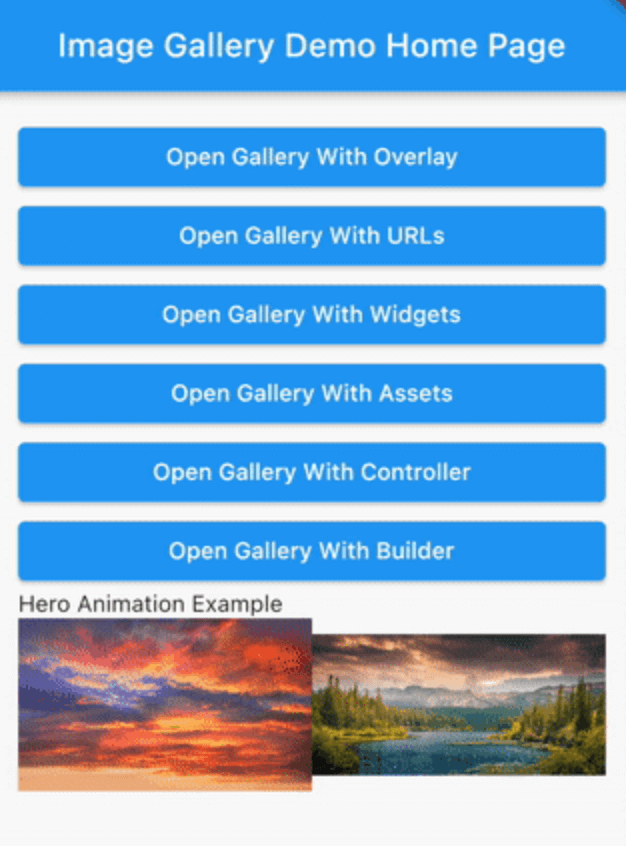
Hero Animation
final heroProperties = [
  ImageGalleryHeroProperties(tag: 'imageId1'),
  ImageGalleryHeroProperties(tag: 'imageId2'),
];

final assets = const [
  Image(image: AssetImage('assets/1.jpeg')),
  Image(image: AssetImage('assets/2.jpeg')),
];

...

Row(
  children: [
    Expanded(
      child: InkWell(
        onTap: () => SwipeImageGallery(
          context: context,
          children: assets,
          heroProperties: heroProperties,
        ).show(),
        child: Hero(
          tag: 'imageId1',
          child: Image(
            image: AssetImage('assets/1.jpeg'),
          ),
        ),
      ),
    ),
    Expanded(
      child: InkWell(
        onTap: () => SwipeImageGallery(
          context: context,
          children: assets,
          initialIndex: 1,
          heroProperties: heroProperties,
        ).show(),
        child: Hero(
          tag: 'imageId2',
          child: Image(
            image: AssetImage('assets/2.jpeg'),
          ),
        ),
      ),
    ),
  ],
),

hero

For more detailed examples you can check out the example project.

Categories

Source repository

Projects using this package

No data available yet.