

 v2.2.1
flutter_parsed_text
A Flutter package to parse text and make them into multiple Flutter Text widget.
270Likes 252K30-day downloads150Pub points
AndroidiOSWebmacOSWindowsLinux
A Flutter package to parse text and make them into linkified text widget

English project snapshot. Visit GitHub for the latest content.
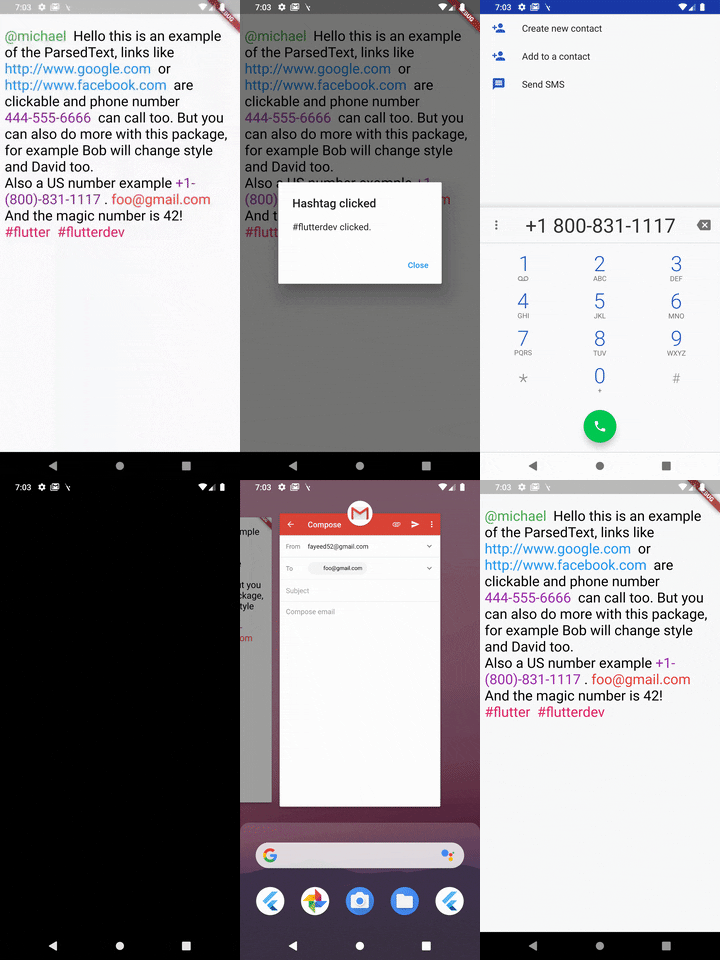
url, phone and email and also supports Regex.To use this package, add flutter_parsed_text as a dependency in your pubspec.yaml file.
import 'package:flutter_parsed_text/flutter_parsed_text.dart';
ParsedText can receive this paramters & all the RichText parameters:
text: Text that will be parsed and rendered.
style: It takes a TextStyle object as it's property to style all the non links text objects.
parse: Array of MatchText object - used for defining structure for pattern matching .
MatchText(
  type: ParsedType.EMAIL, // predefined type can be any of this ParsedTypes
  style: TextStyle(
    color: Colors.red,
    fontSize: 24,
  ), // custom style to be applied to this matched text
  onTap: (url) {
    // do something here with passed url
  }, // callback funtion when the text is tapped on
),
You can also define a custom pattern like this:
MatchText(
  pattern: r"\B#+([\w]+)\b", // a custom pattern to match
  style: TextStyle(
    color: Colors.pink,
    fontSize: 24,
  ), // custom style to be applied to this matched text
  onTap: (url) async {
  // do something here with passed url
  }, // callback funtion when the text is tapped on
)
You can also set RegexOption for the custom regex pattern like so:
MatchText(
  pattern: r"\B#+([\w]+)\b", // a custom pattern to match
  regexOptions: RegexOptions(
    multiLine : false,
    caseSensitive : false,
    unicode : false,
    dotAll : false
  ),
  style: TextStyle(
    color: Colors.pink,
    fontSize: 24,
  ), // custom style to be applied to this matched text
  onTap: (url) async {
  // do something here with passed url
  }, // callback funtion when the text is tapped on
)
A boolean that show a diffrent text and passes a diffrent text to the callback
eg: Your str is "Mention [@michel:5455345]" where 5455345 is ID of this user which will be passed as parameter to the callback funtion and @michel the value to display on interface. Your pattern for ID & username extraction : /\[(@[^:]+):([^\]]+)\]/i
Displayed text will be :
Mention ^^@michel^^
MatchText(
  pattern: r"\[(@[^:]+):([^\]]+)\]",
  style: TextStyle(
    color: Colors.green,
    fontSize: 24,
  ),
  // you must return a map with two keys
  // [display] - the text you want to show to the user
  // [value] - the value underneath it
  renderText: ({String str, String pattern}) {
    Map<String, String> map = Map<String, String>();
    RegExp customRegExp = RegExp(pattern);
    Match match = customRegExp.firstMatch(str);
    map['display'] = match.group(1);
    map['value'] = match.group(2);
    return map;
  },
  onTap: (url) {
    // do something here with passed url
  },
),
Find the complete example wiring in the Flutter_Parsed_Text example application.
A small example of the ParsedText widget.
ParsedText(
  text:
    "[@michael:51515151] Hello this is an example of the ParsedText, links like http://www.google.com or http://www.facebook.com are clickable and phone number 444-555-6666 can call too. But you can also do more with this package, for example Bob will change style and David too. foo@gmail.com And the magic number is 42! #react #react-native",
  parse: <MatchText>[
    MatchText(
      type: ParsedType.EMAIL,
      style: TextStyle(
        color: Colors.red,
        fontSize: 24,
      ),
      onTap: (url) {
        launch("mailto:" + url);
      },
    ),
  ],
)
If you found this project useful, then please consider giving it a ⭐️ on Github and sharing it with your friends via social media.
See the flutter_parsed_text.dart for more API details
If you have any suggestion for including a feature or if something doesn't work, feel free to open a Github issue for us to have a discussion on it.
Dependency list 2 items
{"sdk":"flutter"}{"sdk":"flutter"}Start with your use case, compare repository activity, and check the original project before adopting it.
“A repository is the most basic element of GitHub.”
GitHub Docs — About repositories ↗