Package selection guidance compiled from public package information, community data, and project usage.
A Flutter package that enables parsing text to automatically convert specific patterns—like URLs, emails, or hashtags—into interactive Text widgets. It simplifies the process of rendering formatted text with clickable elements, enhancing user experience in apps that display dynamic content. The package supports multiple platforms and integrates seamlessly into existing Flutter projects. It is ideal for chat interfaces, social media feeds, or any UI requiring rich text parsing.
Use cases
Parsing URLs in chat messages
Highlighting hashtags and mentions
Creating clickable email links
Rendering rich text in social feeds
Displaying formatted user-generated content
Key features
Automatic detection of URLs, emails, and hashtags
Customizable styling for parsed text
Supports multiple platform targets
Easy integration with existing Text widgets
Extensible pattern matching system
Suitable for
Chat and messaging apps
Social media applications
Content-rich UIs with dynamic text
Apps needing interactive text elements
Developers seeking lightweight text parsing
Considerations
May require custom regex for advanced patterns
Performance impact with very long texts
Limited built-in support for complex formatting
Requires careful handling of nested text structures
Not optimized for real-time streaming text
Original README
Original README snapshot from the linked source repository. Visit the repository for the latest content.
🔗 Flutter Parsed text
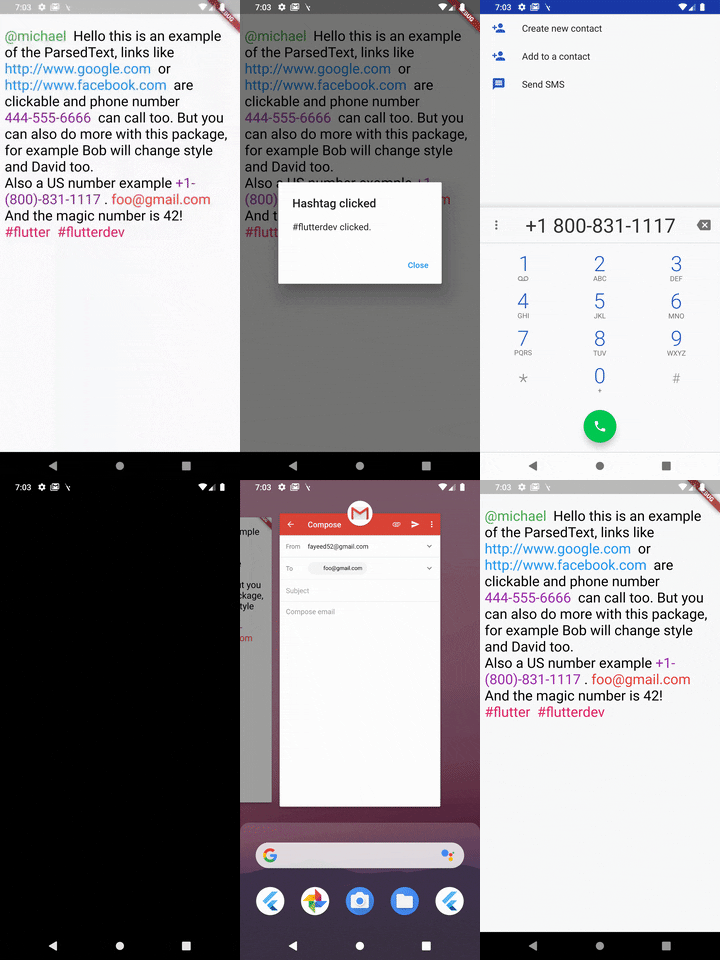
A Flutter package to parse text and extract parts using predefined types like url, phone and email and also supports Regex.
ParsedText can receive this paramters & all the RichText parameters:
text: Text that will be parsed and rendered.
style: It takes a TextStyle object as it's property to style all the non links text objects.
parse: Array of MatchText object - used for defining structure for pattern matching .
MatchText(
  type: ParsedType.EMAIL, // predefined type can be any of this ParsedTypes
  style: TextStyle(
    color: Colors.red,
    fontSize: 24,
  ), // custom style to be applied to this matched text
  onTap: (url) {
    // do something here with passed url
  }, // callback funtion when the text is tapped on
),
You can also define a custom pattern like this:
MatchText(
  pattern: r"\B#+([\w]+)\b", // a custom pattern to match
  style: TextStyle(
    color: Colors.pink,
    fontSize: 24,
  ), // custom style to be applied to this matched text
  onTap: (url) async {
  // do something here with passed url
  }, // callback funtion when the text is tapped on
)
You can also set RegexOption for the custom regex pattern like so:
MatchText(
  pattern: r"\B#+([\w]+)\b", // a custom pattern to match
  regexOptions: RegexOptions(
    multiLine : false,
    caseSensitive : false,
    unicode : false,
    dotAll : false
  ),
  style: TextStyle(
    color: Colors.pink,
    fontSize: 24,
  ), // custom style to be applied to this matched text
  onTap: (url) async {
  // do something here with passed url
  }, // callback funtion when the text is tapped on
)
A boolean that show a diffrent text and passes a diffrent text to the callback
eg: Your str is "Mention [@michel:5455345]" where 5455345 is ID of this user which will be passed as parameter to the callback funtion and @michel the value to display on interface. Your pattern for ID & username extraction : /\[(@[^:]+):([^\]]+)\]/i
Displayed text will be : Mention ^^@michel^^
MatchText(
pattern: r"\[(@[^:]+):([^\]]+)\]",
style: TextStyle(
color: Colors.green,
fontSize: 24,
),
// you must return a map with two keys// [display] - the text you want to show to the user// [value] - the value underneath it
renderText: ({String str, String pattern}) {
Map<String, String> map = Map<String, String>();
RegExp customRegExp = RegExp(pattern);
Match match = customRegExp.firstMatch(str);
map['display'] = match.group(1);
map['value'] = match.group(2);
return map;
},
onTap: (url) {
// do something here with passed url
},
),
ParsedText(
  text:
    "[@michael:51515151] Hello this is an example of the ParsedText, links like http://www.google.com or http://www.facebook.com are clickable and phone number 444-555-6666 can call too. But you can also do more with this package, for example Bob will change style and David too. foo@gmail.com And the magic number is 42! #react #react-native",
  parse: <MatchText>[
    MatchText(
      type: ParsedType.EMAIL,
      style: TextStyle(
        color: Colors.red,
        fontSize: 24,
      ),
      onTap: (url) {
        launch("mailto:" + url);
      },
    ),
  ],
)
Found this project useful? ❤️
If you found this project useful, then please consider giving it a ⭐️ on Github and sharing it with your friends via social media.