

 v1.1.0
textstyle_extensions
Syntactic sugar for easily modifying TextStyles. Quickly create textStyle variants like .bold, .italic or .size().
22Likes 2.4K30-day downloads40Pub points
Platforms unavailable
Syntactic sugar for quickly modifying TextStyles

English project snapshot. Visit GitHub for the latest content.
Syntactic sugar for easily modifying TextStyles:
// Do this:
myTextStyle.bold.italic.size(16).letterSpace(1.6)

//Instead of this:
myTextStyle.copyWith(fontSize: 16, fontWeight: FontWeight.bold, fontStyle: FontStyle.italic, letterSpacing: 1.6,)
dependencies:
  textstyle_extensions: ^1.0.0
import 'package:textstyle_extensions/textstyle_extensions.dart';

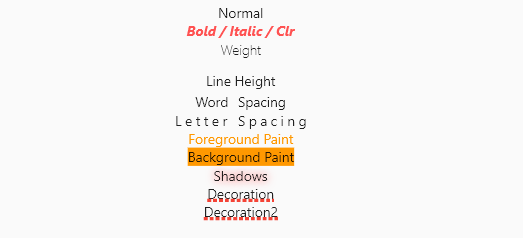
The entire TextStyle API is represented, plus a convenience method for quick scaling:
Widget build(BuildContext context) {
  Text t(String v, TextStyle t) => Text(v, style: t);
  TextStyle style = TextStyle(fontSize: 12);
  return Center(
    child: Column(
      crossAxisAlignment: CrossAxisAlignment.center,
      children: <Widget>[
        t("Normal", style),
        t("Bigger", style.scale(1.1)),
        t("Smaller Bold / Italic / Clr", style.bold.italic.textColor(Colors.redAccent).size(10)),
        t("Weight", style.weight(FontWeight.w100)),
        t("Line Height", style.textHeight(2.5)),
        t("Word Spacing", style.wordSpace(5)),
        t("Letter Spacing", style.letterSpace(3)),
        t("Foreground Paint", style.textForeground(Paint()..color = Colors.orange)),
        t("Background Paint", style.textBackground(Paint()..color = Colors.orange)),
        t("Shadows", style.textShadows([Shadow(color: Colors.redAccent, blurRadius: 4)])),
        t(
          "Decoration",
          style.textDecoration(TextDecoration.underline,
              color: Colors.red, thickness: 4, style: TextDecorationStyle.dotted),
        ),
      ],
    ),
  );
}
Shortcut method names are introduced where it makes sense. This is done both for brevity, and to reduce conflicts with the underlying TextStyle properties.
If you encounter any problems please open an issue. If you feel the library is missing a feature, please raise a ticket on Github and we'll look into it. Pull request are welcome.
MIT License
Dependency list 1 items
{"sdk":"flutter"}Start with your use case, compare repository activity, and check the original project before adopting it.
“A repository is the most basic element of GitHub.”
GitHub Docs — About repositories ↗