Search packages, repositories and app categories

textstyle_extensions cover
Package detailsv1.1.0

textstyle_extensions

Syntactic sugar for easily modifying TextStyles. Quickly create textStyle variants like .bold, .italic or .size().

30-day downloads
2.4K
Likes
22
Pub points
40

Install package

flutter pub add textstyle_extensions

Package Overview

Package selection guidance compiled from public package information, community data, and project usage.

A Flutter package that provides syntactic sugar for easily modifying TextStyles. It allows developers to create styled text variants with intuitive extensions like .bold, .italic, and .size(), streamlining the process of customizing text appearance. By extending TextStyle with fluent methods, it enhances code readability and reduces boilerplate. Ideal for projects requiring frequent text styling adjustments, especially in UI-heavy applications.

Use cases

  • Quickly apply bold or italic styles
  • Create size-adjusted text variants
  • Simplify repetitive TextStyle modifications
  • Enhance UI consistency across components
  • Improve code readability in text-heavy widgets

Key features

  • Fluent extension methods for TextStyle
  • Support for .bold, .italic, .size()
  • Reduces boilerplate in text styling
  • Improves code maintainability
  • Easy integration with existing TextStyle objects

Suitable for

  • UI developers working with rich text
  • Projects with frequent text styling
  • Teams prioritizing clean, readable code
  • Flutter apps with dynamic text formatting
  • Developers seeking concise text manipulation

Considerations

  • Limited to basic TextStyle modifications
  • Does not support advanced styling beyond extensions
  • Requires understanding of TextStyle hierarchy
  • May increase bundle size slightly
  • Not suitable for complex text layout scenarios

Original README

Original README snapshot from the linked source repository. Visit the repository for the latest content.

textstyle_extensions

Syntactic sugar for easily modifying TextStyles:

// Do this:
myTextStyle.bold.italic.size(16).letterSpace(1.6)

//Instead of this:
myTextStyle.copyWith(fontSize: 16, fontWeight: FontWeight.bold, fontStyle: FontStyle.italic, letterSpacing: 1.6,)

🔨 Installation

dependencies:
  textstyle_extensions: ^1.0.0
⚙ Import
import 'package:textstyle_extensions/textstyle_extensions.dart';

🕹️ Usage

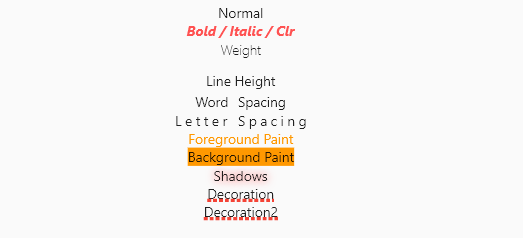
The entire TextStyle API is represented, plus a convenience method for quick scaling:

Widget build(BuildContext context) {
  Text t(String v, TextStyle t) => Text(v, style: t);
  TextStyle style = TextStyle(fontSize: 12);
  return Center(
    child: Column(
      crossAxisAlignment: CrossAxisAlignment.center,
      children: <Widget>[
        t("Normal", style),
        t("Bigger", style.scale(1.1)),
        t("Smaller Bold / Italic / Clr", style.bold.italic.textColor(Colors.redAccent).size(10)),
        t("Weight", style.weight(FontWeight.w100)),
        t("Line Height", style.textHeight(2.5)),
        t("Word Spacing", style.wordSpace(5)),
        t("Letter Spacing", style.letterSpace(3)),
        t("Foreground Paint", style.textForeground(Paint()..color = Colors.orange)),
        t("Background Paint", style.textBackground(Paint()..color = Colors.orange)),
        t("Shadows", style.textShadows([Shadow(color: Colors.redAccent, blurRadius: 4)])),
        t(
          "Decoration",
          style.textDecoration(TextDecoration.underline,
              color: Colors.red, thickness: 4, style: TextDecorationStyle.dotted),
        ),
      ],
    ),
  );
}

Shortcut method names are introduced where it makes sense. This is done both for brevity, and to reduce conflicts with the underlying TextStyle properties.

🐞 Bugs/Requests

If you encounter any problems please open an issue. If you feel the library is missing a feature, please raise a ticket on Github and we'll look into it. Pull request are welcome.

📃 License

MIT License

Categories

Source repository

Projects using this package