

 v0.0.5
art_sweetalert
A beautiful, responsive, customizable, accessible replacement, easy use for flutter popup boxes. Both supported ios and android.
54Likes 36130-day downloads140Pub points
AndroidiOSWebmacOSWindowsLinux
A new sweet alert for flutter

English project snapshot. Visit GitHub for the latest content.
A beautiful, responsive, customizable, accessible replacement, easy use for flutter popup boxes. Both supported ios and android.


ArtSweetAlert.show(
  context: context,
  artDialogArgs: ArtDialogArgs(
    type: ArtSweetAlertType.success,
    title: "A success message!",
    text: "Show a success message with an icon"
  )
);

ArtSweetAlert.show(
    context: context,
    artDialogArgs: ArtDialogArgs(
        type: ArtSweetAlertType.question,
        title: "A question?",
        text: "Show a question message with an icon"
    )
);

ArtSweetAlert.show(
    context: context,
    artDialogArgs: ArtDialogArgs(
        type: ArtSweetAlertType.danger,
        title: "Oops...",
        text: "There is a problem :("
    )
);

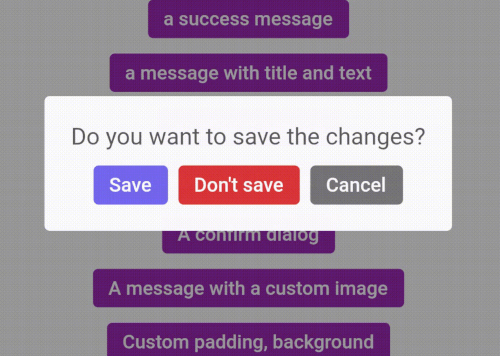
ArtDialogResponse response = await ArtSweetAlert.show(
  barrierDismissible: false,
  context: context,
  artDialogArgs: ArtDialogArgs(
    showCancelBtn: true,
    denyButtonText: "Don't save",
    title: "Do you want to save the changes?",
    confirmButtonText: "Save",
  )
);

if(response==null) {
  return;
}

if(response.isTapConfirmButton) {
  ArtSweetAlert.show(
    context: context,
    artDialogArgs: ArtDialogArgs(
      type: ArtSweetAlertType.success,
      title: "Saved!"
    )
  );
  return;
}

if(response.isTapDenyButton) {
  ArtSweetAlert.show(
    context: context,
    artDialogArgs: ArtDialogArgs(
      type: ArtSweetAlertType.info,
      title: "Changes are not saved!"
    )
  );
  return;
}

ArtDialogResponse response = await ArtSweetAlert.show(
  barrierDismissible: false,
  context: context,
  artDialogArgs: ArtDialogArgs(
    denyButtonText: "Cancel",
    title: "Are you sure?",
    text: "You won't be able to revert this!",
    confirmButtonText: "Yes, delete it",
    type: ArtSweetAlertType.warning
  )
);

if(response==null) {
  return;
}

if(response.isTapConfirmButton) {
  ArtSweetAlert.show(
      context: context,
      artDialogArgs: ArtDialogArgs(
          type: ArtSweetAlertType.success,
          title: "Deleted!"
      )
  );
  return;
}

ArtSweetAlert.show(
    context: context,
    artDialogArgs: ArtDialogArgs(
        title: "Sweet!",
        text: "Modal with a custom image.",
        customColumns: [
          Container(
            margin: EdgeInsets.only(
                bottom: 12.0
            ),
            child: Image.network(
              "https://unsplash.it/400/200",
            ),

          )
        ]
    )
);
ArtDialogResponse response = await ArtSweetAlert.show(
    artDialogKey: _artDialogKey,
    context: context,
    artDialogArgs: ArtDialogArgs(
        title: "Submit your Github username!",
        customColumns: [
            Container(
                margin: EdgeInsets.only( bottom: 20.0 ),
                child: CupertinoTextField(
                    controller: _textController,
                ),
            )
        ],
        onConfirm: () async  {
            _artDialogKey.currentState.showLoader();
            var response = await http.get(Uri.parse('https://api.github.com/users/'+_textController.text));
            if(response.statusCode!=200) {
                _artDialogKey.currentState.hideLoader();
                _artDialogKey.currentState.showErrors(["Request failed: Error"]);
                return;
            }
            var body = response.body;
            var bodyJson = json.decode(body);
            _artDialogKey.currentState.hideLoader();
            _artDialogKey.currentState.closeDialog( data: { "image": bodyJson["avatar_url"] } );
        },
        onDispose: () {
            _artDialogKey = GlobalKey<ArtDialogState>();
        },
    )
);

if (response == null) { return; }

if (response.isTapConfirmButton) {
    ArtSweetAlert.show(
        context: context,
        artDialogArgs: ArtDialogArgs(
            customColumns: [
                Container(
                    margin: EdgeInsets.only(bottom: 12.0),
                    child: Image.network( response.data["image"]),
                )
            ]
        )
    );
    return;
}
Dependency list 2 items
{"sdk":"flutter"}{"sdk":"flutter"}Start with your use case, compare repository activity, and check the original project before adopting it.
“A repository is the most basic element of GitHub.”
GitHub Docs — About repositories ↗