Search packages, repositories and app categories

art_sweetalert cover
Package detailsv0.0.5

art_sweetalert

A beautiful, responsive, customizable, accessible replacement, easy use for flutter popup boxes. Both supported ios and android.

AndroidiOSWebmacOSWindowsLinux
30-day downloads
361
Likes
54
Pub points
140

Install package

flutter pub add art_sweetalert

Package Overview

Package selection guidance compiled from public package information, community data, and project usage.

ArtSweetAlert is a visually appealing, responsive, and highly customizable dialog package for Flutter, offering an accessible and easy-to-use alternative to standard popup dialogs. It supports all major platforms including Android, iOS, Web, macOS, Windows, and Linux, ensuring consistent user experiences across devices. With smooth animations and modern design, it enhances app interactivity while maintaining accessibility standards. Ideal for displaying alerts, confirmations, and notifications with style.

Use cases

  • Displaying alert messages
  • User confirmation dialogs
  • Loading indicators
  • Success or error notifications
  • Customizable popups

Key features

  • Beautiful animations
  • Cross-platform support
  • Accessibility compliant
  • Highly customizable
  • Easy integration
  • Responsive design

Suitable for

  • Apps needing modern UI dialogs
  • Developers prioritizing UX
  • Projects requiring consistent cross-platform behavior
  • Teams wanting quick implementation
  • Apps targeting multiple operating systems

Considerations

  • May require additional styling for complex use cases
  • Limited to dialog-type interactions
  • Performance impact with excessive usage
  • Depends on external dependencies
  • Not suitable for non-dialog UI components

Original README

Original README snapshot from the linked source repository. Visit the repository for the latest content.

art_sweetalert

A beautiful, responsive, customizable, accessible replacement, easy use for flutter popup boxes. Both supported ios and android.

A success message

ArtSweetAlert.show(
  context: context,
  artDialogArgs: ArtDialogArgs(
    type: ArtSweetAlertType.success,
    title: "A success message!",
    text: "Show a success message with an icon"
  )
);

A message with title and text

ArtSweetAlert.show(
    context: context,
    artDialogArgs: ArtDialogArgs(
        type: ArtSweetAlertType.question,
        title: "A question?",
        text: "Show a question message with an icon"
    )
);

An error message

ArtSweetAlert.show(
    context: context,
    artDialogArgs: ArtDialogArgs(
        type: ArtSweetAlertType.danger,
        title: "Oops...",
        text: "There is a problem :("
    )
);

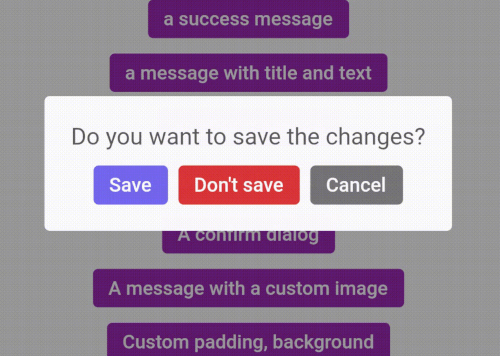
A dialog with three buttons

ArtDialogResponse response = await ArtSweetAlert.show(
  barrierDismissible: false,
  context: context,
  artDialogArgs: ArtDialogArgs(
    showCancelBtn: true,
    denyButtonText: "Don't save",
    title: "Do you want to save the changes?",
    confirmButtonText: "Save",
  )
);

if(response==null) {
  return;
}

if(response.isTapConfirmButton) {
  ArtSweetAlert.show(
    context: context,
    artDialogArgs: ArtDialogArgs(
      type: ArtSweetAlertType.success,
      title: "Saved!"
    )
  );
  return;
}

if(response.isTapDenyButton) {
  ArtSweetAlert.show(
    context: context,
    artDialogArgs: ArtDialogArgs(
      type: ArtSweetAlertType.info,
      title: "Changes are not saved!"
    )
  );
  return;
}

A confirm dialog

ArtDialogResponse response = await ArtSweetAlert.show(
  barrierDismissible: false,
  context: context,
  artDialogArgs: ArtDialogArgs(
    denyButtonText: "Cancel",
    title: "Are you sure?",
    text: "You won't be able to revert this!",
    confirmButtonText: "Yes, delete it",
    type: ArtSweetAlertType.warning
  )
);

if(response==null) {
  return;
}

if(response.isTapConfirmButton) {
  ArtSweetAlert.show(
      context: context,
      artDialogArgs: ArtDialogArgs(
          type: ArtSweetAlertType.success,
          title: "Deleted!"
      )
  );
  return;
}


A message with a custom image


ArtSweetAlert.show(
    context: context,
    artDialogArgs: ArtDialogArgs(
        title: "Sweet!",
        text: "Modal with a custom image.",
        customColumns: [
          Container(
            margin: EdgeInsets.only(
                bottom: 12.0
            ),
            child: Image.network(
              "https://unsplash.it/400/200",
            ),

          )
        ]
    )
);


Submit your Github username!

ArtDialogResponse response = await ArtSweetAlert.show(
    artDialogKey: _artDialogKey,
    context: context,
    artDialogArgs: ArtDialogArgs(
        title: "Submit your Github username!",
        customColumns: [
            Container(
                margin: EdgeInsets.only( bottom: 20.0 ),
                child: CupertinoTextField(
                    controller: _textController,
                ),
            )
        ],
        onConfirm: () async  {
            _artDialogKey.currentState.showLoader();
            var response = await http.get(Uri.parse('https://api.github.com/users/'+_textController.text));
            if(response.statusCode!=200) {
                _artDialogKey.currentState.hideLoader();
                _artDialogKey.currentState.showErrors(["Request failed: Error"]);
                return;
            }
            var body = response.body;
            var bodyJson = json.decode(body);
            _artDialogKey.currentState.hideLoader();
            _artDialogKey.currentState.closeDialog( data: { "image": bodyJson["avatar_url"] } );
        },
        onDispose: () {
            _artDialogKey = GlobalKey<ArtDialogState>();
        },
    )
);

if (response == null) { return; }

if (response.isTapConfirmButton) {
    ArtSweetAlert.show(
        context: context,
        artDialogArgs: ArtDialogArgs(
            customColumns: [
                Container(
                    margin: EdgeInsets.only(bottom: 12.0),
                    child: Image.network( response.data["image"]),
                )
            ]
        )
    );
    return;
}


Categories

Source repository

Projects using this package

No data available yet.