

 v1.0.4+1
side_sheet
Package for implementation of side sheets for all platforms and responsive UI.
83Likes 78730-day downloads150Pub points
AndroidiOSWebmacOSWindowsLinux
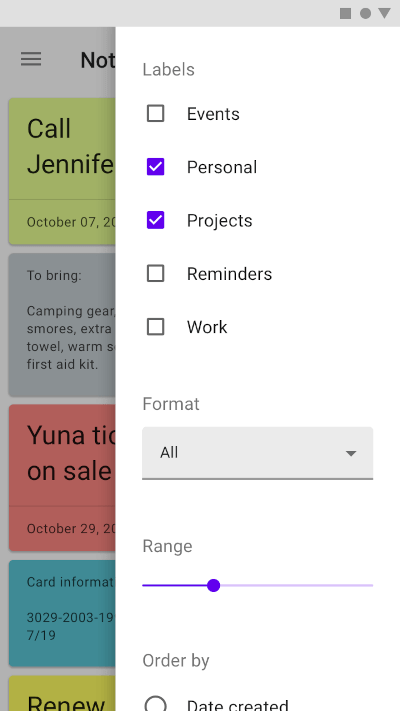
a flutter package for implementing of side sheets

English project snapshot. Visit GitHub for the latest content.
A flutter package for implementing of side sheets
A sample. font: https://material.io/components/sheets-side#usage

Simple Usage:
ElevatedButton(
    onPressed: () =>
        SideSheet.right(
            body: Text("Body"),
                context: context
        ),
    child: Text('OPEN RIGHT SIDE SHEET')),


ElevatedButton(
    onPressed: () =>
        SideSheet.left(
            body: Text("Body"),
                context: context
        ),
    child: Text('OPEN LEFT SIDE SHEET')),
Custom Width Side Sheet:
ElevatedButton(
    onPressed: () =>
        SideSheet.right(
            context: context
            width: MediaQuery.of(context).size.width * 0.3,
            body: Text("Body"),
        ),
    child: Text('OPEN RIGHT SIDE SHEET WITH CUSTOM WIDTH')),


ElevatedButton(
    onPressed: () =>
        SideSheet.left(
            context: context
            width: MediaQuery.of(context).size.width * 0.3,
            body: Text("Body"),
        ),
    child: Text('OPEN LEFT SIDE SHEET WITH CUSTOM WIDTH')),
With return arguments
ElevatedButton(
    onPressed: () async {
      final data = await SideSheet.left(
            body: IconButton(icon: Icon(Icons.close),
                      onPressed: () => Navigator.pop(context, 'Data Returns Left')),
            context: context);

      print(data);
    },
    child: Text('OPEN LEFT SIDE SHEET WITH RETURN DATA')
),

ElevatedButton(
    onPressed: () async {
      final data = await SideSheet.right(
            body: IconButton(
                      icon: Icon(Icons.close),
                      onPressed: () => Navigator.pop(context, 'Data Returns Right')),
            context: context);

      print(data);
    },
    child: Text('OPEN RIGHT SIDE SHEET WITH RETURN DATA')
),
Close sheet in body
Navigator.pop(context);
With arguments
Navigator.pop(context, 'data return');

Dependency list 2 items
{"sdk":"flutter"}{"sdk":"flutter"}Start with your use case, compare repository activity, and check the original project before adopting it.
“A repository is the most basic element of GitHub.”
GitHub Docs — About repositories ↗