Search packages, repositories and app categories

side_sheet cover
Package detailsv1.0.4+1

side_sheet

Package for implementation of side sheets for all platforms and responsive UI.

AndroidiOSWebmacOSWindowsLinux
30-day downloads
787
Likes
83
Pub points
150

Install package

flutter pub add side_sheet

Package Overview

Package selection guidance compiled from public package information, community data, and project usage.

A Flutter package that enables the implementation of side sheets across all platforms, including Android, iOS, Web, macOS, Windows, and Linux. It supports responsive UI design, ensuring consistent behavior and appearance regardless of device or screen size. The package provides a flexible and customizable solution for presenting supplementary content in a sliding panel format, ideal for navigation, filters, or detailed views. Built with cross-platform compatibility in mind, it simplifies the creation of modern, accessible interfaces.

Use cases

  • Responsive navigation panels
  • Filter and settings overlays
  • Detailed information displays
  • Modal-like content containers
  • Cross-platform UI consistency

Key features

  • Cross-platform support
  • Responsive layout adaptation
  • Customizable slide animations
  • Built-in accessibility
  • Easy integration with existing widgets

Suitable for

  • Developers targeting multiple platforms
  • Apps requiring dynamic side panels
  • UI-heavy applications
  • Teams prioritizing code reuse
  • Projects needing responsive bottom sheets

Considerations

  • May require additional styling for complex layouts
  • Limited customization options for edge cases
  • Depends on Flutter's gesture handling
  • Not optimized for very large datasets
  • Best suited for moderate content volumes

Original README

Original README snapshot from the linked source repository. Visit the repository for the latest content.

side_sheet

A flutter package for implementing of side sheets

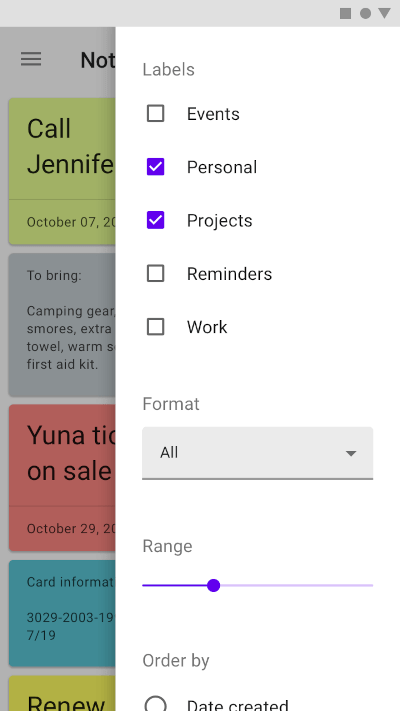
A sample. font: https://material.io/components/sheets-side#usage

sample

Simple Usage:

ElevatedButton(
    onPressed: () =>
        SideSheet.right(
            body: Text("Body"),
                context: context
        ),
    child: Text('OPEN RIGHT SIDE SHEET')),


ElevatedButton(
    onPressed: () =>
        SideSheet.left(
            body: Text("Body"),
                context: context
        ),
    child: Text('OPEN LEFT SIDE SHEET')),

Custom Width Side Sheet:

ElevatedButton(
    onPressed: () =>
        SideSheet.right(
            context: context
            width: MediaQuery.of(context).size.width * 0.3,
            body: Text("Body"),
        ),
    child: Text('OPEN RIGHT SIDE SHEET WITH CUSTOM WIDTH')),


ElevatedButton(
    onPressed: () =>
        SideSheet.left(
            context: context
            width: MediaQuery.of(context).size.width * 0.3,
            body: Text("Body"),
        ),
    child: Text('OPEN LEFT SIDE SHEET WITH CUSTOM WIDTH')),

With return arguments

ElevatedButton(
    onPressed: () async {
      final data = await SideSheet.left(
            body: IconButton(icon: Icon(Icons.close),
                      onPressed: () => Navigator.pop(context, 'Data Returns Left')),
            context: context);

      print(data);
    },
    child: Text('OPEN LEFT SIDE SHEET WITH RETURN DATA')
),

ElevatedButton(
    onPressed: () async {
      final data = await SideSheet.right(
            body: IconButton(
                      icon: Icon(Icons.close),
                      onPressed: () => Navigator.pop(context, 'Data Returns Right')),
            context: context);

      print(data);
    },
    child: Text('OPEN RIGHT SIDE SHEET WITH RETURN DATA')
),    

Close sheet in body

Navigator.pop(context);

With arguments

Navigator.pop(context, 'data return');

Buy Me A Coffee

Categories

Source repository

Projects using this package

No data available yet.
