

v2.0.0
import_lint
The Import Lint package defines import lint rules and report on lints found in Dart code.
28Likes 10.5K30-day downloads150Pub points
AndroidiOSmacOSWindowsLinux
The Import Lint package defines import lint rules and report on lints found in Dart code.

English project snapshot. Visit GitHub for the latest content.


The import_lint package defines rules to restrict imports and performs static analysis. It was inspired by eslint/no-restricted-paths.
flutter pub add --dev import_lint

or

dart pub add --dev import_lint
analysis_options.yaml file at the root of your project.Example of analysis_options.yaml
plugins:
  import_lint: <version number>

import_lint:
  rules:
    example_rule:
      target: "package:example/target/*.dart"
      from: "package:example/from/*.dart"
      except: ["package:example/from/except.dart"]
    self_rule:
      target: "package:example/self/*.dart"
      from: "package:example/self/*.dart"
      except: []
    only_rule:
      target: "package:example/*[!only]/*.dart"
      from: "package:example/only_from/*.dart"
      except: []
    package_rule:
      target: "package:example/**/*.dart"
      from: "package:import_lint/*.dart"
      except: []
    # add custom rules...
Note:
import_lintrequires Dart 3.10 or later (analyzer plugin support was added in Dart 3.10 / Flutter 3.38). The top-levelplugins:section is the new analyzer plugin system. After any change to theplugins:section, the Dart Analysis Server must be restarted to see the effects (VS Code: Dart: Restart Analysis Server).
By adding import_lint plugin to get the warnings directly in your IDE by configuring.
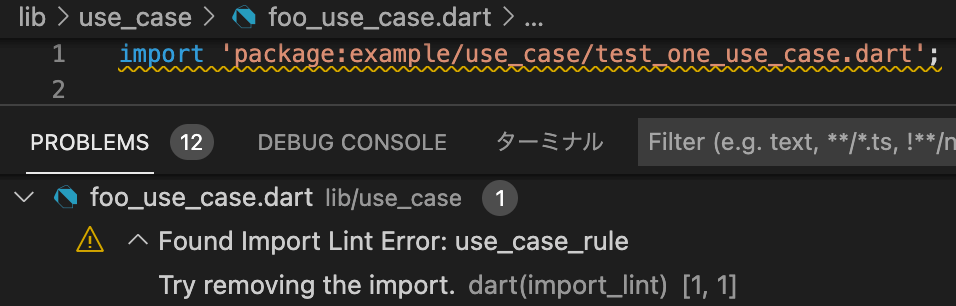
flutter run import_lint
or
dart run import_lint
plugins:
  import_lint:
    path: ..

import_lint:
  rules:
    example_rule:
      target: "package:example/target/*.dart"
      from: "package:example/from/*.dart"
      except: ["package:example/from/except.dart"]
    self_rule:
      target: "package:example/self/*.dart"
      from: "package:example/self/*.dart"
      except: []
    only_rule:
      target: "package:example/*[!only]/*.dart"
      from: "package:example/only_from/*.dart"
      except: []
    package_rule:
      target: "package:example/**/*.dart"
      from: "package:import_lint/*.dart"
      except: []
files
output
$ dart run import_lint

Analyzing...
   warning • /example/lib/not/1.dart:1:8 • package:example/only_from/1.dart • only_rule
   warning • /example/lib/target/1.dart:2:8 • package:example/from/test.dart • example_rule
   warning • /example/lib/self/1.dart:1:8 • package:example/self/2.dart • self_rule
   warning • /example/lib/package/1.dart:1:8 • package:import_lint/import_lint.dart • package_rule

4 issues found.
To change the severity of a rule, add a severity key to the rule configuration.
warning (default)error (exit code 1 when lint is found)import_lint:
severity: "error"
rules: ...
Note on IDE severity: The
severity: "error"setting is honored bydart run import_lint(exit code 1). In the IDE,analysis_server_pluginregisters a fixedwarningseverity. To see import_lint errors as errors in the IDE, add this toanalysis_options.yaml:analyzer: errors: import_lint: error
Welcome PRs!
To develop locally, clone the repo and enable the plugin from a local path in
your host project's analysis_options.yaml:
plugins:
  import_lint:
    path: /path/to/your/import-lint
    diagnostics:
      import_lint: true
For CLI use (dart run import_lint), also add it under dev_dependencies:
dev_dependencies:
  import_lint:
    path: /path/to/your/import-lint
Then run dart pub get in the host project and restart the Dart Analysis
Server. No separate tools/analyzer_plugin directory is needed — the plugin
entry point is lib/main.dart in this package.
Start with your use case, compare repository activity, and check the original project before adopting it.
“A repository is the most basic element of GitHub.”
GitHub Docs — About repositories ↗