Search packages, repositories and app categories

Package detailsv2.0.0

import_lint

The Import Lint package defines import lint rules and report on lints found in Dart code.

AndroidiOSmacOSWindowsLinux
30-day downloads
10.2K
Likes
28
Pub points
150

Install package

flutter pub add import_lint

Package Overview

Package selection guidance compiled from public package information, community data, and project usage.

The Import Lint package provides a set of lint rules to enforce consistent and clean import practices in Dart code. It analyzes import statements and reports issues such as unused imports, redundant imports, or improper import ordering. By integrating with the Dart analysis tool, it helps maintain code quality and readability across projects. The package is particularly useful for teams aiming to standardize their import patterns and reduce clutter in source files.

Use cases

  • Enforcing consistent import styles
  • Detecting unused or redundant imports
  • Improving code readability
  • Maintaining team-wide coding standards
  • Automating import cleanup during development

Key features

  • Customizable import lint rules
  • Integration with Dart analysis server
  • Real-time lint reporting
  • Supports multiple platforms
  • Open-source and community-maintained

Suitable for

  • Dart and Flutter development teams
  • Projects requiring strict code quality
  • CI/CD pipelines for automated linting
  • Developers focused on code hygiene

Considerations

  • Requires configuration in analysis_options.yaml
  • May need tuning for legacy codebases
  • Depends on Dart SDK version compatibility
  • Not a standalone formatter but complements existing tools

Original README

Original README snapshot from the linked source repository. Visit the repository for the latest content.

cover

Why import_lint?

The import_lint package defines rules to restrict imports and performs static analysis. It was inspired by eslint/no-restricted-paths.

😻 Usage

  1. Add import_lint as a dev_dependencies in pubspec.yamls.
flutter pub add --dev import_lint

or

dart pub add --dev import_lint
  1. You have lints configured in an analysis_options.yaml file at the root of your project.
  • target: Define the file paths of the targets to be restricted using glob patterns.
  • from: Define the paths that are not allowed to be used in imports using glob patterns.
  • except: Define the exception paths for the 'from' rule using glob patterns.

Example of analysis_options.yaml

plugins:
  import_lint: <version number>

import_lint:
  rules:
    example_rule:
      target: "package:example/target/*.dart"
      from: "package:example/from/*.dart"
      except: ["package:example/from/except.dart"]
    self_rule:
      target: "package:example/self/*.dart"
      from: "package:example/self/*.dart"
      except: []
    only_rule:
      target: "package:example/*[!only]/*.dart"
      from: "package:example/only_from/*.dart"
      except: []
    package_rule:
      target: "package:example/**/*.dart"
      from: "package:import_lint/*.dart"
      except: []
    # add custom rules...

Note: import_lint requires Dart 3.10 or later (analyzer plugin support was added in Dart 3.10 / Flutter 3.38). The top-level plugins: section is the new analyzer plugin system. After any change to the plugins: section, the Dart Analysis Server must be restarted to see the effects (VS Code: Dart: Restart Analysis Server).

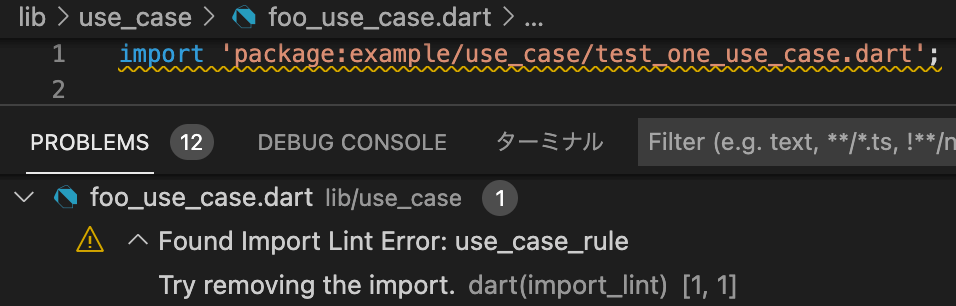
By adding import_lint plugin to get the warnings directly in your IDE by configuring.

vscode

  1. run import_lint(CLI Support)
flutter run import_lint

or

dart run import_lint

Example

example/analysis_options.yaml

plugins:
  import_lint:
    path: ..

import_lint:
  rules:
    example_rule:
      target: "package:example/target/*.dart"
      from: "package:example/from/*.dart"
      except: ["package:example/from/except.dart"]
    self_rule:
      target: "package:example/self/*.dart"
      from: "package:example/self/*.dart"
      except: []
    only_rule:
      target: "package:example/*[!only]/*.dart"
      from: "package:example/only_from/*.dart"
      except: []
    package_rule:
      target: "package:example/**/*.dart"
      from: "package:import_lint/*.dart"
      except: []

files

example/lib

output

$ dart run import_lint

Analyzing...
   warning • /example/lib/not/1.dart:1:8 • package:example/only_from/1.dart • only_rule
   warning • /example/lib/target/1.dart:2:8 • package:example/from/test.dart • example_rule
   warning • /example/lib/self/1.dart:1:8 • package:example/self/2.dart • self_rule
   warning • /example/lib/package/1.dart:1:8 • package:import_lint/import_lint.dart • package_rule

4 issues found.

Option

Rule Severities

To change the severity of a rule, add a severity key to the rule configuration.

  • warning (default)
  • error (exit code 1 when lint is found)
import_lint:
  severity: "error"
  rules: ...

Note on IDE severity: The severity: "error" setting is honored by dart run import_lint (exit code 1). In the IDE, analysis_server_plugin registers a fixed warning severity. To see import_lint errors as errors in the IDE, add this to analysis_options.yaml:

analyzer:
  errors:
    import_lint: error

Contribution

Welcome PRs!

To develop locally, clone the repo and enable the plugin from a local path in your host project's analysis_options.yaml:

plugins:
  import_lint:
    path: /path/to/your/import-lint
    diagnostics:
      import_lint: true

For CLI use (dart run import_lint), also add it under dev_dependencies:

dev_dependencies:
  import_lint:
    path: /path/to/your/import-lint

Then run dart pub get in the host project and restart the Dart Analysis Server. No separate tools/analyzer_plugin directory is needed — the plugin entry point is lib/main.dart in this package.

Categories

Dependencies

Dependency list 8 items

Source repository

Projects using this package

No data available yet.