

 v0.5.0
flutter_cupertino_settings
Flutter widget to create an iOS settings-table (static TableView).
50Likes 1.3K30-day downloads45Pub points
Platforms unavailable
A Flutter widget to create an iOS settings-table (static TableView).

English project snapshot. Visit GitHub for the latest content.


A Flutter widget to create an iOS settings-table (static TableView).
import 'package:flutter_cupertino_settings/flutter_cupertino_settings.dart';

CSWidgetStyle brightnessStyle = const CSWidgetStyle(
    icon: const Icon(Icons.brightness_medium, color: Colors.black54)
);

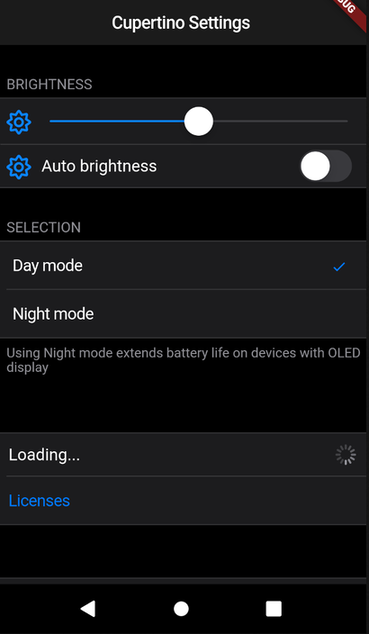
CupertinoSettings(
    items: <Widget>[
        const CSHeader('Brightness'),
        CSWidget(CupertinoSlider(value: 0.5), style: brightnessStyle),
        CSControl(
            nameWidget: Text('Auto brightness'),
            contentWidget: CupertinoSwitch(value: true),
            style: brightnessStyle,
        ),
        CSHeader('Selection'),
        CSSelection<int>(
            items: const <CSSelectionItem<int>>[
                CSSelectionItem<int>(text: 'Day mode', value: 0),
                CSSelectionItem<int>(text: 'Night mode', value: 1),
            ],
            onSelected: (index) {print(index);},
            currentSelection: 0,
        ),
        CSDescription('Using Night mode extends battery life on devices with OLED display',),
        const CSHeader(''),
        CSControl(
            nameWidget: Text('Loading...'),
            contentWidget: CupertinoActivityIndicator(),
        ),
        CSButton(CSButtonType.DEFAULT, "Licenses", (){ print("It works!"); }),
        const CSHeader(''),
        CSButton(CSButtonType.DESTRUCTIVE, "Delete all data", (){})
    ]
);
Dependency list 2 items
{"sdk":"flutter"}^1.0.0Start with your use case, compare repository activity, and check the original project before adopting it.
“A repository is the most basic element of GitHub.”
GitHub Docs — About repositories ↗