Search packages, repositories and app categories

flutter_cupertino_settings cover
Package detailsv0.5.0

flutter_cupertino_settings

Flutter widget to create an iOS settings-table (static TableView).

30-day downloads
1.3K
Likes
50
Pub points
45

Install package

flutter pub add flutter_cupertino_settings

Package Overview

Package selection guidance compiled from public package information, community data, and project usage.

A Flutter package that provides a widget to create an iOS-style settings table, mimicking the look and feel of native iOS Settings apps. It supports static table views with customizable sections, rows, and interactive elements like switches, sliders, and text inputs. Designed for developers aiming to deliver a consistent iOS user experience within Flutter applications. The package is lightweight and focused on UI presentation without complex state management.

Use cases

  • Building iOS-style app settings screens
  • Creating static configuration panels
  • Designing user preference interfaces
  • Implementing onboarding or setup flows
  • Matching Apple's design guidelines

Key features

  • iOS-native appearance
  • Support for switches and sliders
  • Sectioned layout with headers
  • Simple declarative API
  • Customizable row content

Suitable for

  • iOS-focused Flutter apps
  • Settings pages requiring native look
  • Developers prioritizing UI consistency
  • Apps targeting Apple ecosystem users
  • Prototyping configuration interfaces

Considerations

  • Does not support dynamic data binding
  • Limited to static table structures
  • No built-in validation or form handling
  • Requires manual state management
  • Not suitable for complex forms or dynamic lists

Original README

Original README snapshot from the linked source repository. Visit the repository for the latest content.

flutter_cupertino_settings

Pub badge

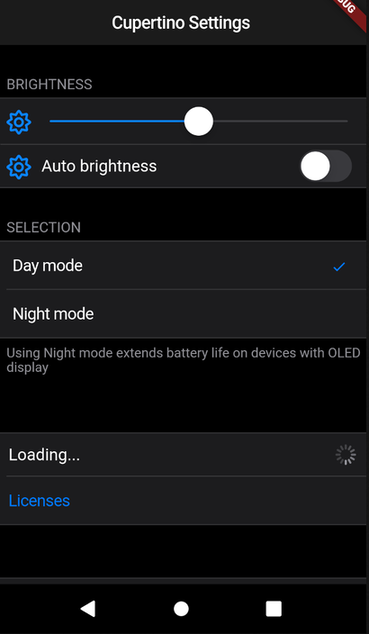
A Flutter widget to create an iOS settings-table (static TableView).


import 'package:flutter_cupertino_settings/flutter_cupertino_settings.dart';

CSWidgetStyle brightnessStyle = const CSWidgetStyle(
    icon: const Icon(Icons.brightness_medium, color: Colors.black54)
);

CupertinoSettings(
    items: <Widget>[
        const CSHeader('Brightness'),
        CSWidget(CupertinoSlider(value: 0.5), style: brightnessStyle),
        CSControl(
            nameWidget: Text('Auto brightness'),
            contentWidget: CupertinoSwitch(value: true), 
            style: brightnessStyle,
        ),
        CSHeader('Selection'),
        CSSelection<int>(
            items: const <CSSelectionItem<int>>[
                CSSelectionItem<int>(text: 'Day mode', value: 0),
                CSSelectionItem<int>(text: 'Night mode', value: 1),
            ],
            onSelected: (index) {print(index);},
            currentSelection: 0,
        ),
        CSDescription('Using Night mode extends battery life on devices with OLED display',),
        const CSHeader(''),
        CSControl(
            nameWidget: Text('Loading...'), 
            contentWidget: CupertinoActivityIndicator(),
        ),
        CSButton(CSButtonType.DEFAULT, "Licenses", (){ print("It works!"); }),
        const CSHeader(''),
        CSButton(CSButtonType.DESTRUCTIVE, "Delete all data", (){})
    ]
);

Contributors

Categories

Dependencies

Dependency list 1 items

Source repository

Projects using this package