
 v1.1.0
flutter_colorpicker
HSV(HSB)/HSL/RGB/Material color picker inspired by all the good design for your amazing flutter apps.
1KLikes 559K30-day downloads150Pub points
AndroidiOSWebmacOSWindowsLinux
HSV(HSB)/HSL/RGB/Material color picker inspired by all the good design for your amazing flutter apps.

{"sdk":"flutter"}{"sdk":"flutter"}^4.0.0English project snapshot. Visit GitHub for the latest content.
HSV(HSB)/HSL/RGB/Material color picker inspired by all the good design for your amazing flutter apps.
Adorable color pickers out of the box with highly customized widgets to all developers' needs.
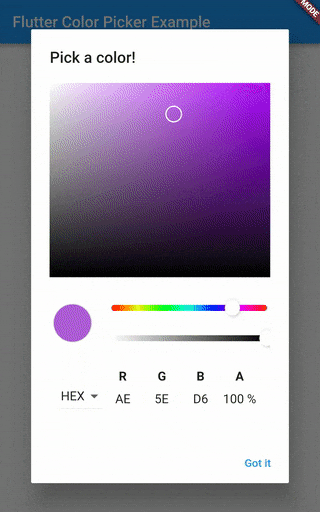
Use it in [showDialog] widget:
// create some values
Color pickerColor = Color(0xff443a49);
Color currentColor = Color(0xff443a49);

// ValueChanged<Color> callback
void changeColor(Color color) {
  setState(() => pickerColor = color);
}

// raise the [showDialog] widget
showDialog(
  context: context,
  child: AlertDialog(
    title: const Text('Pick a color!'),
    content: SingleChildScrollView(
      child: ColorPicker(
        pickerColor: pickerColor,
        onColorChanged: changeColor,
      ),
      // Use Material color picker:
      //
      // child: MaterialPicker(
      //   pickerColor: pickerColor,
      //   onColorChanged: changeColor,
      //   showLabel: true, // only on portrait mode
      // ),
      //
      // Use Block color picker:
      //
      // child: BlockPicker(
      //   pickerColor: currentColor,
      //   onColorChanged: changeColor,
      // ),
      //
      // child: MultipleChoiceBlockPicker(
      //   pickerColors: currentColors,
      //   onColorsChanged: changeColors,
      // ),
    ),
    actions: <Widget>[
      ElevatedButton(
        child: const Text('Got it'),
        onPressed: () {
          setState(() => currentColor = pickerColor);
          Navigator.of(context).pop();
        },
      ),
    ],
  ),
)
preview SlidePicker
https://user-images.githubusercontent.com/7392658/141606774-8193f4ee-e40d-49fc-b081-261c72325bf8.pngDetails in example folder.