

 v2.0.0
multilevel_drawer
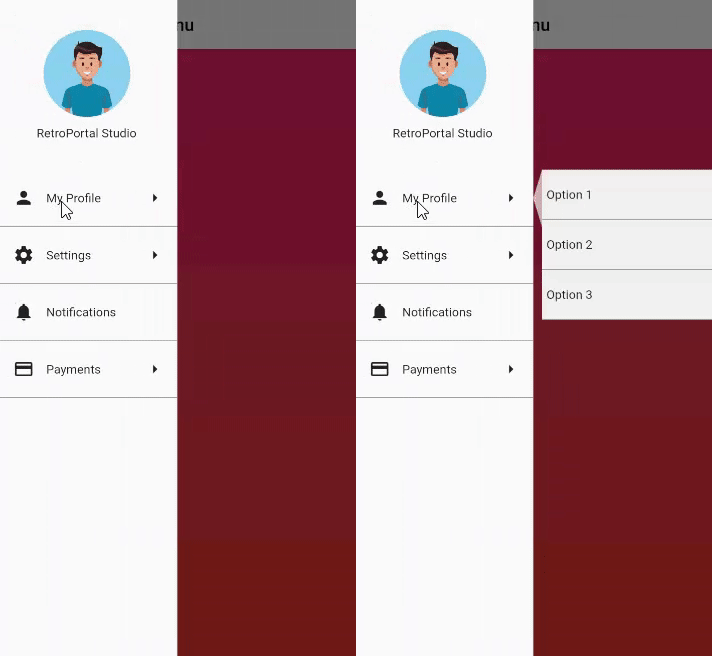
An easy to implement Multi Level Drawer for Flutter Applications. Just use this in place of regular Scaffold Drawer and you are ready to go.
132Likes 8030-day downloads130Pub points
AndroidiOSWebmacOSWindowsLinux
Repo for MultiLevel Drawer Flutter Package

English project snapshot. Visit GitHub for the latest content.
An easy to implement Multi Level Drawer for Flutter Applications. Just use this in place of regular Scaffold Drawer and you are ready to go.

To Use, simply add MultiLevelDrawer to your Scaffold's drawer property:
      child: Scaffold(
        drawer: MultiLevelDrawer(
          backgroundColor: Colors.white,
          rippleColor: Colors.white,
          subMenuBackgroundColor: Colors.grey.shade100,
          header: Container(                  // Header for Drawer
            height: size.height * 0.25,
            child: Center(child: Column(
              mainAxisAlignment: MainAxisAlignment.center,
              children: <Widget>[
                Image.asset("assets/dp_default.png",width: 100,height: 100,),
                SizedBox(height: 10,),
                Text("RetroPortal Studio")
              ],
            )),
          ),

          children: [           // Child Elements for Each Drawer Item
            MLMenuItem(
                leading: Icon(Icons.person),
                trailing: Icon(Icons.arrow_right),
                content: Text(
                  "My Profile",
                ),
                subMenuItems: [
                  MLSubmenu(onClick: () {}, submenuContent: Text("Option 1")),
                  MLSubmenu(onClick: () {}, submenuContent: Text("Option 2")),
                  MLSubmenu(onClick: () {}, submenuContent: Text("Option 3")),
                ],
                onClick: () {}),
            MLMenuItem(
                leading: Icon(Icons.settings),
                trailing: Icon(Icons.arrow_right),
                content: Text("Settings"),
                onClick: () {},
                subMenuItems: [
                  MLSubmenu(onClick: () {}, submenuContent: Text("Option 1")),
                  MLSubmenu(onClick: () {}, submenuContent: Text("Option 2"))
                ]),
            MLMenuItem(
              leading: Icon(Icons.notifications),
              content: Text("Notifications"),
              onClick: () {},
            ),
            MLMenuItem(
                leading: Icon(Icons.payment),
                trailing: Icon(Icons.arrow_right),
                content: Text(
                  "Payments",
                ),
                subMenuItems: [
                  MLSubmenu(onClick: () {}, submenuContent: Text("Option 1")),
                  MLSubmenu(onClick: () {}, submenuContent: Text("Option 2")),
                  MLSubmenu(onClick: () {}, submenuContent: Text("Option 3")),
                  MLSubmenu(onClick: () {}, submenuContent: Text("Option 4")),
                ],
                onClick: () {}),
          ],
        ),
        appBar: AppBar(
          backgroundColor: Colors.white,
          iconTheme: IconThemeData(color: Colors.black),
          title: Text(
            "Multi Level Menu",
            style: TextStyle(color: Colors.black),
          ),
        ),
        body: Container(
            decoration: BoxDecoration(
              gradient:
              LinearGradient(begin: Alignment.topCenter, end: Alignment.bottomCenter, colors: [
                Color.fromRGBO(255, 65, 108, 1.0),
                Color.fromRGBO(255, 75, 43, 1.0),
              ]),
            ),
            child: Center()),
      ),
Important Classes:
MLMenuItem //For Each direct child item of Drawer
MLSubmenu  //For Adding Submenu to MLMenuItem
Plans to add more customizations.
Dependency list 2 items
{"sdk":"flutter"}{"sdk":"flutter"}Start with your use case, compare repository activity, and check the original project before adopting it.
“A repository is the most basic element of GitHub.”
GitHub Docs — About repositories ↗