Package selection guidance compiled from public package information, community data, and project usage.
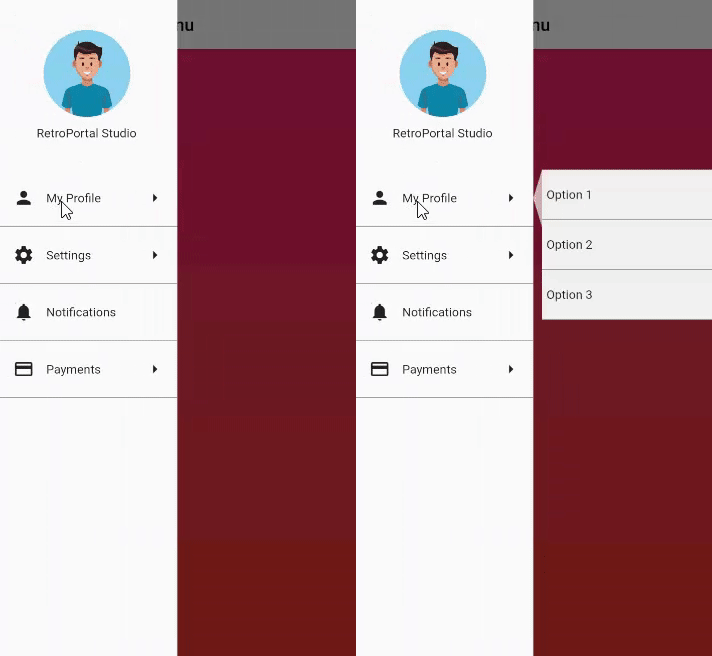
A simple and customizable multi-level drawer for Flutter apps, designed as a drop-in replacement for the standard Scaffold drawer. It enables hierarchical navigation with nested menus, enhancing user experience in complex applications. The package supports all major platforms and requires minimal setup—just replace the default drawer with this widget. Ideal for apps needing structured, collapsible navigation.
Use cases
Complex app navigation
Hierarchical menu systems
Mobile and web dashboards
Admin panels
User settings with nested sections
Key features
Nested drawer levels
Easy integration with Scaffold
Cross-platform support
Customizable appearance
Minimal configuration required
Suitable for
Developers building feature-rich apps
Apps with deep navigation structures
Designers seeking intuitive navigation
Teams prioritizing rapid implementation
Considerations
May require custom styling for advanced designs
Limited built-in animations
Best suited for moderate nesting levels
Not ideal for very simple navigation needs
Requires careful UX planning for deep hierarchies
Original README
Original README snapshot from the linked source repository. Visit the repository for the latest content.
MultiLevel Drawer
An easy to implement Multi Level Drawer for Flutter Applications. Just use this in place of regular Scaffold Drawer and you are ready to go.
Current Features
Add MultiLevel Drawer to Selected Items
Change Color of Main and Sub menu According to your Application Needs.
Demo
Usage
To Use, simply add MultiLevelDrawer to your Scaffold's drawer property: