
 v1.1.29
flutter_list_view
Provide enhanced list view include jump index, keep position etc.
133Likes 9.2K30-day downloads140Pub points
AndroidiOSWebmacOSWindowsLinux
robert-luoqing/flutter_list_view open-source repository details.

{"sdk":"flutter"}{"sdk":"flutter"}^1.0.0English project snapshot. Visit GitHub for the latest content.
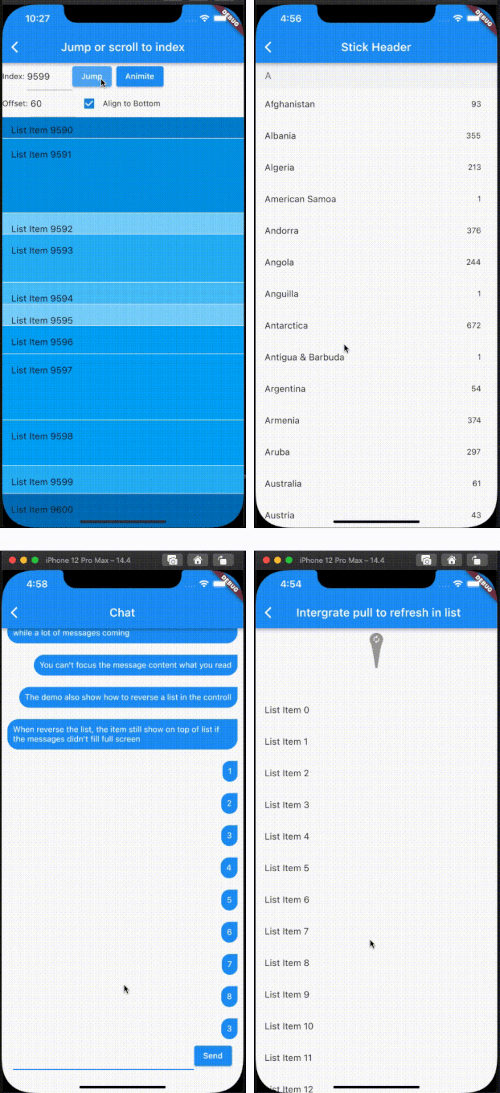
Enhance list view to support scroll to index, jump to index, header sticky, enable without scroll when insert data on top and turn performance to reused items.
[!NOTE]
The list item will be reuse when disableCacheItems=false and the invisible item will destroy. This mean, one item may be create or destroy multiple times. So The Item widget must not have any state, as it may lead to unforeseeable issues. If you want work same with list_view which item didn't destroy after create, please put onIsPermanent: (keyOrIndex) => true to FlutterListViewDelegate
FlutterListViewDelegate(
    (BuildContext context, int index) => _renderItem(index),
    childCount: messages.length,
    onItemKey: (index) => messages[index].id.toString(),
    // ...
    disableCacheItems: true,
    onIsPermanent: (keyOrIndex) => true,
| https://raw.githubusercontent.com/robert-luoqing/flutter_list_view/HEAD/screen/jump.gif | https://raw.githubusercontent.com/robert-luoqing/flutter_list_view/HEAD/screen/stickyHeader.gif |
| https://raw.githubusercontent.com/robert-luoqing/flutter_list_view/HEAD/screen/chat.gif | https://raw.githubusercontent.com/robert-luoqing/flutter_list_view/HEAD/screen/pullToRefresh.gif |
FlutterListView(
      delegate: FlutterListViewDelegate(
    (BuildContext context, int index) =>
        ListTile(title: Text('List Item ${data[index]}')),
    childCount: data.length,
  ))
flutterListViewController.jumpToIndex(100);
OR
/// Declare
FlutterListViewController controller = FlutterListViewController();
...
controller.sliverController
                      .jumpToIndex(100);
...
FlutterListView(
  controller: controller,
  delegate: FlutterListViewDelegate(
    (BuildContext context, int index) => Container(
      color: Colors.white,
      child: ListTile(title: Text('List Item ${data[index]}')),
    ),
    childCount: data.length,
  ))
If you want better user expierence, preferItemHeight or onItemHeight may set to.
_renderList() {
  return FlutterListView(
      reverse: true,
      delegate: FlutterListViewDelegate(
          (BuildContext context, int index) => Align(
                alignment: Alignment.centerRight,
                child: Padding(
                  padding: const EdgeInsets.all(10.0),
                  child: Container(
                    decoration: const BoxDecoration(
                        color: Colors.blue,
                        borderRadius: BorderRadius.only(
                            topLeft: Radius.circular(20),
                            bottomLeft: Radius.circular(20),
                            bottomRight: Radius.circular(20))),
                    child: Padding(
                      padding: const EdgeInsets.all(10.0),
                      child: Text(
                        chatListContents[index].msg,
                        style: const TextStyle(
                            fontSize: 14.0, color: Colors.white),
                      ),
                    ),
                  ),
                ),
              ),
          childCount: chatListContents.length,
          onItemKey: (index) => chatListContents[index].id.toString(),
          keepPosition: true,
          keepPositionOffset: 80,
          firstItemAlign: FirstItemAlign.end));
}
Notice: Keep positoin need implement onItemKey, the onItemKey used to identify the unique of item. The key should difference with other items' key. We use the key to know what position you insert to current list. if you insert a item before the rendered item, package should increase the scrollOffset.
Widget _renderHeader(String text) {
  return Container(
    color: const Color(0xFFF3F4F5),
    child: Padding(
      padding: const EdgeInsets.symmetric(horizontal: 16.0, vertical: 12.0),
      child: Text(
        text,
        style: const TextStyle(fontSize: 18, color: Color(0xFF767676)),
      ),
    ),
  );
}

Widget _renderItem(CountryModel itemData) {
  return Padding(
      padding: const EdgeInsets.only(right: 12.0),
      child: ListTile(
          title: Text(itemData.name), trailing: Text(itemData.phoneCode)));
}

@override
Widget build(BuildContext context) {
  return Scaffold(
    appBar: AppBar(title: const Text("Stick Header")),
    body: FlutterListView(
        delegate: FlutterListViewDelegate(
          (BuildContext context, int index) {
            var data = _countries[index];
            if (data is AlphabetHeader) {
              return _renderHeader(data.alphabet);
            } else {
              return _renderItem(data as CountryModel);
            }
          },
          childCount: _countries.length,
          onItemSticky: (index) => _countries[index] is AlphabetHeader,
        ),
        controller: controller),
  );
}
You can also check doc/stickyHeader.md
@override
Widget build(BuildContext context) {
  return Scaffold(
    appBar: AppBar(
      title: const Text("Intergrate pull to refresh in list"),
    ),
    body: SmartRefresher(
      enablePullDown: true,
      enablePullUp: true,
      header: const WaterDropHeader(),
      footer: CustomFooter(
        builder: (context, mode) {
          Widget body;
          if (mode == LoadStatus.idle) {
            body = const Text("pull up load");
          } else if (mode == LoadStatus.loading) {
            body = const CupertinoActivityIndicator();
          } else if (mode == LoadStatus.failed) {
            body = const Text("Load Failed!Click retry!");
          } else if (mode == LoadStatus.canLoading) {
            body = const Text("release to load more");
          } else {
            body = const Text("No more Data");
          }
          return SizedBox(
            height: 55.0,
            child: Center(child: body),
          );
        },
      ),
      controller: _refreshController,
      onRefresh: _onRefresh,
      onLoading: _onLoading,
      child: FlutterListView(
          delegate: FlutterListViewDelegate(
        (BuildContext context, int index) =>
            ListTile(title: Text('List Item ${data[index]}')),
        childCount: data.length,
      )),
    ),
  );
}
FlutterListView(
  delegate: FlutterListViewDelegate(
      (BuildContext context, int index) =>
          Item(text: data[index].toString()),
      childCount: data.length,
      // If onItemKey is not given, the key is index
      // The example is indicate the "40" item will not be reused and disposed after it was created
      onIsPermanent: (key) => key == "40"))