Package selection guidance compiled from public package information, community data, and project usage.
A Flutter package that enhances the standard ListView with advanced features such as jump index navigation, position persistence during rebuilds, and improved scrolling behavior. It is designed to provide a smoother user experience in list-heavy applications by maintaining scroll state and enabling quick navigation through large datasets. Ideal for apps requiring efficient and responsive list management across multiple platforms.
Use cases
Large data lists with quick navigation
Maintaining scroll position after updates
Enhanced user experience in long lists
Cross-platform list consistency
Dynamic content reloading without losing scroll state
Implementing alphabetical jump indexes
Key features
Jump index for fast navigation
Preserves scroll position during rebuilds
Optimized performance for large lists
Supports all major Flutter platforms
Customizable index indicators
Smooth scrolling transitions
Suitable for
Developers building complex list interfaces
Apps with dynamic or frequently updated lists
Users needing intuitive list navigation
Cross-platform mobile and web applications
Applications requiring high-performance list rendering
Considerations
Requires careful integration with existing list logic
May increase bundle size slightly
Best suited for lists with more than 50 items
Limited customization for non-standard list layouts
Depends on stable Flutter version compatibility
Original README
Original README snapshot from the linked source repository. Visit the repository for the latest content.
Flutter List View
Enhance list view to support scroll to index, jump to index, header sticky, enable without scroll when insert data on top and turn performance to reused items.
Features
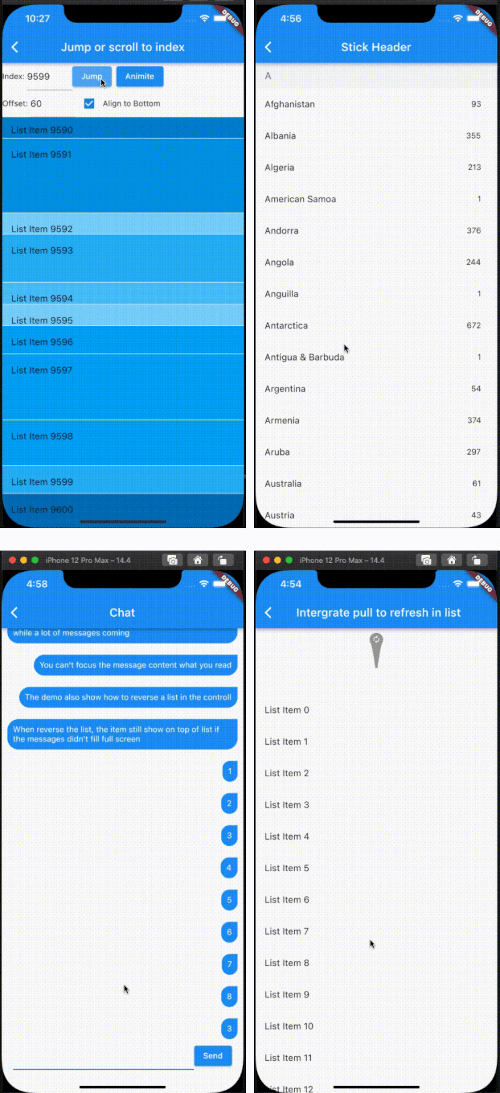
Support the list view to jump to and scroll to index.
Support for inserting data without scrolling
Support for show top in reverse mode if the data can't fill the full viewport.
Support sticky header.
Support integrated pull_to_refresh
When initializing data, allow for scrolling to specify an index.
To save performance, flutter list_view always reuses the rendered item.
Support to keep specifying items without reusing and disposing of them once the item is created.
[!NOTE]
The list item will be reuse when disableCacheItems=false and the invisible item will destroy. This mean, one item may be create or destroy multiple times. So The Item widget must not have any state, as it may lead to unforeseeable issues. If you want work same with list_view which item didn't destroy after create, please put onIsPermanent: (keyOrIndex) => true to FlutterListViewDelegate
If you want better user expierence, preferItemHeight or onItemHeight may set to.
preferItemHeight
The package don't know the item's height, If you don't set, package alway think the item height is 50 util layout the item. If you know the height, you should set it.
onItemHeight
like preferItemHeight, the function will used to get height of each item util the item layout.
Notice: Keep positoin need implement onItemKey, the onItemKey used to identify the unique of item. The key should difference with other items' key.
We use the key to know what position you insert to current list. if you insert a item before the rendered item, package should increase the scrollOffset.
@overrideWidgetbuild(BuildContext context) {
returnScaffold(
appBar: AppBar(
title: constText("Intergrate pull to refresh in list"),
),
body: SmartRefresher(
enablePullDown: true,
enablePullUp: true,
header: constWaterDropHeader(),
footer: CustomFooter(
builder: (context, mode) {
Widget body;
if (mode == LoadStatus.idle) {
body = constText("pull up load");
} elseif (mode == LoadStatus.loading) {
body = constCupertinoActivityIndicator();
} elseif (mode == LoadStatus.failed) {
body = constText("Load Failed!Click retry!");
} elseif (mode == LoadStatus.canLoading) {
body = constText("release to load more");
} else {
body = constText("No more Data");
}
returnSizedBox(
height: 55.0,
child: Center(child: body),
);
},
),
controller: _refreshController,
onRefresh: _onRefresh,
onLoading: _onLoading,
child: FlutterListView(
delegate: FlutterListViewDelegate(
(BuildContext context, int index) =>
ListTile(title: Text('List Item ${data[index]}')),
childCount: data.length,
)),
),
);
}
Support to keep specifying items without reusing and disposing of them once the item is created.
FlutterListView(
delegate: FlutterListViewDelegate(
(BuildContext context, int index) =>
Item(text: data[index].toString()),
childCount: data.length,
// If onItemKey is not given, the key is index// The example is indicate the "40" item will not be reused and disposed after it was created
onIsPermanent: (key) => key == "40"))