
 v0.1.7
flutter_storyboard
A Flutter package to show a storyboard of all your widgets.
133Likes 9830-day downloads40Pub points
Platforms unavailable
Flutter Storyboard

{"sdk":"flutter"}^0.4.0{"sdk":"flutter"}English project snapshot. Visit GitHub for the latest content.
Buy Me A Coffee Donate github pages GitHub stars flutter_storyboard
A Flutter Debug tool to see and test all your screens at once.
Online Demo: https://rodydavis.github.io/storyboard/
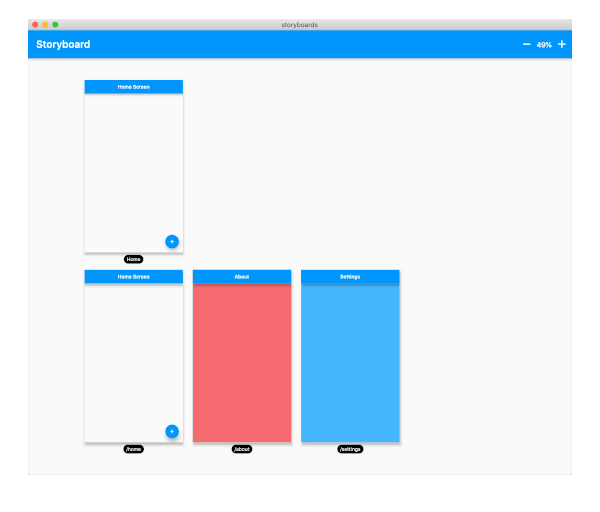
screenshot
Wrap your MaterialApp with Storyboard.
return StoryBoard.material(
      child: MaterialApp(
        debugShowCheckedModeBanner: false,
        title: 'Flutter Storyboard Example',
        theme: ThemeData.light().copyWith(
          visualDensity: VisualDensity.adaptivePlatformDensity,
        ),
        darkTheme: ThemeData.dark().copyWith(
          visualDensity: VisualDensity.adaptivePlatformDensity,
        ),
        themeMode: ThemeMode.light,
        home: HomeScreen(),
        routes: {
          '/home': (_) => HomeScreen(),
          '/about': (_) => AboutScreen(),
          '/settings': (_) => SettingsScreen(),
        },
      ),
    );
Wrap your WidgetsApp with Storyboard.widgets(). Wrap your CupertinoApp with Storyboard.cupertino().
You can add any number of custom widgets to the canvas, including custom routes. You can add dummy data to the constructors here as it will render all default values.
customScreens: [
  SettingsScreen(),
  AboutScreen(),
  CustomWidget(title: 'Dummy Data'),
],
customRoutes: [
  RouteSettings(name: '/about'),
],
Now you can test all your screens with a hot reload! You can also disable the widget at any time by setting enabled to false. You will need to do a hot restart after you change this value.