
 v6.0.0
calendar_day_view
This package is dedicated to calendar day view. This is a complement to calendar to make your app better
36Likes 89730-day downloads150Pub points
AndroidiOSWebmacOSWindowsLinux
samderlust/calendar_day_view open-source repository details.

{"sdk":"flutter"}^0.3.3^6.0.0{"sdk":"flutter"}English project snapshot. Visit GitHub for the latest content.
pub package style: very good analysis License: MIT Buy Me A Coffee
A powerful and customizable Flutter library for displaying calendar events in day view format. Perfect for applications requiring detailed daily event visualization.
Renamed tap callbacks — all tap callbacks are now consistently named onTimeTap:
| View | Before (v5) | After (v6) |
|---|---|---|
CalendarDayView.category() |
onTileTap |
onTimeTap |
CalendarDayView.categoryOverflow() |
onTileTap |
onTimeTap |
CalendarDayView.inRow() |
onTap |
onTimeTap |
CalendarDayView.overflow() |
onTimeTap |
onTimeTap (no change) |
CategoryDayView() |
onTileTap |
onTimeTap |
CategoryOverflowDayView() |
onTileTap |
onTimeTap |
Removed parameters:
controlBarBuilder removed from CalendarDayView.category() and CalendarDayView.categoryOverflow()backgroundTimeTileBuilder removed from CalendarDayView.categoryOverflow()Typedefs now exported — all typedefs (e.g., CategoryDayViewEventBuilder, DayViewItemBuilder) are now accessible via the main import 'package:calendar_day_view/calendar_day_view.dart' import. No need to import src/models/typedef.dart directly.
Styling moved to DayViewDecoration — all visual customization is now grouped in a separate DayViewDecoration object, passed via config.decoration:
// Before (v5.x)
OverFlowDayViewConfig(
  currentDate: DateTime.now(),
  timeColumnWidth: 70,
  dividerColor: Colors.black,
  currentTimeLineColor: Colors.red,
  timeLabelBuilder: (ctx, t) => Text(...),
)

// After (v6.x)
OverFlowDayViewConfig(
  currentDate: DateTime.now(),
  decoration: DayViewDecoration(
    timeColumnWidth: 70,
    dividerColor: Colors.black,
    currentTimeLineColor: Colors.red,
    timeLabel: (ctx, t) => Text(...),
  ),
)
Properties moved to DayViewDecoration: timeColumnWidth, timeTextStyle, timeTextColor, dividerColor, currentTimeLineColor, timeLabel (was timeLabelBuilder), currentTimeLine (was currentTimeLineBuilder), rowBackground (was timeRowBackgroundBuilder), divider (was dividerBuilder). The same decoration can be reused across multiple views for consistent branding.
scrollToCurrentTime: true in config to auto-scroll on load (overflow and in-row views)currentTimeLineBuilder in config to fully customize the current time indicatorshowAllEventsInCell: true in CategoryDavViewConfig to display all events horizontally instead of only the firstemptyTileBuilder in category views to customize empty cellscurrentTimeLineColor and cropBottomEvents moved to base DavViewConfig, available to all views without duplicationtimeRowBackgroundBuilder in config to shade specific time ranges (lunch break, working hours, unavailable blocks) in overflow, multi-column, and in-row viewsdivider in DayViewDecoration for custom dividers per row (dashed lines, per-row thickness, hide specific dividers)DayViewDecoration — new visual decoration class groups all styling and builder callbacks. Reusable across view types for shared themingtimeColumnPosition: TimeColumnPosition.left | .right | .none in decoration for flexible layoutsheader and footer in decoration for custom widgets above/below the time gridoverlapStrategy on MultiColumnDayViewConfig<T> for custom multi-column layout algorithmsFor full details, see the Changelog.
Check out the live demo at: https://samderlust.github.io/calendardayview
Add the package to your pubspec.yaml:
dependencies:
  calendar_day_view: <latest_version>
Then import it in your Dart code:
import 'package:calendar_day_view/calendar_day_view.dart';
All visual customization is done via DayViewDecoration, which can be reused across view types:
final myDecoration = DayViewDecoration(
  timeColumnWidth: 70,
  dividerColor: Colors.grey.shade300,
  currentTimeLineColor: Colors.red,
  timeLabel: (context, time) => Text(
    DateFormat('HH:mm').format(time),
    style: const TextStyle(fontWeight: FontWeight.bold),
  ),
  rowBackground: (context, rowTime, constraints) {
    // Shade lunch break
    if (rowTime.hour == 12) {
      return Container(color: Colors.grey.withValues(alpha: 0.1));
    }
    return null;
  },
  divider: (context, rowTime) {
    // Thicker line at the hour
    if (rowTime.minute == 0) {
      return Divider(color: Colors.grey.shade400, thickness: 1.5, height: 0);
    }
    return null; // skip divider
  },
);

// Reuse the same decoration across different views
OverFlowDayViewConfig(currentDate: DateTime.now(), decoration: myDecoration);
MultiColumnDayViewConfig(currentDate: DateTime.now(), decoration: myDecoration);
Google Calendar-style layout. Overlapping events are automatically placed side-by-side in columns. Column count is determined by the overlap pattern — solo events get full width.
CalendarDayView.multiColumn(
  config: MultiColumnDayViewConfig(
    currentDate: DateTime.now(),
    timeGap: 60,
    heightPerMin: 2,
    startOfDay: const TimeOfDay(hour: 7, minute: 0),
    endOfDay: const TimeOfDay(hour: 20, minute: 0),
    scrollToCurrentTime: true,
  ),
  events: events,
  onTimeTap: (time) => handleTimeTap(time),
  itemBuilder: (context, constraints, event, columnIndex, totalColumns) {
    return Container(
      margin: const EdgeInsets.all(1),
      decoration: BoxDecoration(
        color: Colors.blue.shade100,
        borderRadius: BorderRadius.circular(4),
      ),
      child: Text(event.value),
    );
  },
);
Perfect for displaying events across multiple categories (e.g., meeting rooms, resources).
CalendarDayView.category(
  config: CategoryDavViewConfig(
    time12: true,
    allowHorizontalScroll: true,
    columnsPerPage: 2,
    currentDate: DateTime.now(),
    timeGap: 60,
    heightPerMin: 1,
    showAllEventsInCell: true, // show all events in cell horizontally
  ),
  categories: categories,
  events: events,
  onTimeTap: (category, time) {
    // Handle time slot tap
  },
  emptyTileBuilder: (constraints, category, time) {
    return Center(child: Text('Available'));
  },
  eventBuilder: (constraints, category, _, event) => YourEventWidget(),
);
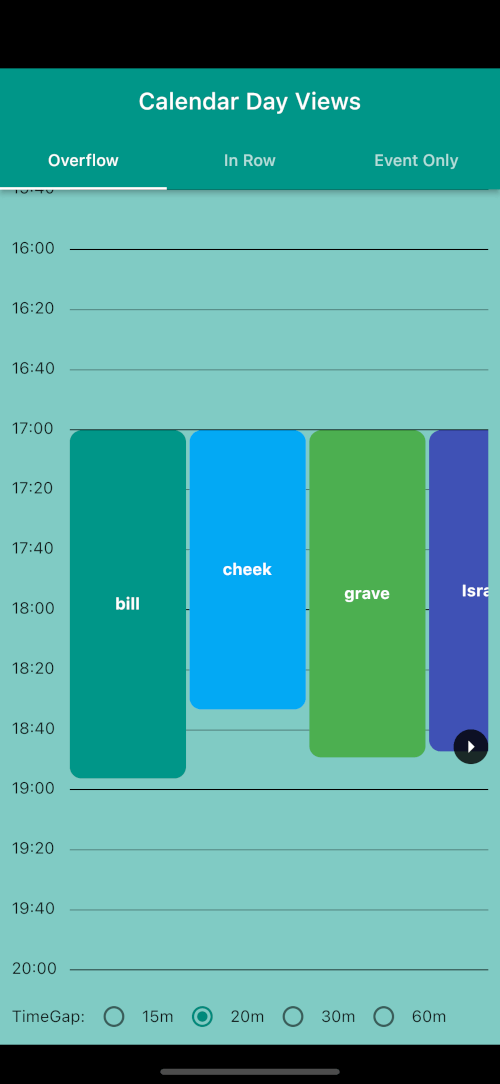
Display events with duration visualization across multiple time slots.
CalendarDayView.overflow(
  config: OverFlowDayViewConfig(
    currentDate: DateTime.now(),
    timeGap: 60,
    heightPerMin: 2,
    endOfDay: const TimeOfDay(hour: 20, minute: 0),
    startOfDay: const TimeOfDay(hour: 4, minute: 0),
    renderRowAsListView: true,
    time12: true,
    scrollToCurrentTime: true, // auto-scroll to current time
  ),
  onTimeTap: (time) => handleTimeTap(time),
  events: UnmodifiableListView(events),
  overflowItemBuilder: (context, constraints, itemIndex, event) => YourEventWidget(),
);
Simple chronological list of events.
CalendarDayView.eventOnly(
  config: EventDayViewConfig(
    showHourly: true,
    currentDate: DateTime.now(),
  ),
  events: events,
  eventDayViewItemBuilder: (context, event) => YourEventWidget(),
);
Group events starting in the same time window.
CalendarDayView.inRow(
  config: InRowDayViewConfig(
    heightPerMin: 1,
    showCurrentTimeLine: true,
    dividerColor: Colors.black,
    timeGap: 60,
    showWithEventOnly: true,
    currentDate: DateTime.now(),
    startOfDay: const TimeOfDay(hour: 3, minute: 00),
    endOfDay: const TimeOfDay(hour: 22, minute: 00),
    scrollToCurrentTime: true, // auto-scroll to current time
  ),
  events: UnmodifiableListView(events),
  onTimeTap: (time) => handleTimeTap(time),
  itemBuilder: (context, constraints, itemIndex, event) => YourEventWidget(),
);
Category Day View
| Normal | ListView |
|---|---|
| Overflow Normal | Overflow ListView |
Event Only Day View
In Row Day View
We welcome contributions! Please feel free to submit a Pull Request. For major changes, please open an issue first to discuss what you would like to change.
git checkout -b feature/amazing-feature)git commit -m 'Add some amazing feature')dart format --line-length 200 lib/ test/ example/git push origin feature/amazing-feature)This project is licensed under the MIT License - see the LICENSE file for details.