

 v0.9.0
cell_calendar
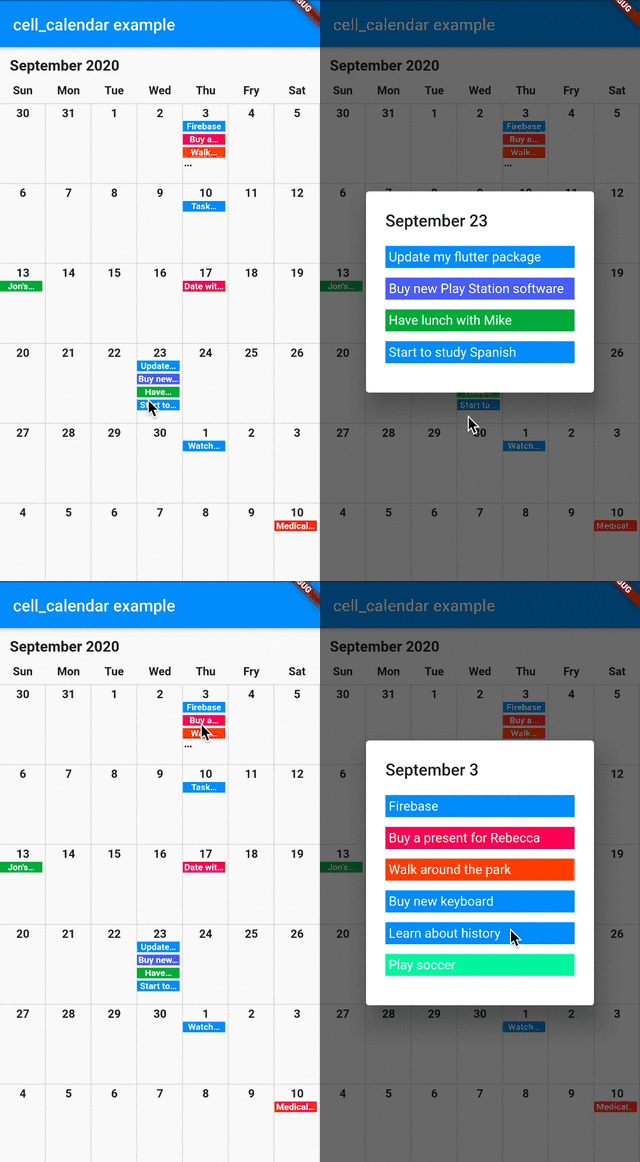
Modern calendar widget with useful features. Enables to develop well designed calendar in a moment. Inspired by the UI of Google calendar.
104Likes 1.3K30-day downloads140Pub points
AndroidiOSWebmacOSWindowsLinux
Modern calendar widget with useful features. Enables you to develop well designed calendar in a moment.

English project snapshot. Visit GitHub for the latest content.


Modern calendar widget with useful features. Enables to develop well designed calendar in a moment.
Inspired by the UI of Google Calendar

You can show the events in the calendar by inserting the list of CalendarEvent as events
    CellCalendar(
      events: [
        CalendarEvent(eventName: "Event 1",eventDate: DateTime1),
        CalendarEvent(eventName: "Event 2",eventDate: DateTime2),
      ]
    );
If you need to customize the calendar more, the additional parameters like eventBackGroundColor, eventTextColor and eventID are helpful.
The callback onPageChanged is literally called when the current page is changed.
    CellCalendar(
      onPageChanged: (firstDate, lastDate) {
        print("This is the first date of the new page: $firstDate");
        print("This is the last date of the new page: $lastDate");
      }
    );
In this sample code, firstDate is the date in the very first cell of the new page, and its logic is same as lastDate.
The callback onCellTapped is called when user tapped a cell.
    CellCalendar(
      onCellTapped: (date) {
        print("$date is tapped !");
      }
    );
It is called with tapped DateTime, so you can get the events on the date if you want.
    CellCalendar(
      onCellTapped: (date){
        print("$date is tapped !");
        final eventsOnTheDate = sampleEvents().where((event) {
          final eventDate = event.eventDate;
          return eventDate.year == date.year &&
              eventDate.month == date.month &&
              eventDate.day == date.day;
        }).toList();
        /// ex) Show dialog or navigate to new page with [eventsOnTheDate]
      }
    );
If you don't want to use default labels on the calendar, you can use callbacks for customization.
    CellCalendar(
      daysOfTheWeekBuilder: (dayIndex) {
        /// dayIndex: 0 for Sunday, 6 for Saturday.
        final labels = ["S", "M", "T", "W", "T", "F", "S"];
        return Padding(
          padding: const EdgeInsets.only(bottom: 4.0),
          child: Text(
            labels[dayIndex],
            style: TextStyle(
              fontWeight: FontWeight.bold,
            ),
            textAlign: TextAlign.center,
          ),
        );
      },
      monthYearLabelBuilder: (datetime) {
        final year = datetime.year.toString();
        final month = datetime.month.toString();
        return Padding(
          padding: const EdgeInsets.all(16.0),
          child: Text(
            "$month, $year",
            style: TextStyle(
              fontSize: 24,
              fontWeight: FontWeight.bold,
            ),
          ),
        );
      },
    )
If you have any requests or questions, please feel free to ask on github.
Thanks goes to these wonderful people (emoji key):
 Santa Takahashi 💻 |
 Denis Filonov 💻 |
 HPanda 💻 |
This project follows the all-contributors specification. Contributions of any kind welcome!
Dependency list 3 items
{"sdk":"flutter"}^2.3.6{"sdk":"flutter"}Start with your use case, compare repository activity, and check the original project before adopting it.
“A repository is the most basic element of GitHub.”
GitHub Docs — About repositories ↗