Search packages, repositories and app categories

cell_calendar cover
Package detailsv0.9.0

cell_calendar

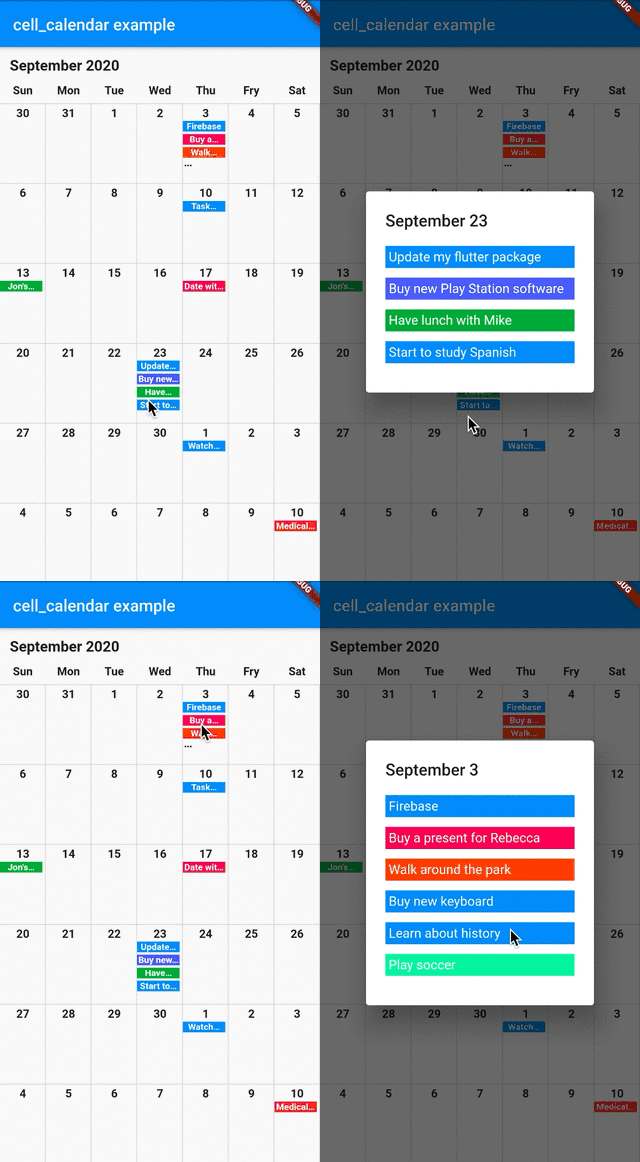
Modern calendar widget with useful features. Enables to develop well designed calendar in a moment. Inspired by the UI of Google calendar.

AndroidiOSWebmacOSWindowsLinux
30-day downloads
1.5K
Likes
104
Pub points
140

Install package

flutter pub add cell_calendar

Package Overview

Package selection guidance compiled from public package information, community data, and project usage.

A modern, customizable calendar widget inspired by Google Calendar's UI. It enables rapid development of visually appealing calendars with minimal setup. The package supports multiple platforms and includes intuitive features like date selection, navigation, and event integration. Designed for developers seeking a clean, responsive calendar solution without extensive custom coding. Ideal for apps requiring date management with a polished look.

Use cases

  • Scheduling applications
  • Event planning tools
  • Task management interfaces
  • Booking systems
  • Daily planner apps
  • Calendar-based dashboards

Key features

  • Clean, Google Calendar-inspired design
  • Cross-platform support
  • Easy date selection
  • Built-in navigation controls
  • Customizable appearance
  • Event integration capabilities

Suitable for

  • Developers building calendar-heavy apps
  • Teams wanting fast UI implementation
  • Projects needing responsive calendar widgets
  • Apps targeting multiple operating systems
  • Design-focused mobile and web applications

Considerations

  • Limited built-in event management
  • Requires manual handling of complex scheduling logic
  • May need additional styling for unique themes
  • Depends on Flutter's rendering performance on older devices
  • Not ideal for highly specialized calendar workflows

Original README

Original README snapshot from the linked source repository. Visit the repository for the latest content.

cell_calendar

pub package License: MIT

Modern calendar widget with useful features. Enables to develop well designed calendar in a moment.

Inspired by the UI of Google Calendar

cell_calendar

Usage

  • Events

You can show the events in the calendar by inserting the list of CalendarEvent as events

    CellCalendar(
      events: [
        CalendarEvent(eventName: "Event 1",eventDate: DateTime1),
        CalendarEvent(eventName: "Event 2",eventDate: DateTime2),
      ]
    );

If you need to customize the calendar more, the additional parameters like eventBackGroundColor, eventTextColor and eventID are helpful.

  • onPageChanged

The callback onPageChanged is literally called when the current page is changed.

    CellCalendar(
      onPageChanged: (firstDate, lastDate) {
        print("This is the first date of the new page: $firstDate");
        print("This is the last date of the new page: $lastDate");
      }
    );

In this sample code, firstDate is the date in the very first cell of the new page, and its logic is same as lastDate.

  • onCellTapped

The callback onCellTapped is called when user tapped a cell.

    CellCalendar(
      onCellTapped: (date) {
        print("$date is tapped !");
      }
    );

It is called with tapped DateTime, so you can get the events on the date if you want.

    CellCalendar(
      onCellTapped: (date){
        print("$date is tapped !");
        final eventsOnTheDate = sampleEvents().where((event) {
          final eventDate = event.eventDate;
          return eventDate.year == date.year &&
              eventDate.month == date.month &&
              eventDate.day == date.day;
        }).toList();
        /// ex) Show dialog or navigate to new page with [eventsOnTheDate]
      }
    );

  • daysOfTheWeekBuilder and monthYearLabelBuilder

If you don't want to use default labels on the calendar, you can use callbacks for customization.

    CellCalendar(
      daysOfTheWeekBuilder: (dayIndex) {
        /// dayIndex: 0 for Sunday, 6 for Saturday.
        final labels = ["S", "M", "T", "W", "T", "F", "S"];
        return Padding(
          padding: const EdgeInsets.only(bottom: 4.0),
          child: Text(
            labels[dayIndex],
            style: TextStyle(
              fontWeight: FontWeight.bold,
            ),
            textAlign: TextAlign.center,
          ),
        );
      },
      monthYearLabelBuilder: (datetime) {
        final year = datetime.year.toString();
        final month = datetime.month.toString();
        return Padding(
          padding: const EdgeInsets.all(16.0),
          child: Text(
            "$month, $year",
            style: TextStyle(
              fontSize: 24,
              fontWeight: FontWeight.bold,
            ),
          ),
        );
      },
    )

If you have any requests or questions, please feel free to ask on github.

Contributors ✨

Thanks goes to these wonderful people (emoji key):

Santa Takahashi
Santa Takahashi

💻
Denis Filonov
Denis Filonov

💻
HPanda
HPanda

💻

This project follows the all-contributors specification. Contributions of any kind welcome!

Categories

Dependencies

Dependency list 1 items

Source repository

Projects using this package

No data available yet.