

 v1.1.0
flutter_awesome_buttons
A new Flutter package project.
34Likes 12630-day downloads110Pub points
AndroidiOSWebmacOSWindowsLinux
Buttons Plugin for Flutter

English project snapshot. Visit GitHub for the latest content.
A new Flutter package project for createing Buttons.
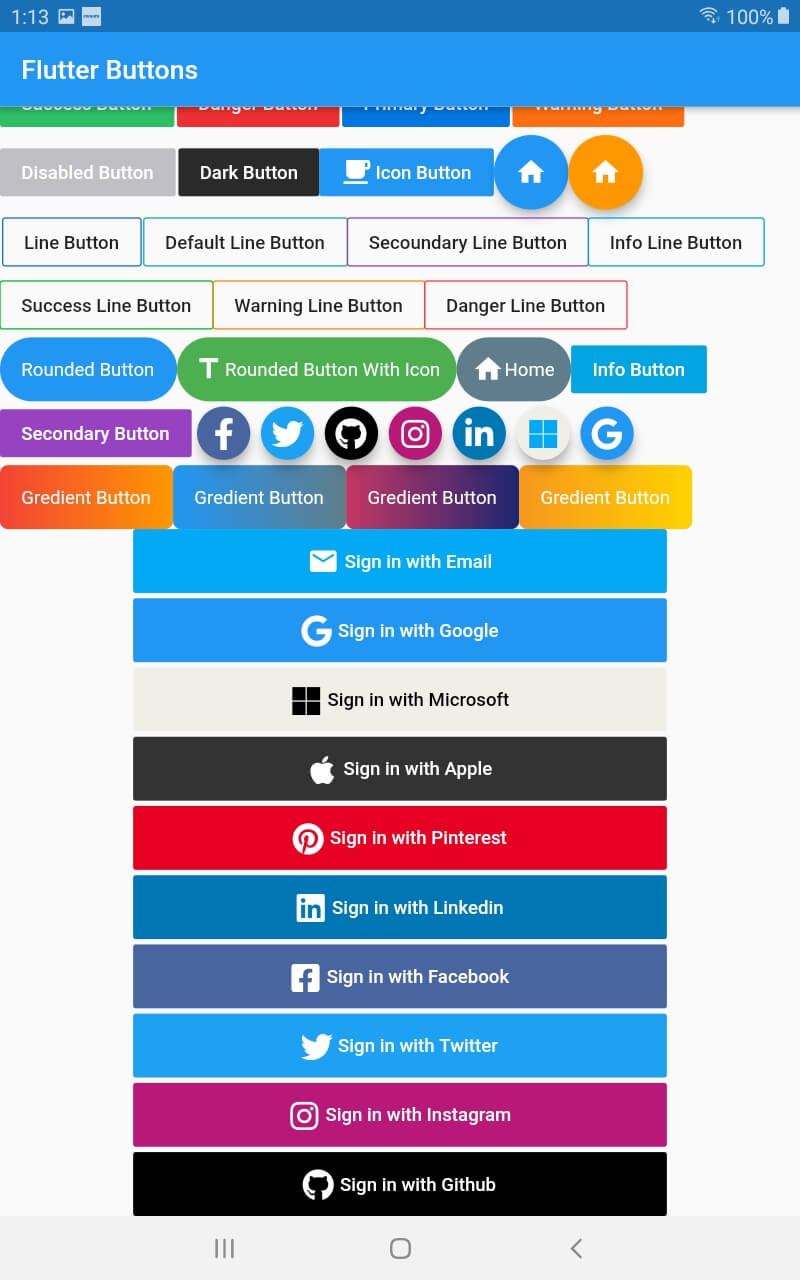
| Screenshot | Screenshot |
|---|---|
 |
 |
import 'package:flutter/material.dart';
import 'package:flutter_buttons/flutter_buttons.dart';

void main() => runApp(MyApp());

class MyApp extends StatelessWidget {

  @override
  Widget build(BuildContext context) {
    return MaterialApp(
      debugShowCheckedModeBanner: false,
      home: HomePage()
    );
  }
}

class HomePage extends StatefulWidget {
  @override
  _HomePageState createState() => _HomePageState();
}

class _HomePageState extends State<HomePage> {
  var testing = "123";
  @override
  Widget build(BuildContext context) {
    return Scaffold(
          appBar: AppBar(
            title: Text("Flutter Buttons"),
          ),
          body: ListView(
            children: <Widget>[
              Row(
                children: <Widget>[
                 SuccessButton(
                   title: "Success Button",
                   onPressed: () {

                   },
                 ),
                 SizedBox(width: 2.0,),
                 DangerButton(
                   title: "Danger Button",
                   onPressed: () {

                   },
                 ),
                SizedBox(width: 2.0,),
                 PrimaryButton(
                   title: "Primary Button",
                   onPressed: () {
                   },
                 ),
                SizedBox(width: 2.0,),
                 WarningButton(
                   title: "Warning Button",
                   onPressed: () {
                   },
                 ),

               ],
             ),
             Row(
               children: <Widget>[
                 DisabledButtton(
                   onPressed: (){},
                   title: "Disabled Button",
                 ),
                  SizedBox(width: 2.0,),
               DarkButtton(
                 onPressed: (){},
                 title: "Dark Button",
               ),
ButttonWithIcon(icon: Icons.local_cafe,title: "Icon Button",onPressed: (){},),
                FloatingIconButton(
                  icon: Icons.home,
                  onPressed: (){},
                ),
                FloatingIconButton(
                  icon: Icons.home,
                  onPressed: (){},
                  buttonColor: Colors.orange,
                )
                ],
              )
              ,Row(
                children: <Widget>[
                   SizedBox(width: 2,)
                  PrimaryLineButton(
                    onPressed: (){},
                    title: "Line Button",
                  ),
                  SizedBox(width: 2,),
                  DefaultLineButton(
                    onPressed: (){},
                    title: "Default Line Button",
                  ),
                  SecoundaryLineButton(
                    onPressed: (){},
                    title: "Secoundary Line Button",
                  ),

                  InfoLineButton(
                    onPressed: (){},
                    title: "Info Line Button",
                  ),
                ],
              ),
              Row(children: <Widget>[

                SuccessLineButton(
                    onPressed: (){},
                    title: "Success Line Button",
                  ),

                  WarningLineButton(
                    onPressed: (){},
                    title: "Warning Line Button",
                  ),
                  DangerLineButton(
                    onPressed: (){},
                    title: "Danger Line Button",
                  ),
              ],),
              Row(
                children: <Widget>[
                  RoundedButton(
                    onPressed: (){},
                    title: "Rounded Button",
                  ),
                   RoundedButtonWithIcon(
                    onPressed: (){},
                    icon:Icons.title,
                    title: "Rounded Button With Icon",
                    buttonColor: Colors.green,
                  ),
                  RoundedButtonWithIcon(
                    onPressed: (){},
                    icon:Icons.home,
                    title: "Home",
                    buttonColor: Colors.blueGrey,
                  )
                ,InfoButtton(
                    onPressed: (){},
                    title: "Info Button",
                  ),
                ],
              ),
              Row(
                children: <Widget>[
                  SecondaryButtton(
                    onPressed: (){},
                    title: "Secondary Button",
                  ),
                  FacebookButton(onPressed: (){},),
                   TwitterButton(onPressed: (){},),
                   GithubButton(onPressed: (){},),
                   InstagramButton(onPressed: (){},),
                   LinkedinButton(onPressed: (){},),
                   MicrosoftButton(onPressed: (){},),
                   GoogleButton(onPressed: (){},),
                ],
              )
              ,Column(
                children: <Widget>[
                  Row(
                       children: <Widget>[
                          GredientButton(onPressed: (){},
                  splashColor: Colors.orange,
                  colors: [
                    Colors.red,
                    Colors.orange,
                  ], title: "Gredient Button",),
                  GredientButton(onPressed: (){},
                  splashColor: Colors.orange,
                  colors: [
                    Colors.blue,
                    Colors.blueGrey,
                  ], title: "Gredient Button",),
                  GredientButton(onPressed: (){},
                  splashColor: Colors.orange,
                  colors: [
                    Color(0xFFC33764),
                    Color(0xFF1D2671),
                  ], title: "Gredient Button",),
                  GredientButton(onPressed: (){},
                  splashColor: Colors.orange,
                  colors: [
                    Color(0xFFF7971E),
                    Color(0xFFFFD200),
                  ], title: "Gredient Button",),
                       ],
                  ),
                  Padding(
                    padding: EdgeInsets.symmetric(horizontal: 100),
                    child: SignInWithEmail(onPressed: (){},),
                  ),
                  SizedBox(height: 4.0,),

                  Padding(
                    padding: EdgeInsets.symmetric(horizontal: 100),
                    child: SignInWithGoogle(onPressed: (){},),
                  ),
                  SizedBox(height: 4.0,),
                  Padding(
                    padding: EdgeInsets.symmetric(horizontal: 100),
                    child: SignInWithMicrosoft(onPressed: (){},),
                  ),
                  SizedBox(height: 4.0,),
                  Padding(
                    padding: EdgeInsets.symmetric(horizontal: 100),
                    child: SignInWithApple(onPressed: (){},),
                  ),
                  SizedBox(height: 4.0,),
                  Padding(
                    padding: EdgeInsets.symmetric(horizontal: 100),
                    child: SignInWithPinterest(onPressed: (){},),
                  ),
                   SizedBox(height: 4.0,),
                  Padding(
                    padding: EdgeInsets.symmetric(horizontal: 100),
                    child: SignInWithLinkedin(onPressed: (){},),
                  ),
                   SizedBox(height: 4.0,),
                  Padding(
                    padding: EdgeInsets.symmetric(horizontal: 100),
                    child: SignInWithFacebook(onPressed: (){},),
                  ),
                   SizedBox(height: 4.0,),
                  Padding(
                    padding: EdgeInsets.symmetric(horizontal: 100),
                    child: SignInWithTwitter(onPressed: (){},),
                  ),
                   SizedBox(height: 4.0,),
                  Padding(
                    padding: EdgeInsets.symmetric(horizontal: 100),
                    child: SignInWithInstagram(onPressed: (){},),
                  ),
                  SizedBox(height: 4.0,),
                  Padding(
                    padding: EdgeInsets.symmetric(horizontal: 100),
                    child: SignInWithGithub(onPressed: (){},),
                  ),


                ],
              )
            ],
          ));
  }
}
Dependency list 3 items
{"sdk":"flutter"}^9.0.0-nullsafety{"sdk":"flutter"}Start with your use case, compare repository activity, and check the original project before adopting it.
“A repository is the most basic element of GitHub.”
GitHub Docs — About repositories ↗