
 v0.0.22
simple_form_builder
A simple form builder that lets you create a complete form from a simple JSON data.
28Likes 4130-day downloads125Pub points
AndroidiOSmacOSWindowsLinux
A simple form builder for flutter

{"sdk":"flutter"}^0.17.0^5.2.2^0.8.6^6.0.4{"sdk":"flutter"}English project snapshot. Visit GitHub for the latest content.
pub package GitHub Stars Platform
A complete form builder for all your needs
Maintainer : Tanmoy Karmakar
contributor: Shayon Sarkar
This library allows you to create a complete form from a json file with
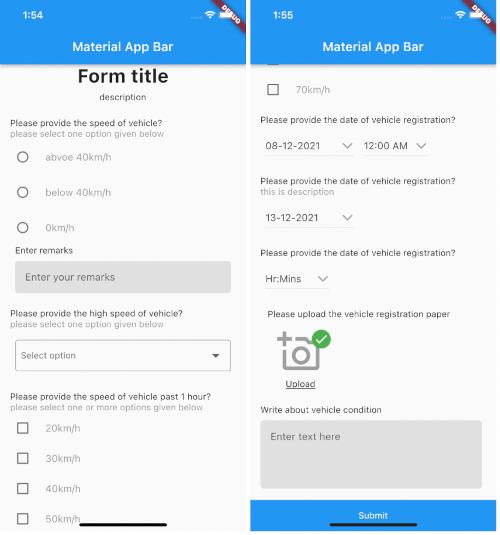
multiple types of fields text , checkbox, multiselect , datetime , date , time , and file upload.
This package also provides additional remark options.
It has been written 100% in Dart. ❤️
Example Example App Closed Example App Open
Add the following to your pubspec.yaml file:
dependencies:
  simple_form_builder: ^0.0.18
To integrate the Simple form builder all you need to do is follow the given JSON schema and pass it to the formBuilder widget
// The complete sample is provided in the global folder that can be used as a reference

{
  "status": 1,
  "data": [
    {
      "questions": [
        {
          "question_id": String,
          "fields": ["abvoe 40km/h", "below 40km/h", "0km/h"],
          "_id": "60dc6a3dc9fe14577c30d271",
          "title": "Please provide the speed of vehicle?",
          "description": "please select one option given below",
          "remark": true,
          "type": "multiple",
          "is_mandatory": true
        }
      ]
    }
  ]
}
import 'package:flutter/material.dart';
import 'package:simple_form_builder/formbuilder.dart';
import 'package:simple_form_builder/global/constant.dart';

void main() => runApp(MyApp());

class MyApp extends StatelessWidget {
  @override
  Widget build(BuildContext context) {
    return MaterialApp(
      title: 'FormBuilder Example',
      home: Scaffold(
        appBar: AppBar(
          title: Text('Material App Bar'),
        ),
        body: SingleChildScrollView(
          child: Column(
            children: [
              FormBuilder(
                initialData: sampleData,
                index: 0,
                showIndex:true,
                // showPrefix
                //radioIcon
                //checklistIcon
                onSubmit: (val) {
                  print(val);
                },
              ),
            ],
          ),
        ),
      ),
    );
  }
}
There are several options that allow for more control:
| Properties | Description |
|---|---|
initialData |
This is the map that is required to generate the form. the sample JSON format is given in the constant.dart file |
index |
If the data contains mutiple forms passing the index of the form will show the question of that perticular form |
onSubmit |
This function will take in the map value and pass it to the given function when submit button is pressed |
showPrefix |
This toggle will enable or disable prefix icon before the question |
onUpload |
This contains the file uploaded by user in String |
showIndex |
to specify weather to show numbering or not |