

 v0.3.0
flutter_shapes
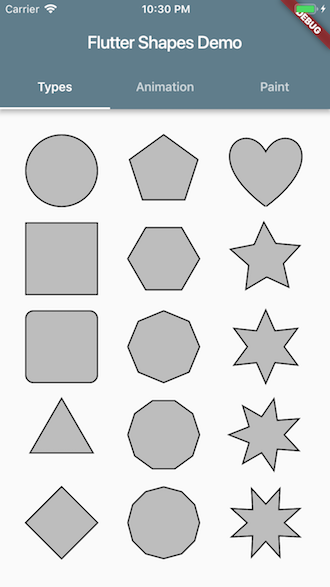
Paint various shapes on canvas.
52Likes 22830-day downloads115Pub points
AndroidiOSWebmacOSWindowsLinux
Paint various shapes on canvas with Flutter CustomPainter

English project snapshot. Visit GitHub for the latest content.



Live demo powered by Flutter for web.
dependencies:
  flutter:
    sdk: flutter
  flutter_shapes:
import 'package:flutter_shapes/flutter_shapes.dart';

class MyPainter extends CustomPainter {
  @override
  void paint(Canvas canvas, Size size) {
    Paint paint = Paint()..color = Colors.black;
    Shapes shapes = Shapes(canvas: canvas, radius: 50, paint: paint, center: Offset.zero, angle: 0);

    shapes.drawCircle();                // method name
    shapes.drawType(ShapeType.Circle);  // enum
    shapes.draw('Circle');              // string
  }
}
https://proandroiddev.com/flutter-animation-creating-mediums-clap-animation-in-flutter-3168f047421e
A great article about animation with Flutter.
It helped me to write example codes.
Dependency list 2 items
{"sdk":"flutter"}{"sdk":"flutter"}Start with your use case, compare repository activity, and check the original project before adopting it.
“A repository is the most basic element of GitHub.”
GitHub Docs — About repositories ↗