Search packages, repositories and app categories

flutter_shapes cover
Package detailsv0.3.0

flutter_shapes

Paint various shapes on canvas.

AndroidiOSWebmacOSWindowsLinux
30-day downloads
228
Likes
52
Pub points
115

Install package

flutter pub add flutter_shapes

Package Overview

Package selection guidance compiled from public package information, community data, and project usage.

Flutter Shapes is a lightweight package that enables developers to easily paint various geometric shapes and custom paths on a Flutter canvas. It provides simple, reusable widgets and utilities for drawing circles, rectangles, polygons, and more with customizable colors, strokes, and fills. Ideal for creating visual elements in games, diagrams, or UI components requiring precise shape rendering. The package supports all major platforms including mobile, web, and desktop, ensuring consistent behavior across devices.

Use cases

  • Creating custom UI icons
  • Drawing game elements
  • Generating data visualization charts
  • Designing interactive diagrams
  • Building educational apps with geometric illustrations

Key features

  • Easy shape creation with minimal code
  • Support for stroke and fill customization
  • Cross-platform compatibility
  • Built-in support for common shapes
  • Extensible for custom path drawing

Suitable for

  • UI designers seeking visual elements
  • Game developers needing simple graphics
  • Educational app creators
  • Data visualization projects
  • Prototyping interactive interfaces

Considerations

  • Best suited for static or simple animations
  • May require additional logic for complex interactions
  • Not optimized for high-performance rendering at scale
  • Limited to 2D canvas-based drawing only

Original README

Original README snapshot from the linked source repository. Visit the repository for the latest content.

FlutterShapes

Live demo powered by Flutter for web.

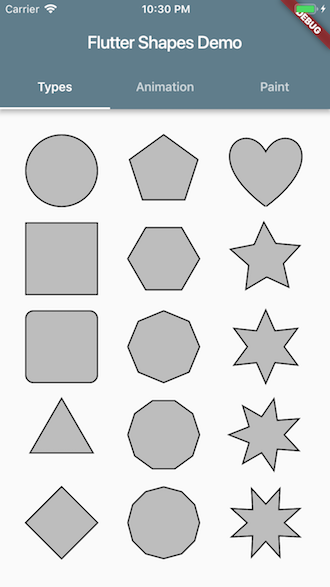
Shape types

Adding FlutterShapes to your project

dependencies:
  flutter:
    sdk: flutter
  flutter_shapes:

Drawing a Shape

import 'package:flutter_shapes/flutter_shapes.dart';

class MyPainter extends CustomPainter {
  @override
  void paint(Canvas canvas, Size size) {
    Paint paint = Paint()..color = Colors.black;
    Shapes shapes = Shapes(canvas: canvas, radius: 50, paint: paint, center: Offset.zero, angle: 0);

    shapes.drawCircle();                // method name
    shapes.drawType(ShapeType.Circle);  // enum
    shapes.draw('Circle');              // string
  }
}

Acknowledgements

https://proandroiddev.com/flutter-animation-creating-mediums-clap-animation-in-flutter-3168f047421e

A great article about animation with Flutter.
It helped me to write example codes.

Categories

Source repository

Projects using this package