English project snapshot. Visit GitHub for the latest content.
disable_screenshots
在Flutter开发中,有时我们需要对App的内容进行管控,避免敏感信息暴露,所以开发了这个插件。此插件提供三个禁用截屏的相关功能,分别是:截屏监控行为、全局添加水印、禁用截屏(仅支持Android)。
Getting Started
Add dependency
dependencies:
disable_screenshots: 0.0.1
功能演示
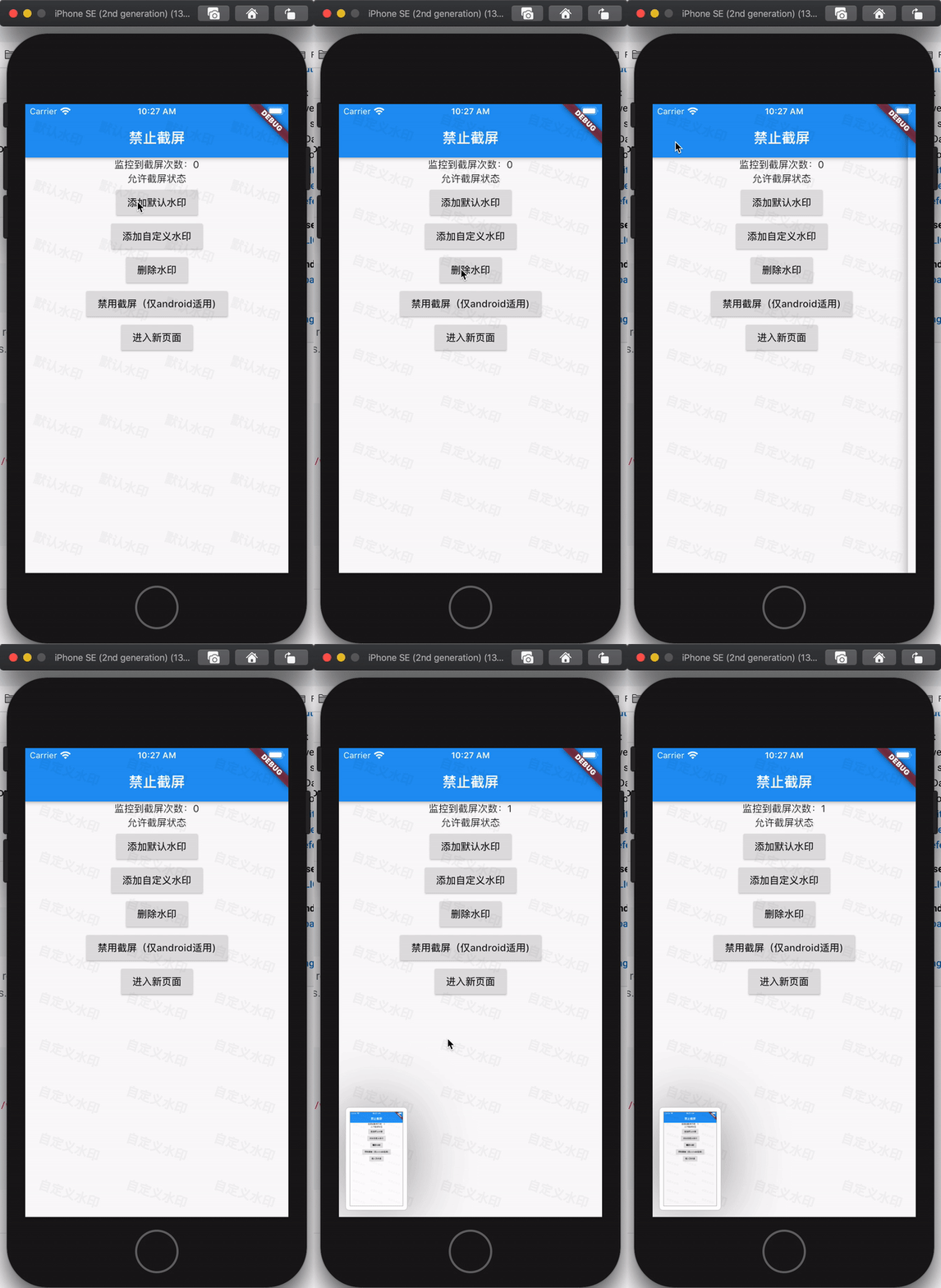
使用样例
class RootApp extends StatefulWidget {
@override
_RootAppState createState() => _RootAppState();
}
class _RootAppState extends State<RootApp> {
DisableScreenshots _plugin = DisableScreenshots();
StreamSubscription<void> _screenshotsSubscription;
int _screenshotsCount = 0;
bool _disableScreenshots = false;
@override
void initState() {
super.initState();
_screenshotsSubscription = _plugin.onScreenShots.listen((event) {
setState(() {
_screenshotsCount++;
});
});
}
@override
Widget build(BuildContext context) {
return Scaffold(
appBar: AppBar(
title: const Text('禁止截屏'),
),
body: Column(
children: <Widget>[
Center(
child: Text("监控到截屏次数:$_screenshotsCount"),
),
Center(
child: Text(_disableScreenshots ? "禁止截屏状态" : "允许截屏状态"),
),
RaisedButton(
onPressed: () {
_plugin.addWatermark(context, "默认水印",
rowCount: 4, columnCount: 8);
},
child: Text("添加默认水印")),
RaisedButton(
onPressed: () {
_plugin.addCustomWatermark(context,
Watarmark(rowCount: 3, columnCount: 10, text: "自定义水印"));
},
child: Text("添加自定义水印")),
RaisedButton(
onPressed: () {
_plugin.removeWatermark();
},
child: Text("删除水印")),
RaisedButton(
onPressed: () async {
bool flag = !_disableScreenshots;
await _plugin.disableScreenshots(flag);
setState(() {
_disableScreenshots = flag;
});
},
child: Text(_disableScreenshots ? "允许截屏(仅android适用)" : "禁用截屏(仅android适用)")),
RaisedButton(
onPressed: () {
Navigator.of(context).push(MaterialPageRoute(
builder: (_) => Scaffold(
appBar: AppBar(
title: Text("我是新页面"),
),
body: Center(child: Text("new page")),
)));
},
child: Text("进入新页面"))
],
),
);
}
@override
void dispose() {
super.dispose();
if (_screenshotsSubscription != null) {
_screenshotsSubscription.cancel();
}
}
}
已知问题
- 在老的flutter项目中,在iOS平台运行可能出现编译问题无法运行。这个是由于老的flutter项目里面没有使用到swift,所以没有briging文件,但是插件使用了swift,所以会编译失败,这种情况直接使用xcode在iOS项目中创建一个swift文件,会自动生成briding文件。
- 在某些安卓设备上(华为P30、Mi 10、三星Note10、OPPO reno3 Pro等),存在不能捕获截屏事件的问题,如果大家有解决方案,请提交
pull request,谢谢!
其它
此Plugin的创建流程,可以参考博文如何创建一个Flutter Plugin


