Search packages, repositories and app categories

Package detailsv0.2.0

disable_screenshots

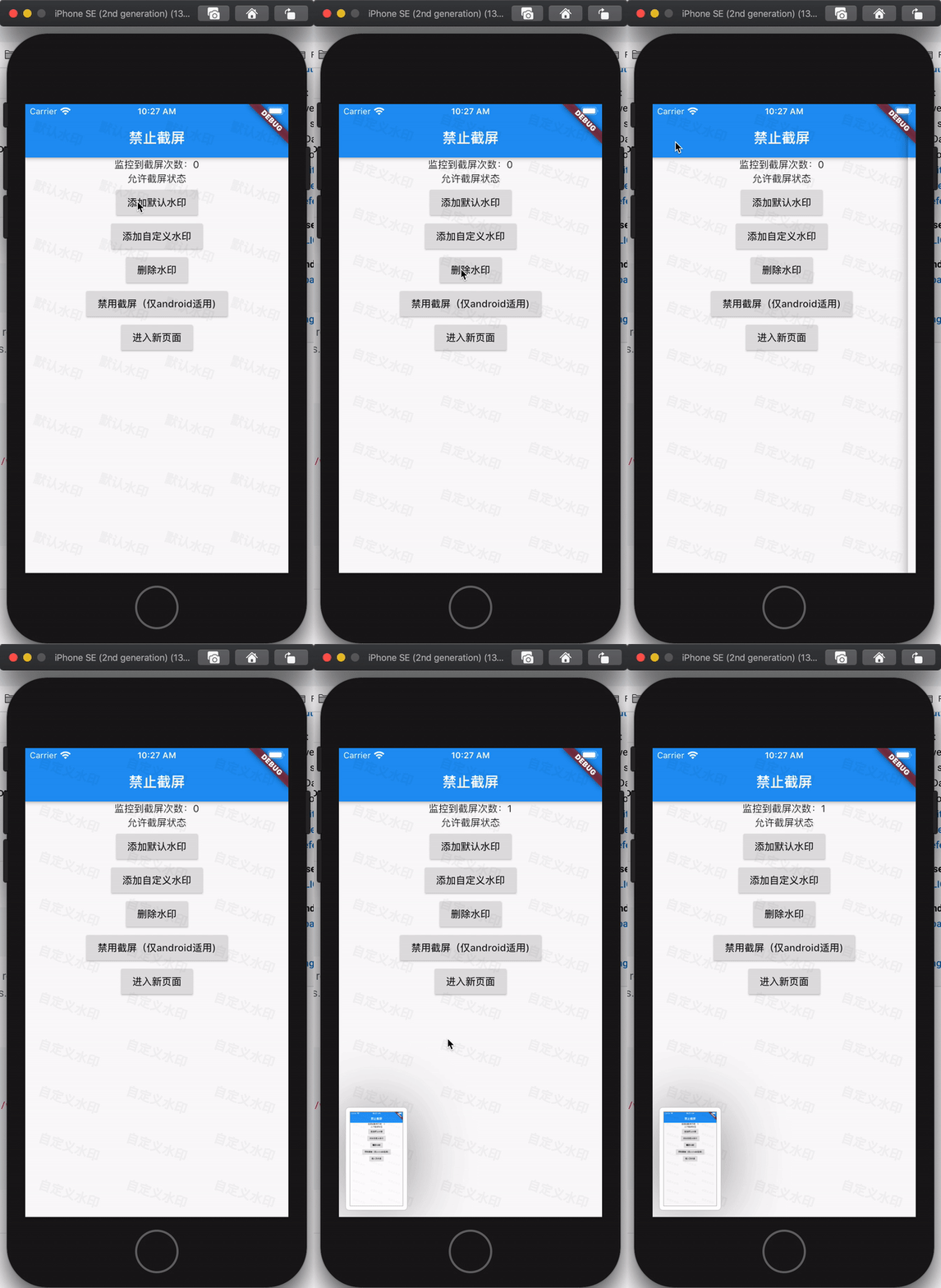
Provides three related functions that disable screenshots. These are: screenshot monitoring, adding a watermark globally, disabling screenshots (only supports Android). 提供三个禁用截屏的相关功能。分别是:截屏监控、全局添加水印、禁用截屏(仅支持Android)

AndroidiOS
30-day downloads
61
Likes
33
Pub points
115

Install package

flutter pub add disable_screenshots

Package Overview

Package selection guidance compiled from public package information, community data, and project usage.

The disable_screenshots package offers three functions to enhance app security by preventing unauthorized screenshots. It enables screenshot monitoring to detect when a screenshot is taken, allows adding a global watermark to discourage sharing, and disables screenshots on Android devices. While iOS support is listed, the actual functionality for disabling screenshots is limited to Android only. The package integrates easily via Flutter Pub and is useful for apps handling sensitive content. Its features are designed to protect user privacy and data integrity in high-security contexts.

Use cases

  • Protecting sensitive app content
  • Securing financial or healthcare applications
  • Preventing unauthorized screen sharing
  • Enhancing digital rights management
  • Monitoring screenshot attempts

Key features

  • Screenshot monitoring
  • Global watermark overlay
  • Android-only screenshot disable
  • Simple Flutter integration
  • Privacy-focused design

Suitable for

  • Apps with confidential data
  • Educational platforms with copyrighted material
  • Secure banking or enterprise apps
  • Content protection for digital media
  • Development teams prioritizing user privacy

Considerations

  • No iOS screenshot disable functionality
  • Watermark may affect UI aesthetics
  • Requires Android-specific permissions
  • Limited to Android for full screenshot blocking
  • May impact user experience if overused
Original README

Original README snapshot from the linked source repository. Visit the repository for the latest content.

disable_screenshots

在Flutter开发中,有时我们需要对App的内容进行管控,避免敏感信息暴露,所以开发了这个插件。此插件提供三个禁用截屏的相关功能,分别是:截屏监控行为、全局添加水印、禁用截屏(仅支持Android)。

Getting Started

Add dependency
dependencies:
  disable_screenshots: 0.0.1 #latest version
功能演示

demo_gif

使用样例
class RootApp extends StatefulWidget {
  @override
  _RootAppState createState() => _RootAppState();
}

class _RootAppState extends State<RootApp> {
  // 初始化插件
  DisableScreenshots _plugin = DisableScreenshots();
  // 监控截屏行为的stream
  StreamSubscription<void> _screenshotsSubscription;
  int _screenshotsCount = 0;
  bool _disableScreenshots = false;

  @override
  void initState() {
    super.initState();
    _screenshotsSubscription = _plugin.onScreenShots.listen((event) {
      // 监控到截屏行为会回调到这里
      setState(() {
        _screenshotsCount++;
      });
    });
  }

  @override
  Widget build(BuildContext context) {
    return Scaffold(
      appBar: AppBar(
        title: const Text('禁止截屏'),
      ),
      body: Column(
        children: <Widget>[
          Center(
            child: Text("监控到截屏次数:$_screenshotsCount"),
          ),
          Center(
            child: Text(_disableScreenshots ? "禁止截屏状态" : "允许截屏状态"),
          ),
          RaisedButton(
              onPressed: () {
                // 添加默认样式的水印
                _plugin.addWatermark(context, "默认水印",
                    rowCount: 4, columnCount: 8);
              },
              child: Text("添加默认水印")),
          RaisedButton(
              onPressed: () {
                // 添加自定义widget当做水印
                _plugin.addCustomWatermark(context,
                    Watarmark(rowCount: 3, columnCount: 10, text: "自定义水印"));
              },
              child: Text("添加自定义水印")),
          RaisedButton(
              onPressed: () {
                // 移除水印
                _plugin.removeWatermark();
              },
              child: Text("删除水印")),
          RaisedButton(
              onPressed: () async {
                bool flag = !_disableScreenshots;
                // 禁用或允许截屏(只支持iOS)
                await _plugin.disableScreenshots(flag);
                setState(() {
                  _disableScreenshots = flag;
                });
              },
              child: Text(_disableScreenshots ? "允许截屏(仅android适用)" : "禁用截屏(仅android适用)")),
          RaisedButton(
              onPressed: () {
                Navigator.of(context).push(MaterialPageRoute(
                    builder: (_) => Scaffold(
                          appBar: AppBar(
                            title: Text("我是新页面"),
                          ),
                          body: Center(child: Text("new page")),
                        )));
              },
              child: Text("进入新页面"))
        ],
      ),
    );
  }

  @override
  void dispose() {
    super.dispose();
    //取消截屏监控可以调用cancel()方法
    if (_screenshotsSubscription != null) {
      _screenshotsSubscription.cancel();
    }
  }
}
已知问题
  1. 在老的flutter项目中,在iOS平台运行可能出现编译问题无法运行。这个是由于老的flutter项目里面没有使用到swift,所以没有briging文件,但是插件使用了swift,所以会编译失败,这种情况直接使用xcode在iOS项目中创建一个swift文件,会自动生成briding文件。
  2. 在某些安卓设备上(华为P30、Mi 10、三星Note10、OPPO reno3 Pro等),存在不能捕获截屏事件的问题,如果大家有解决方案,请提交pull request,谢谢!
其它

此Plugin的创建流程,可以参考博文如何创建一个Flutter Plugin

Categories

Source repository

Projects using this package

No data available yet.