
 v1.1.31
jovial_svg
SVG - Robust rendering of Scalable Vector Graphic images, supporting a well-defined profile of SVG, a fast-loading binary storage format, and animation.
253Likes 337K30-day downloads160Pub points
AndroidiOSWebmacOSWindowsLinux
Flutter library for robust, efficient rendering of SVG static images

^7.0.0^1.15.0^2.0.0^2.1.0^0.10.0^1.0.0^1.7.0{"sdk":"flutter"}^6.0.0{"sdk":"flutter"}English project snapshot. Visit GitHub for the latest content.
Robust, efficient rendering of SVG static images, supporting a well-defined profile of SVG, an efficient binary storage format, and animation. Very fast load times result from using the binary format -- loading a pre-compiled binary file is usually an order of magnitude faster than parsing an XML SVG file. Observed speedups for loading larger SVG files range from 5x to 20x.
The supported SVG profile includes the parts of
SVG Tiny 1.2
that are applicable to static images, plus a healthy subset of
SVG 1.1. In-line
Cascading style sheets (CSS) are supported with limitations, via
the <style> tag. In addition to SVG,
Android Vector Drawable files
are supported. A widget for displaying these scalable images is provided.
SVG assets can be modified with a DOM interface in order to produce
animation.
The library is published to pub.dev,
where you can also find the
dartdocs.
It's used for the jupiter icon in
JRPN, and for the cards in
Jovial Aisleriot.
An SVG can be parsed into a ScalableImage and displayed in a
ScalableImageWidget like this:
MaterialApp(
  title: 'SVG Minimal Sample',
  home: ScalableImageWidget.fromSISource(
      si: ScalableImageSource.fromSvgHttpUrl(
          Uri.parse('https://jovial.com/images/jupiter.svg'))));
It's generally preferable to pre-load an instance of ScalableImage, as
discussed below. Alternately, a cache can be used to avoid re-loading.
Sample applicatons
are available. The
asset sample
shows the common case of a static SVG asset bundled with the application.
The
cache sample
might be of interest if ScalableImageWidget is used in a widget that is
frequently rebuilt (e.g. because it's used in an animation), or if SVGs
are to be loaded over the network. There's
also an example of extending jovial_svg with a
persistent cache.
Parsing an XML file isn't terribly efficient, and it's generally better to do any loading before building a widget tree. This package includes tools to make its use more efficient in both of these aspects.
The svg_to_si program compiles an SVG file into a much more efficient
binary representation, suitable for inclusion in an asset bundle. The
avd_to_si program converts an Android Vector Drawable file. If you prefer,
you can instead use
jovial_svg_transformer
to convert files at build time. Converting
to an si file speeds runtime loading by an order of magnitude. You can
activate the conversion programs with dart pub global activate jovial_svg,
or you can run them from your project directory like this:
dart run jovial_svg:svg_to_si path/to/SVG_Logo.svg --out output/dir
Rendering a complex asset can be a time-consuming operation,
particularly in terms of GPU load. Flutter's
RepaintBoundary
can work well to avoid re-rendering a complex ScalableImage asset. This
is discussed in the ScalableImageWidget documentation.
For optimal performance, you can pre-load a ScalableImage using various
static methods defined on the class. You can also proactively load
and decode any image assets contained within the ScalableImage. Once
ready, your ScalableImage can be used synchronously with
ScalableImageWidget, or directly with a Flutter CustomPaint.
Avoiding reloading is, of course, especially important if a
ScalableImage is displayed as part of an animation, or if it is loaded
over the network. ScalableImageWidget does, however, have an option for
the widget to handle loading and the asynchronous operations, for
convenience and/or quick prototyping. Using a ScalableImageCache with
ScalableImageWidget can be a good way to avoid reloading, without the need
to directly manage ScalableImage instances as part of your application's
state.
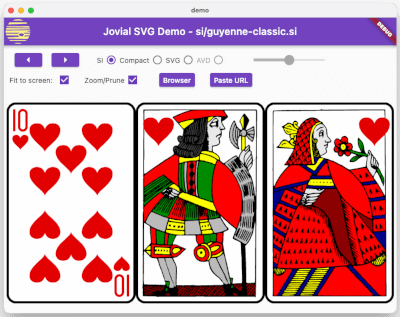
To try out the library, see the demo program. It's mostly intended to be run on the desktop, though it will run fine on other platforms. It lets you cycle through a series of test images, including several taken from an open-source card game (Aisleriot). The demo also lets you paste the URL to an SVG asset into the program; it then loads and renders it.
https://raw.githubusercontent.com/zathras/jovial_svg/main/doc/images/demo_screen_shot.pngInteractivity is supported by letting a program detect mouse clicks within
a rendered SVG asset. Named SVG nodes can be marked as exported, and exported
nodes' names and bounding rectangles are made available to the caller.
The bounding rectangles can be compared with the location of a mouse click
or touch event to determine which node was rendered at the given point.
See the ExportedID class for details.
A Dart document object model (DOM) API is provided to programmatically modify an SVG asset. Using it, Dart code can change rendering atributes like color, line width, font and many others. It can also add or remove nodes from the in-memory graph that represents the asset. These modifications can be done repeatedly to achieve animation.
See animation.dart in the examples directory to see animaiton and
interactivity being used.
Most features of SVG 1.1 that are applicable to static SVG documents are
supported. This includes using CSS (the <style> tag) to specify SVG
attributes.
use element is supported (including forward references).stroke-linecap, stroke-linejoin and
stroke-miterlimit are supported.stroke-dasharray and stroke-dashoffset attributes are
supported (cf. Tiny s. 11.4).xlink:href attributes
to other gradients, and gradientTransform attributes from SVG 1.1.mask element is supported (not in Tiny; see SVG 1.1 s. 14.4).
Note that as of this writing, a long-standing
bug in Flutter
web's "html" renderer prevents it from working on this niche
platform, though it works with the canvaskit renderer. See also
Issue 24.clipPath SVG element is supported (not in Tiny, cf. SVG 1.1 14.3.5).filter tag are not supported (not in Tiny, cf.
SVG s. 15)svg elements are not supported.style tag for inline CSS and the style= attribute are
supported to specify node attributes (not in Tiny - cf. s. 6.2).stop in a color gradient.background and transform-origin are not.text and tspan tags are supported.font-family attribute
is used when selecting a font, and fonts can be included in an
application that uses this library. For example, the demo program
uses the
ROLLERBALL
1975 font to render
this
image.textArea is not supported (not in SVG 1.1).font-variant (small-caps) is not supported.rotate is not supported (but normal transformations, including
rotation, apply to text elements).android:width/android:height requires specification
of android:viewportWidth/android:viewportHeight.android:autoMirrored is not supported.android:alpha on a vector tag is not supported.This library was originally written because existing alternatives didn't correctly handle many aspects of SVG. This made it impossible to re-purpose existing SVG graphical assets, e.g. from other open-source programs. Additionally, runtime performance wasn't so good, perhaps due to the overhead associated with parsing XML.
It must be said that the SVG specifications are rather large. SVG 2 notably added a rich set of features that aren't needed for a graphics interchange format. SVG in browsers also supports scripting and animation. Further, this family of specifications has always been somewhat squishy about conformance and profiling -- there's a whole set of resources devoted to tracking which browsers support which features, and that's with fairly large and well-funded teams developing browsers over decades.
However, there are a large number of (quite beautiful!) SVG assets for static images that generally stay within the bounds of SVG 1.1. SVG Tiny 1.2 is a reasonable collection of the most important parts of SVG 1.1 -- it was intended as such (though it has since been essentially abandoned). One of the challenges in developing this kind of library is deciding which features are essential, and which are gold-plating that are not in wide use. For this library, informed guesses were necessary at some points; SVG Tiny provided a solid starting point that a group of experts put considerable thought behind.
If you come across an SVG asset that falls within the scope of this library, but that doesn't render, please try to narrow down what support would be needed in the library, and submit an image that correctly uses that feature in any enhancement request. Contributions can be considered too -- and the binary format has plenty of room for extensibility.
For the binary format, it is a goal to ensure that new versions of the
library continue to read old files. Old versions of the library do not need
to read new .si files, however - the library can simply fail when
it detects a newer file version number. .si files are intended to be bundled
as application resources alongside the library, and not used as a
publication format.
There's a good discussion of Flutter and vector graphics at https://flutter.dev/go/vector-graphics. It includes a list of alternatives to SVG for various use-cases. Especially if you're creating your own assets, one of those alternatives might be worth considering.
There's a high-level overview of the source code in the repo, in
doc/index.html. This complements a reasonable level of comments
in the source itself.