


 v1.3.10
agora_uikit
Flutter 插件,只需几行代码即可轻松将 Agora 视频通话或实时视频流集成到您的应用中。
440喜欢 456近 30 天下载80Pub 分数
平台暂无数据
Flutter 插件,只需几行代码即可轻松将 Agora 视频通话或实时视频流集成到您的应用中。

以下为英文项目原文快照,最新内容请访问 GitHub。
⚠️ This project is no longer maintained and has been archived.
Please note that this repository is now in a read-only state and will not receive any further updates or support.
We recommend migrating to the following alternatives:
For documentation and support, please visit the Agora Documentation.





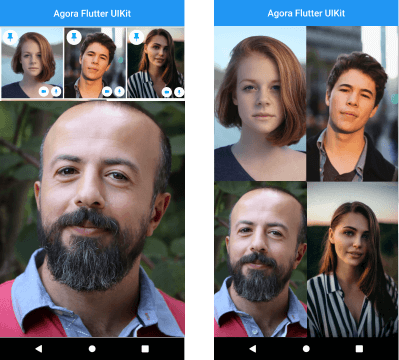
Instantly integrate Agora video calling or video streaming into your Flutter application.
NOTE: The Flutter VideoUIKit( >version 1.1.0) uses the latest version of the Agora 4.x SDK. To know more about the changes and the new features in the 4.x SDK, kindly take a look at the docs.

In your Flutter application, add the agora_uikit as a dependency inside your pubspec.yaml file.
In your Android level build.gradle add this at the end of the repositories:
allprojects {
	repositories {
		...
		maven { url 'https://jitpack.io' }
	}
}
Agora Video SDK requires camera and microphone permission to start video call.
Open the AndroidManifest.xml file and add the required device permissions to the file.
<manifest>
...
<uses-permission  android:name="android.permission.READ_PHONE_STATE"/>
<uses-permission  android:name="android.permission.INTERNET"  />
<uses-permission  android:name="android.permission.RECORD_AUDIO"  />
<uses-permission  android:name="android.permission.CAMERA"  />
<uses-permission  android:name="android.permission.MODIFY_AUDIO_SETTINGS"  />
<uses-permission  android:name="android.permission.ACCESS_NETWORK_STATE"  />
<!-- The Agora SDK requires Bluetooth permissions in case users are using Bluetooth devices.-->
<uses-permission  android:name="android.permission.BLUETOOTH"  />
...
</manifest>
Open info.plist and add:
Privacy - Microphone Usage Description, and add a note in the Value column.Privacy - Camera Usage Description, and add a note in the Value column.Your application can still run the voice call when it is switched to the background if the background mode is enabled. Select the app target in Xcode, click the Capabilities tab, enable Background Modes, and check Audio, AirPlay, and Picture in Picture.
// Instantiate the client
final AgoraClient client = AgoraClient(
  agoraConnectionData: AgoraConnectionData(
    appId: "<--Add Your App Id Here-->",
    channelName: "test",
  ),
);

// Initialize the Agora Engine
@override
void initState() {
  super.initState();
  initAgora();
}

void initAgora() async {
  await client.initialize();
}

// Build your layout
@override
Widget build(BuildContext context) {
  return MaterialApp(
    home: Scaffold(
      body: SafeArea(
        child: Stack(
          children: [
            AgoraVideoViewer(client: client),
            AgoraVideoButtons(client: client),
          ],
        ),
      ),
    ),
  );
}
The plan is to grow this library and have similar offerings across all supported platforms. There are already similar libraries for Android, iOS, React Native, and Web React, so be sure to check them out.
依赖清单 7 项
^6.3.0^1.5.5{"sdk":"flutter"}>=0.13.1 <2.0.0>=1.0.1 <3.0.1^11.0.0{"sdk":"flutter"}先按使用场景筛选,再比较项目活跃情况,最后到原始仓库核对使用要求。
“A repository is the most basic element of GitHub.”
GitHub Docs — About repositories ↗