

 v1.8.6
app_bar_with_search_switch
一个可将 AppBar 切换为搜索框的扩展。
59喜欢 582近 30 天下载150Pub 分数
AndroidiOSWebmacOSWindowsLinux
带有搜索开关的 AppBar

以下为英文项目原文快照,最新内容请访问 GitHub。
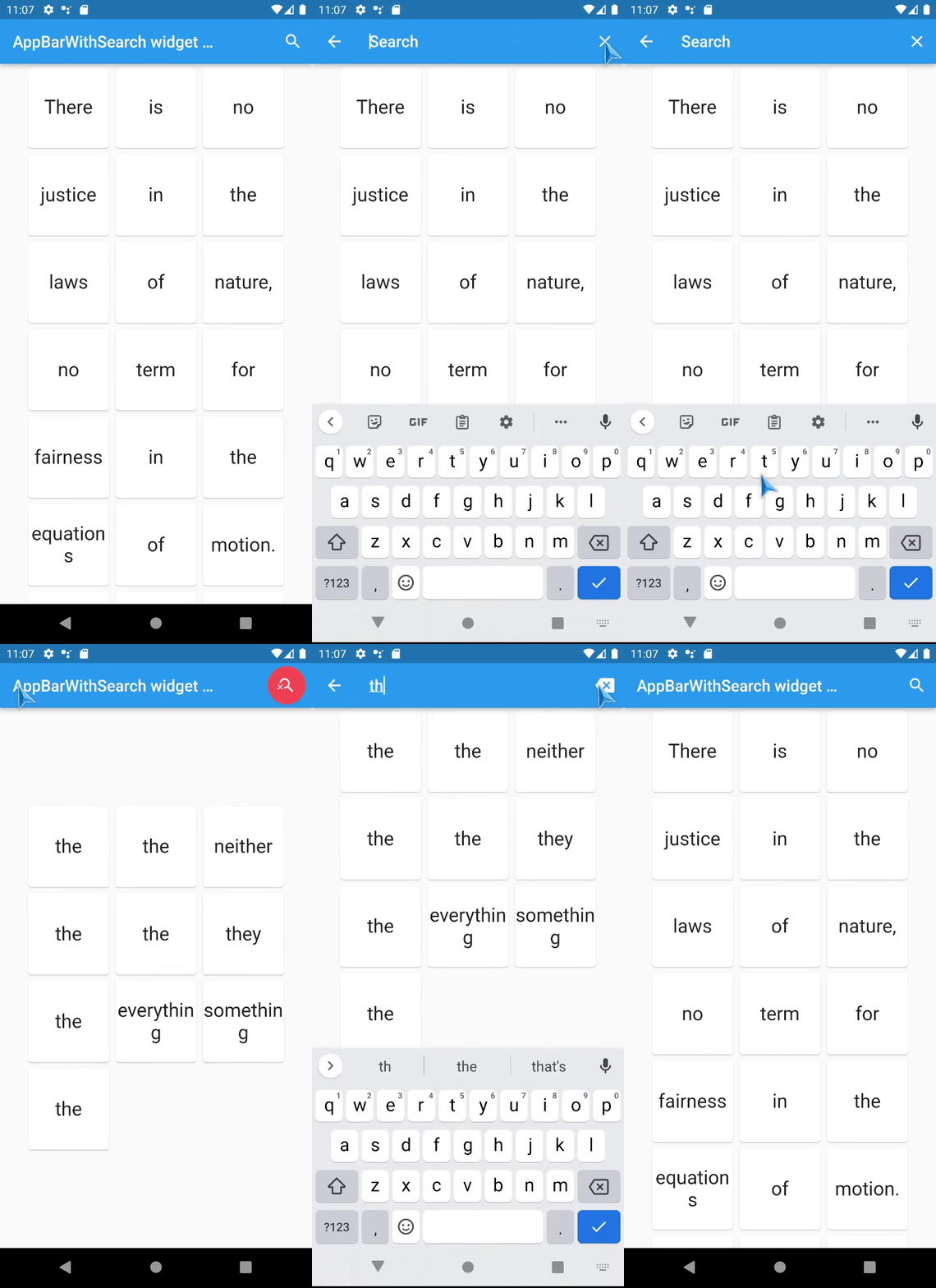
An AppBar that can switch into search field.
The AppBarWithSearchSwitch is a replacement class for AppBar, essentially, it returns two different app bars based on whether search is active.
Note: version 1.5+ is lightweight version of this package, version 2.0+ uses SpeechToText package for speech recognition.
This is complete rewrite of flutter_search_bar with support of these features:
Use appBarBuilder parameter to build default AppBar with:
The appBarBuilder is the only required parameter, all other parameters are optional!
Use one of these callbacks to get text from TextField:
Also, there are callbacks for:
This widget support almost all properties of AppBar, but:
leading
and title
properties are now expect - Widget Function(context)?:
AppBarWithSearchSwitch.of(context) methods in them,preferredSize here is a method, you should set it via toolbarWidth and toolbarHeight.
Here is a list of all other new properties(without mentioned above) with their default values:
Online example here: https://alexqwesa.github.io/app_bar_with_search_switch/.
Full example of Stateful widget is here: https://pub.dev/packages/app_bar_with_search_switch/example.
Full example of Stateless widget is here: (github).
Full example of Stateless widget with 10000 elements searched in place and with search button outside of app bar is here: (github).
Full example of Stateless widget there android back button will close search is here: (github).
And the fragment of example code is here:
  //...
  @override
  Widget build(BuildContext context) {
    return Scaffold(
      //
      // *** The Widget AppBarWithSearchSwitch
      //
      appBar: AppBarWithSearchSwitch(
        onChanged: (text) {
          // update you provider here
          // searchText.value = text;
        }, // onSubmitted: (text) => searchText.value = text,
        appBarBuilder: (context) {
          return AppBar(
            title: Text('Example '),
            actions: [
              AppBarSearchButton(),
              // or
              // IconButton(onPressed: AppBarWithSearchSwitch.of(context)?startSearch, icon: Icon(Icons.search)),
            ],
          );
        },
      ),
      // search in body by any way you want, example:
      body: AppBarOnEditListener(builder: (context) { return /* your code here */ ;} ),
    );
  }
How to activate search field (isSearchMode=true)
of AppBarWithSearchSwitch
from somewhere far away?
If it is inside the same Scaffold or its children, then:
AppBarWithSearchFinder.of(context)?.triggerSearch() inside.If it is outside of Scaffold, use customIsSearchModeNotifier,
clearOnClose will not work, and callBack onClose will not be called), so use GlobalKey if you need them.How to make android back button close search? (instead of going to previous screen or exit app)
onWillPop as in example below:... // inside a widget
final isSearchMode = ValueNotifier<bool>(false);
final searchText = ValueNotifier<String>('');
@override
Widget build(BuildContext context) {
return WillPopScope(
onWillPop: () async { // android back button handler
if (searchText.value != '') {
isSearchMode.value = false;
searchText.value = '';
return false;
}
return true;
},
child: Scaffold(
//
// *** The Widget AppBarWithSearchSwitch
//
appBar: AppBarWithSearchSwitch(
customIsSearchModeNotifier: isSearchMode,
customTextNotifier: searchText,
appBarBuilder: (context) {
return AppBar(
... // you code here
How to add autocompletion to search field?
... // inside a widget
  @override
  Widget build(BuildContext context) {

    return Scaffold(
        appBar: AppBarWithSearchSwitch(
          title:  (context) {
                return Autocomplete<String>(
                  optionsBuilder: (TextEditingValue textEditingValue) {
                    // your code here
                  },
                );
          }
          appBarBuilder: (context) {
            return AppBar(
... // you code here
Can it be used with old flutter sdk versions?
The release 1.3.5 is a special release with support of old flutter sdk, it tested with flutter 2.10.0
keepAppBarColors = true didn't change color of 'Text Selection Handles' (selection bubbles), this is because of
upstream issue https://github.com/flutter/flutter/issues/74890 with textSelectionTheme: selectionHandleColor依赖清单 4 项
{"sdk":"flutter"}{"sdk":"flutter"}anyany先按使用场景筛选,再比较项目活跃情况,最后到原始仓库核对使用要求。
“A repository is the most basic element of GitHub.”
GitHub Docs — About repositories ↗