

 v1.0.0
diagram_editor
一个用于构建交互式图表编辑器的 Flutter 库,支持类型安全的组件、链接、平移/缩放以及序列化。
184喜欢 1110近 30 天下载160Pub 分数
AndroidiOSWebmacOSWindowsLinux
Fllutter 图表编辑器库

以下为英文项目原文快照,最新内容请访问 GitHub。

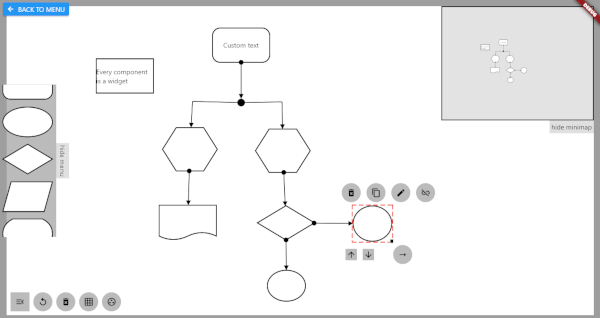
Flutter library for building interactive diagram editors. Create, connect, and manipulate nodes and links with pan, zoom, and full gesture support.
import 'package:diagram_editor/diagram_editor.dart';
import 'package:flutter/material.dart';

class MyDiagram extends StatelessWidget {
  MyDiagram({super.key});

  final controller = DiagramController<void, void>();

  @override
  Widget build(BuildContext context) {
    return DiagramEditor<void, void>(
      controller: controller,
      componentBuilder: (context, component) => Container(
        color: Colors.blue,
        child: Center(child: Text(component.id)),
      ),
      onCanvasTapUp: (details) {
        controller.addComponent(ComponentData(
          size: const Size(96, 72),
          position: controller.fromCanvasCoordinates(details.localPosition),
        ));
      },
      onComponentTap: (id) => controller.removeComponent(id),
    );
  }
}
Pan, zoom, link joints, and link control all work out of the box.
Use generic type parameters to attach typed data to components and links:
class MyNodeData {
  final Color color;
  final String label;
  MyNodeData({required this.color, required this.label});
}

final controller = DiagramController<MyNodeData, void>(
  componentDataCodec: JsonCodec(
    encode: (d) => {'color': d.color.toHex(), 'label': d.label},
    decode: (j) => MyNodeData(
      color: Color(int.parse(j['color'] as String, radix: 16)),
      label: j['label'] as String,
    ),
  ),
);

// No more casting — data is typed
controller.addComponent(ComponentData(
  data: MyNodeData(color: Colors.blue, label: 'Start'),
  size: const Size(96, 72),
));

// Access data without casting
final node = controller.getComponent('id');
final color = node.data?.color; // Color, not dynamic
final linkId = controller.connect(
  sourceComponentId: 'node-1',
  targetComponentId: 'node-2',
  linkStyle: LinkStyle(
    arrowType: ArrowType.arrow,
    lineWidth: 2,
    color: Colors.grey,
  ),
);
DiagramEditor<MyNodeData, void>(
  controller: controller,
  componentBuilder: (context, data) => MyNodeWidget(data),

  // Canvas config
  canvasConfig: const CanvasConfig(
    backgroundColor: Color(0xFFF5F5F5),
    minScale: 0.2,
    maxScale: 5.0,
  ),

  // Link endpoint alignment strategy
  linkEndpointAlignment: LinkAttachment.oval(),

  // Disable defaults if you want full control
  enableDefaultPanZoom: true,       // default
  enableDefaultLinkControl: true,   // default
  enableDefaultJointControl: true,  // default

  // Links rendered on top of components
  linksOnTop: true,                 // default

  // All gesture callbacks
  onCanvasTapUp: (details) { /* ... */ },
  onComponentTap: (id) { /* ... */ },
  onComponentScaleUpdate: (id, details) { /* ... */ },
  onLinkTap: (id) { /* ... */ },

  // Custom layers
  backgroundBuilder: (context) => [CustomPaint(painter: GridPainter())],
  foregroundBuilder: (context) => [/* selection UI, toolbars, etc. */],
  componentOverlayBuilder: (context, data) => /* resize handles, etc. */,
);
// Save
final json = controller.serialize();

// Load
controller.deserialize(json);
Custom data is serialized via the JsonCodec passed to the controller.
The central class managing all diagram state.
| Category | Methods |
|---|---|
| Components | addComponent, removeComponent, moveComponent, getComponent, componentExists, components, componentsSorted |
| Links | connect, removeLink, getLink, linkExists, links |
| Z-order | bringToFront, sendToBack, setComponentZOrder |
| Parent-child | setComponentParent, removeComponentParent |
| Canvas | setCanvasPosition, panCanvas, zoomCanvas, resetCanvasView, fromCanvasCoordinates, toCanvasCoordinates |
| Joints | insertLinkJoint, removeLinkJoint, showLinkJoints, hideLinkJoints |
| Serialization | serialize, deserialize |
| Strategy | Method |
|---|---|
| Rectangular | LinkAttachment.rectangular() (default) |
| Oval | LinkAttachment.oval() |
| Crystal/Diamond | LinkAttachment.crystal() |
| Center | LinkAttachment.center() |
none, arrow, pointedArrow, circle, centerCircle, semiCirclesolid, dashed, dottedGridPainter — canvas grid backgroundComponentHighlightPainter — selection highlightDeleteIconPainter — delete icon overlaySee the full Migration Prompt for a detailed mapping of every old API surface to its new equivalent, including complete before/after examples.
Key changes:
PolicySet with mixins -> DiagramEditor with callbackscanvasWriter.model.addComponent(...) -> controller.addComponent(...)componentData.data as MyType -> componentData.data (typed generics)provider dependency removed (uses built-in ListenableBuilder)依赖清单 4 项
{"sdk":"flutter"}^4.5.1{"sdk":"flutter"}^7.0.0先按使用场景筛选,再比较项目活跃情况,最后到原始仓库核对使用要求。
“A repository is the most basic element of GitHub.”
GitHub Docs — About repositories ↗