

 v3.1.0
sticky_grouped_list
一个可滚动的位置列表,其中列表项可以分组为部分。
311喜欢 7470近 30 天下载150Pub 分数
AndroidiOSWebmacOSWindowsLinux
一个可滚动的 ScrollablePositionedList,其中项目可以分组为带有粘性标题的章节。

以下为英文项目原文快照,最新内容请访问 GitHub。


A ListView in which list items can be grouped to sections. Based on scrollable_positioned_list, which enables programatically scrolling of the list.
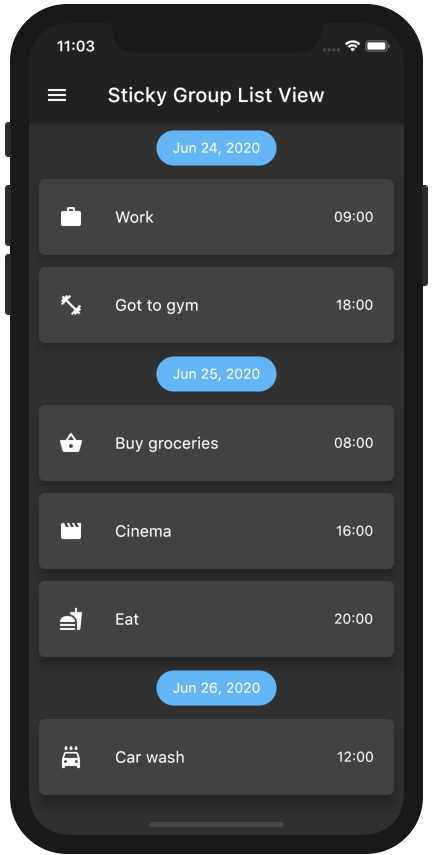
ScrollablePositionedList available.Add the package to your pubspec.yaml:
sticky_grouped_list: ^3.1.0
In your dart file, import the library:
import 'package:sticky_grouped_list/sticky_grouped_list.dart';
Create a StickyGroupedListView Widget:
 final GroupedItemScrollController itemScrollController = GroupedItemScrollController();

 StickyGroupedListView<dynamic, String>(
   elements: _elements,
   groupBy: (dynamic element) => element['group'],
   groupSeparatorBuilder: (dynamic element) => Text(element['group']),
   itemBuilder: (context, dynamic element) => Text(element['name']),
   itemComparator: (e1, e2) => e1['name'].compareTo(e2['name']), // optional
   elementIdentifier: (element) => element.name // optional - see below for usage
   itemScrollController: itemScrollController, // optional
   order: StickyGroupedListOrder.ASC, // optional
 );
If you are using the GroupedItemScrollController you can scroll or jump to an specific position in the list programatically:
  itemScrollController.scrollTo(index: 4, duration: Duration(seconds: 2));
  itemScrollController.jumpTo(index: 4);
Function which takes one element and returns a unique identifier of any type.
The methods scrollToElement and jumpToElement can be used to jump to an element by providing the elements identifier instead of the index: final GroupedItemScrollController itemScrollController = GroupedItemScrollController();
StickyGroupedListView<dynamic, String>(
elements: _elements,
elementIdentifier: (element) => element.name
itemScrollController: itemScrollController,
[...]
);
itemScrollController.scrollToElement(identifier: 'item-1', duration: Duration(seconds: 2));
itemScrollController.jumpToElement(identifier: 'item-2');
| Name | Description | Required | Default value |
|---|---|---|---|
elements |
A list of the data you want to display in the list | required | - |
itemBuilder / indexedItemBuilder |
Function which returns an Widget which defines the item. indexedItemBuilder provides the current index as well. If both are defined indexedItemBuilder is preferred |
yes, either of them | - |
groupBy |
Function which maps an element to its grouped value | required | - |
groupSeparatorBuilder |
Function which gets a element and returns an Widget which defines the group header separator | required | - |
separator |
A Widget which defines a separator between items inside a group | no | no separator |
floatingHeader |
When set to true the sticky header will float over the list |
no | false |
stickyHeaderBackgroundColor |
Defines the background color of the sticky header | no | Color(0xffF7F7F7) |
itemScrollController |
Instead of an ItemScrollController a GroupedItemScrollController needs to be provided. |
no | - |
elementIdentifier |
Used by itemScrollController and defines the unique identifier for each element. |
no | - |
order |
Change to StickyGroupedListOrder.DESC to reverse the group sorting |
no | StickyGroupedListOrder.ASC |
groupComparator |
Can be used to define a custom sorting for the groups. Otherwise the natural sorting order is used | no | - |
itemComparator |
Can be used to define a custom sorting for the elements inside each group. Otherwise the natural sorting order is used | no | - |
reverse |
Scrolls in opposite from reading direction (Starting at bottom and scrolling up). Same as in scrollable_positioned_list. | no | false |
GroupedItemScrollController.srollTo() and GroupedItemScrollController.jumpTo() automatic set the alignment so that the item is fully visible aligned under the group header. Both methods take automaticAlignment as a additional optional paramenter which needs to be set to true if alignment is specified.
Also the fields from ScrollablePositionedList.builder can be used.
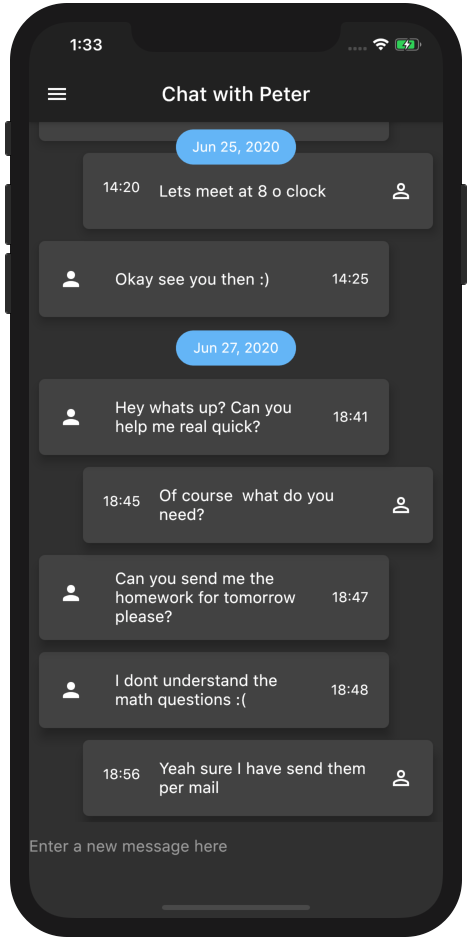
Easy creation of chat-like dialogs.
Just set the option reverse to true and the option order to StickyGroupedListOrder.DESC. A full example can be found in the examples.
The list will be scrolled to the end in the initial state and therefore scrolling will be against redeaing direction.
TThe list views in the GroupedList package are based on the default flutter listview and the silver list. This package is based on the scrollable_positioned_list which enables the possibility to programatically scroll to certain positions in the list. So if you need the ability to programatically scroll the list use the this package otherwise I would recommend to use the GroupedList package.
| Package name | Copyright | License |
|---|---|---|
| scrollable_positioned_list | Copyright 2018 the Dart project authors, Inc. All rights reserved | BSD 3-Clause "New" or "Revised" License |
依赖清单 5 项
{"sdk":"flutter"}^0.3.8^1.9.1{"sdk":"flutter"}>=2.0.3 <5.0.0先按使用场景筛选,再比较项目活跃情况,最后到原始仓库核对使用要求。
“A repository is the most basic element of GitHub.”
GitHub Docs — About repositories ↗