v4.1.0
brick_build
用于 Brick 组件的代码生成库和接口。对于创建适配器的序列化/反序列化生成器非常有用。
1喜欢 3870近 30 天下载140Pub 分数
AndroidiOSmacOSWindowsLinux
一种在 Dart 中处理持久化数据的直观方法

以下为英文项目原文快照,最新内容请访问 GitHub。

An intuitive way to work with persistent data in Dart.
Brick is an extensible query interface for Dart applications. It's an all-in-one solution responsible for representing business data in the application, regardless of where your data comes from. Using Brick, developers can focus on implementing the application, without concern for where the data lives. Brick was inspired by the need for applications to work offline first, even if an API represents your source of truth.
Add the packages:
dependencies:
  # Or brick_offline_first_with_graphql
  # Or brick_offline_first_with_supabase
  brick_offline_first_with_rest:
  sqflite: # optional
dev_dependencies:
  # Or brick_offline_first_with_graphql_build: any
  # Or brick_offline_first_with_supabase_build: any
  brick_offline_first_with_rest_build:
  build_runner:
Configure your app directory structure to match Brick's expectations:
mkdir -p lib/brick/adapters lib/brick/db;
Add models that contain your app logic. Models must be saved with the .model.dart suffix (i.e. lib/brick/models/person.model.dart).
Run dart run build_runner build to generate your models and sometimes migrations. Rerun after every new model change or dart run build_runner watch for automatic generations. You'll need to run this again after your first migration.
Extend an existing repository or create your own (Supabase has some exceptions):
// lib/brick/repository.dart
import 'package:brick_offline_first_with_rest/brick_offline_first_with_rest.dart';
import 'package:brick_rest/brick_rest.dart';
import 'package:brick_sqlite/brick_sqlite.dart';
import 'package:my_app/brick/brick.g.dart';
import 'package:sqflite/sqflite.dart' show databaseFactory;
import 'package:my_app/brick/db/schema.g.dart';
export 'package:brick_core/query.dart' show And, Or, Query, QueryAction, Where, WherePhrase;

class Repository extends OfflineFirstWithRestRepository {
  Repository()
      : super(
          migrations: migrations,
          restProvider: RestProvider(
            'http://0.0.0.0:3000',
            modelDictionary: restModelDictionary,
          ),
          sqliteProvider: SqliteProvider(
            _DB_NAME,
            databaseFactory: databaseFactory,
            modelDictionary: sqliteModelDictionary,
          ),
          offlineQueueManager: RestRequestSqliteCacheManager(
            'brick_offline_queue.sqlite',
            databaseFactory: databaseFactory,
          ),
        );
}
Profit.
Create a model as the app's business logic:
// brick/models/user.dart
@ConnectOfflineFirstWithRest()
class User extends OfflineFirstWithRestModel {}
And generate (de)serializing code to fetch to and from multiple providers:
$ (flutter) pub run build_runner build
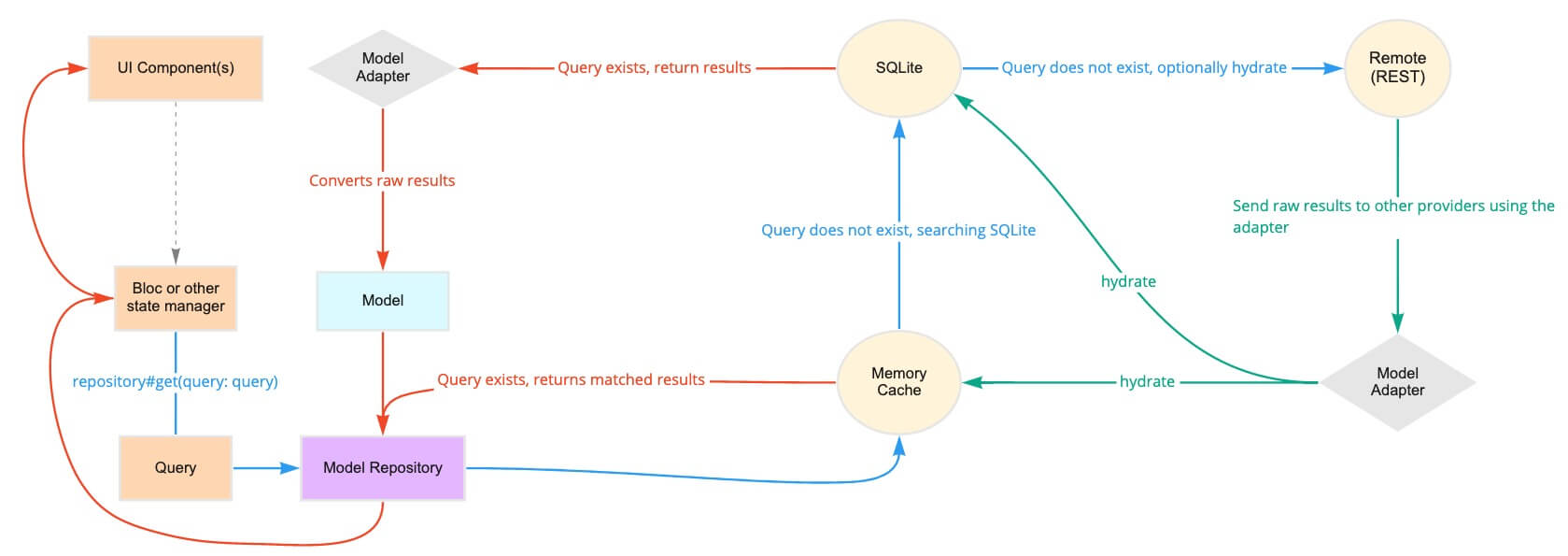
A repository fetches and returns data across multiple providers. It's the single access point for data in your app:
class MyRepository extends OfflineFirstWithRestRepository {
  MyRepository();
}

final repository = MyRepository();

// Now the models can be queried:
final users = await repository.get<User>();
Behind the scenes, this repository could poll a memory cache, then SQLite, then a REST API. The repository intelligently determines how and when to use each of the providers to return the fastest, most reliable data.
// Queries can be general:
final query = Query(where: [Where('lastName').contains('Muster')]);
final users = await repository.get<User>(query: query);

// Or singular:
final query = Query.where('email', 'user@example.com', limit1: true);
final user = await repository.get<User>(query: query);
Queries can also receive reactive updates. The subscribed stream receives all models from its query whenever the local copy is updated (e.g. when the data is hydrated in another part of the app):
final users = repository.subscribe<User>().listen((users) {})
Once a model has been created, it's sent to the repository and back out to each provider:
final user = User();
await repository.upsert<User>(user);
Repositories can support associations and automatic (de)serialization of child models.
class Hat extends OfflineFirstWithRestModel {
  final String color;
  Hat({this.color});
}
class User extends OfflineFirstWithRestModel {
  // user has many hats
  final List<Hat> hats;
}

final query = Query.where('hats', Where('color').isExactly('brown'));
final usersWithBrownHats = repository.get<User>(query: query);
Brick natively serializes primitives, associations, and more.
If it's still murky, check out Learn for videos, tutorials, and examples that break down Brick.
用于 Brick 组件的代码生成库和接口。对于创建适配器的序列化/反序列化生成器非常有用。
Brick(一个数据持久化库)的 GraphQL 连接器。包含注解、适配器、模型和提供者。
Brick 中用于 GraphQL 提供者、模型和适配器的代码生成库
Brick 中用于 JSON 类型提供者、模型和适配器的代码生成库
一个 Brick 域,通过本地提供程序在远程提供程序之前路由数据获取。
用于 Brick 离线优先域的代码生成库
一个 Brick 域,通过本地提供程序在 GraphQL 提供程序之前路由数据获取。
使用 GraphQL 的 Brick 离线优先域的代码生成库
一个 Brick 域,通过本地提供程序在 REST 提供程序之前路由数据获取。
用于使用 REST 的 Brick 离线优先域的代码生成库
一个 Brick 域,它通过本地提供者在 Supabase 提供者之前路由数据获取。
Brick 数据持久化库的 RESTful API 连接器。包含注解、适配器、模型和提供者。
先按使用场景筛选,再比较项目活跃情况,最后到原始仓库核对使用要求。
“A repository is the most basic element of GitHub.”
GitHub Docs — About repositories ↗