
活力检测
一个单一函数包,用于检测摄像头中可见的面部是活体面部还是非活体面部。
- 星标
- 10
- 复刻
- 24
- 最近推送(UTC)
- 2026年7月16日
- 项目状态
- 未归档
原始 README
以下为英文项目原文快照,最新内容请访问 GitHub。
livelyness_detection










Index
What is the Livelyness Detection?
Liveness detection for face recognition in biometrics is a technique where an algorithm detects if the person in front of the camera is alive and real. The algorithm is able to recognize a live person from presentation attacks - where a bad actor, or fraud perpetrator, uses someone else's physical characteristics or biometric data (known as "spoofs") for impersonation.
Spoofing attempts using printed photos, recordings, deep fake pictures, and 3D masks poses a serious threat. Facial Liveness Detection incorporates specialized features to identify biometric spoofing attacks, which could be an imitation emulating a person’s unique biometrics scanned through the biometric detector to deceive or bypass the identification and authentication steps provided by the system. Even though face recognition can reliably answer the question, “Is this the right person?” but not the question, “Is this a live person?” This is where liveness detection technology plays a significant role in fraud detection and mitigation. Face biometric matching must be able to detect spoofs in order to be trusted, and to maintain the integrity of biometric data.
Platform Support
| iOS | Android | MacOS | Web | Linux | Windows |
|---|---|---|---|---|---|
| ✔️ | ✔️ |
Installation
First, we have to install the package on flutter.
Flutter Setup
Add livelyness_detection to your pubspec.yaml dependencies.
Using command-line
flutter pub add livelyness_detection
Native Setup
Next comes the native setup on both android and iOS
iOS
iOS Setup
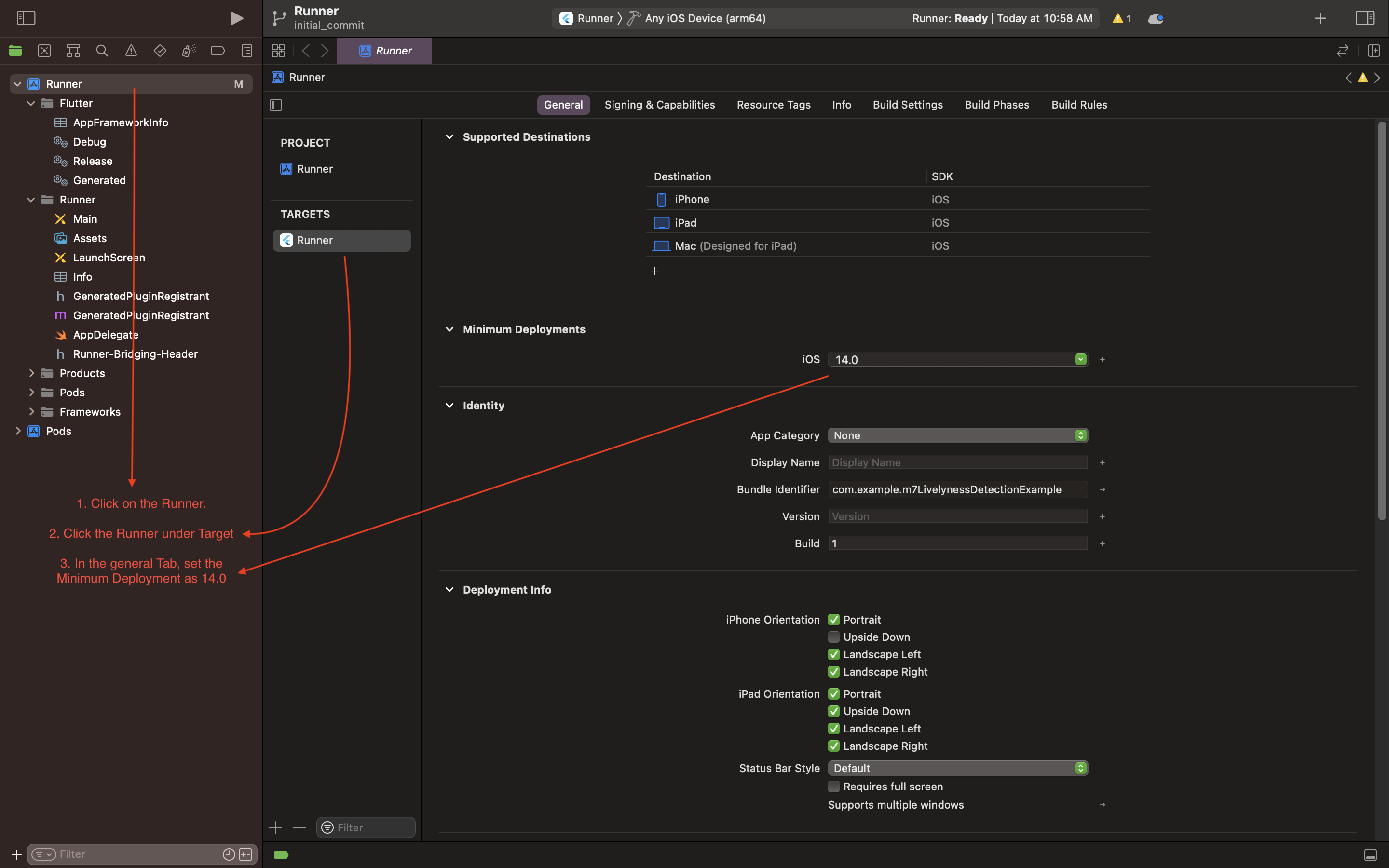
- Open the project in Xcode and set the deployment
- Open the
ios/Runner/Info.plistfile asSource Code. - Add the below-mentioned code inside the
<dict>tag.
  <key>NSCameraUsageDescription</key>
  <string>Camera Access for Scanning</string>
  <key>NSMicrophoneUsageDescription</key>
  <string>Microphone for playing instructions audio.</string>
- Open the
ios/Runner/Podfileand uncomment the second line.
platform :ios, '14.0' # <---------- Uncomment this line
- Set the deployment target in the Xcode project
Android
Android Setup
- Open the
example/android/app/build.gradlefile and set theminSdkVersionas21.
Example
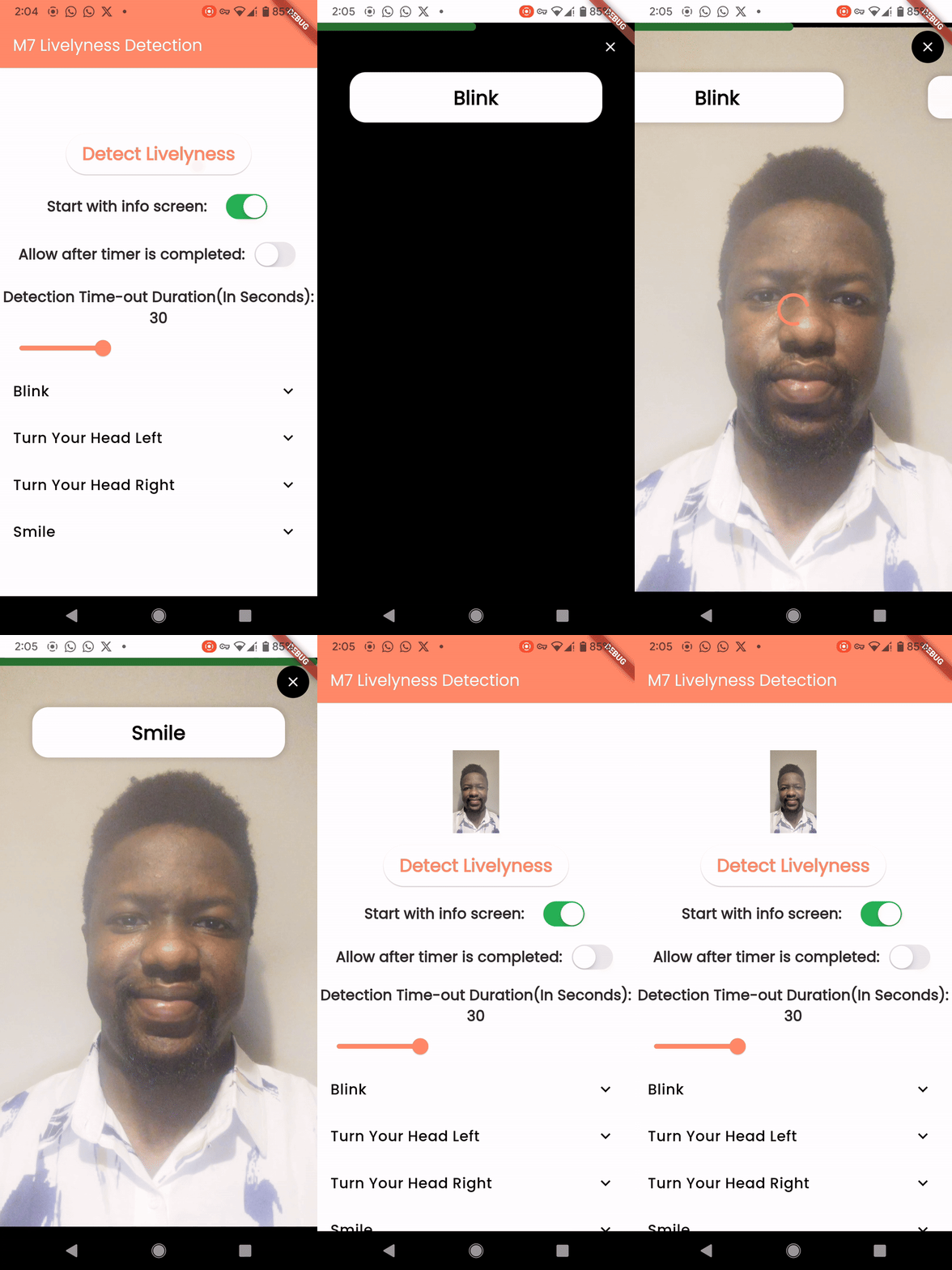
A call to a single line function will return a temporary path to the captured image.
Code
    final String? response =
        await LivelynessDetection.instance.detectLivelyness(
      context,
      config: DetectionConfig(
        steps: [
          LivelynessStepItem(
            step: LivelynessStep.blink,
            title: "Blink",
            isCompleted: false,
          ),
          LivelynessStepItem(
            step: LivelynessStep.smile,
            title: "Smile",
            isCompleted: false,
          ),
        ],
        startWithInfoScreen: true,
      ),
    );
Example Video-Andriod , iOS
Contributors

Kryonex Labs ↗
使用的依赖
依赖清单 15 项
- animate_do
^3.3.4 - camera
^0.11.0+1 - camerawesome
^2.1.0 - collection
^1.17.0 - equatable
^2.0.5 - flutter
{"sdk":"flutter"} - google_mlkit_face_detection
^0.11.0 - image
^4.0.15 - lottie
^3.1.2 - path_provider
^2.0.14 - plugin_platform_interface
^2.1.3 - rxdart
^0.28.0 - uuid
^4.4.2 - flutter_lints开发依赖
^4.0.0 - flutter_test开发依赖
{"sdk":"flutter"}
如何选择适合项目的代码仓?
先按使用场景筛选,再比较项目活跃情况,最后到原始仓库核对使用要求。
- 通过仓库名、作者或描述搜索,再按技术分类缩小范围。
- 结合星标、复刻与最近推送比较项目;星标反映社区关注,不代表质量保证。
- 使用前在 GitHub 核对 README、许可证与 Issues。
来源与维护
“A repository is the most basic element of GitHub.”
GitHub Docs — About repositories ↗