 v3.1.1
assets_audio_player
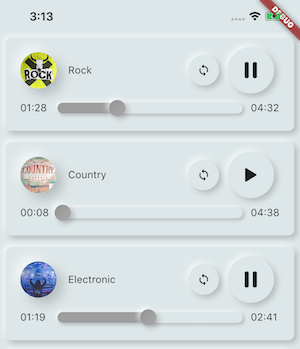
直接从Flutter和网络、广播、直播流、本地文件播放存储在assets文件中的音乐/音频。与Android、iOS、web和macOS兼容。
1180喜欢 2170近 30 天下载110Pub 分数
AndroidiOSWebmacOS
InnerQuest 是一款旨在帮助您开启自我发现、个人成长和提升生产力之旅的应用程序。这款基于 Flutter 的应用程序提供了一种独特的功能组合,可根据您的个性类型量身定制。这是一个由两名大学生组成的专注团队开发的小而充满激情的项目。
以下为英文项目原文快照,最新内容请访问 GitHub。
InnerQuest is an app designed to help you embark on a journey of self-discovery, personal growth, and increased productivity. This Flutter-based application offers a unique blend of features that are tailored to your individual personality type. It's a small but passionate project developed by a dedicated team of two college students.
Personalized Extensions: InnerQuest offers a variety of plug-and-play extensions that are customized to align with your unique personality type. These extensions help you enhance your personal development and productivity.
Mood Points System: Stay motivated with our mood point system. Earn points by being productive, and use them to unlock further features, extensions, and rewards.
Empowerment Through NFTs: Every achievement in InnerQuest is backed by real Non-Fungible Tokens (NFTs) on the blockchain. This not only gamifies your personal growth but also offers a tangible representation of your accomplishments.
Open Source Community: We are strong advocates of open-source development. InnerQuest is a project designed for the community and by the community. We encourage other developers to contribute and help us shape the future of InnerQuest.
To get started with InnerQuest, follow these steps:
git clone https://github.com/Kushalrock/innerquest.git
flutter pub get
flutter run
Now, you're all set to explore the InnerQuest app and begin your journey of personal growth and productivity.
If you're looking for a convenient way to mirror your Android device's screen onto your computer for testing and development, we recommend using Vysor. Vysor is a reliable tool that can streamline your Flutter app testing process.
To set up Vysor:
Download and install Vysor on your computer.
Connect your Android device to your computer via USB or enable ADB over Wi-Fi.
Open Vysor and select your Android device from the available devices.
You'll now see your Android device's screen mirrored on your computer, making it easier to test and debug your Flutter app.
Vysor is a valuable tool for developers working with Flutter, and we highly recommend integrating it into your workflow.
Our future plans for InnerQuest include:
Expanding Extensions: We are working on creating more plug-and-play extensions to cater to various aspects of personal growth and productivity.
Mainnet Integration: We aim to take the project to the mainnet, enhancing the user experience and reliability.
Community Involvement: We are actively encouraging other developers and the community to contribute to the project's development and growth.
Addressing Youth Issues: We will continue to focus on our mission to address issues like drug abuse and mental health, providing support and resources to the youth.
We welcome contributions from the community to make InnerQuest even better. If you'd like to contribute, please fork the repository, make your changes, and submit a pull request. We appreciate your support in enhancing this project.
This project is open-source and available under the GNU GPL V3.0.
We're excited to have you join us on this journey of personal growth and productivity. If you have any questions, suggestions, or feedback, please feel free to reach out. Together, we can make the world a better place, one step at a time.

依赖清单 8 项
{"sdk":"flutter"}^1.0.2^6.1.0^3.0.1^4.6.6^3.1.1{"sdk":"flutter"}^2.0.0先按使用场景筛选,再比较项目活跃情况,最后到原始仓库核对使用要求。
“A repository is the most basic element of GitHub.”
GitHub Docs — About repositories ↗