

 v6.7.3
month_picker_dialog
从无限年份列表中选择单个月份的国际化对话框。
162喜欢 4.4万近 30 天下载160Pub 分数
AndroidiOSWebmacOSWindowsLinux
从无限年份列表中选择单个月份的国际化对话框。
以下为英文项目原文快照,最新内容请访问 GitHub。


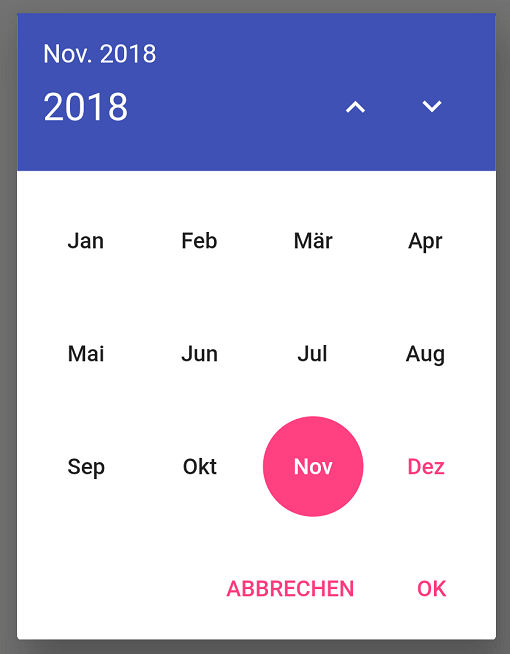
Internationalized material style dialog for picking a single month from an infinite list of years. This package makes use of the intl package and flutter's i18n abilities to provide labels in all languages known to flutter.
Setting up an internationalized app: the flutter localization package
Just add:
showMonthPicker() to select a single month;
showMonthRangePicker() to select a range of months;
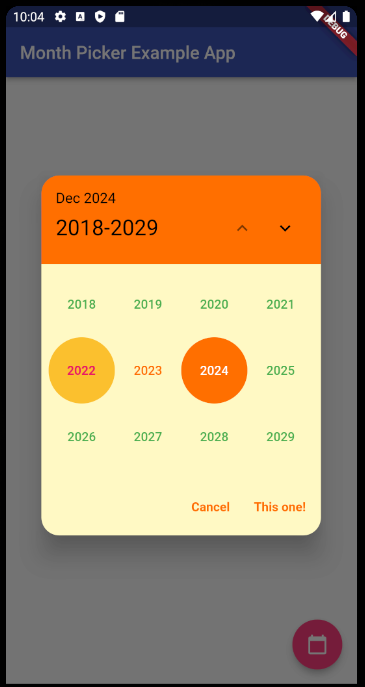
showYearPicker() to select only a year;
...inside your button function like a normal date picker dialog (context parameter is required):
FloatingActionButton(
    onPressed: () {
        showMonthPicker(
        context: context,
        initialDate: DateTime.now(),
        ).then((date) {
        if (date != null) {
            setState(() {
            selectedDate = date;
            });
        }
        });
    },
    child: Icon(Icons.calendar_today),
),

FloatingActionButton(
    onPressed: () {
        showMonthRangePicker(
        context: context,
        initialDate: DateTime.now(),
        rangeList: true,
        ).then((List<DateTime>? dates) {
        if (dates != null) {
            print(dates);
            print(dates.last.lastDayOfMonth());
        }
        });
    },
    child: Icon(Icons.calendar_today),
),

FloatingActionButton(
    onPressed: () {
        showYearPicker(
        context: context,
        initialDate: DateTime.now(),
        ).then((year) {
        if (year != null) {
            setState(() {
            selectedYear = year;
            });
        }
        });
    },
    child: Icon(Icons.calendar_today),
),
Starting with version 5.0.0 of the package, everything related to the behavior/style of it that isn't a function, date parameter or custom widget is now under the new MonthPickerDialogSettings class.
It contains three subclasses:
PickerDialogSettings to customize the dialog part of the package;
PickerHeaderSettings to customize the header part of the package;
PickerButtonsSettings to customize the buttons part of the package;
And will be used like this:
FloatingActionButton(
    onPressed: () {
        showMonthPicker(
        context: context,
        initialDate: DateTime.now(),
        monthPickerDialogSettings: const MonthPickerDialogSettings(
            headerSettings: PickerHeaderSettings(
                headerCurrentPageTextStyle: TextStyle(fontSize: 14),
                headerSelectedIntervalTextStyle: TextStyle(fontSize: 16),
            ),
            dialogSettings: PickerDialogSettings(
                locale: const Locale('en'),
                dialogRoundedCornersRadius: 20,
                dialogBackgroundColor: Colors.blueGrey[50],
            ),
            buttonsSettings: PickerButtonsSettings(
                buttonBorder: const RoundedRectangleBorder(),
                selectedMonthBackgroundColor: Colors.amber[900],
                selectedMonthTextColor: Colors.white,
                unselectedMonthsTextColor: Colors.black,
                currentMonthTextColor: Colors.green,
                yearTextStyle: const TextStyle(
                    fontSize: 10,
                ),
                monthTextStyle: const TextStyle(
                    fontWeight: FontWeight.bold,
                    fontSize: 18,
                ),
            ),
        ),
        ).then((date) {
        if (date != null) {
            setState(() {
            selectedDate = date;
            });
        }
        });
    },
    child: Icon(Icons.calendar_today),
),
If you have any doubts on how to use this new settings class (that the sample app can't solve), please feel free to open an issue on the github project.
Dimitri Krivoj (the original creator of the package)

依赖清单 5 项
{"sdk":"flutter"}^6.1.5+1—{"sdk":"flutter"}^6.0.0先按使用场景筛选,再比较项目活跃情况,最后到原始仓库核对使用要求。
“A repository is the most basic element of GitHub.”
GitHub Docs — About repositories ↗