

 v4.3.4
horizontal_data_table
一个水平数据表,左侧有一个固定列。
410喜欢 1.1万近 30 天下载160Pub 分数
AndroidiOSWebmacOSWindowsLinux
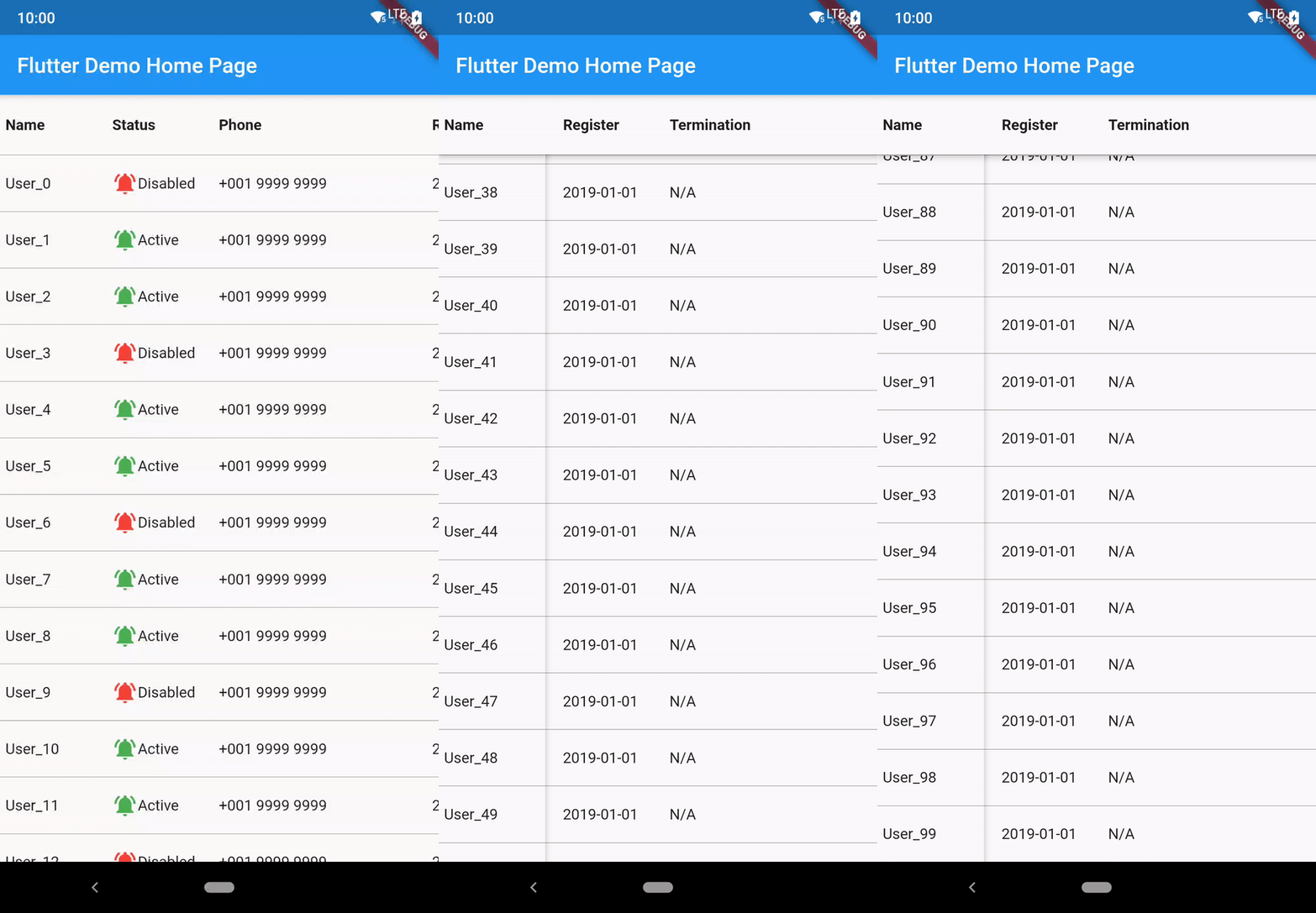
Flutter 固定列水平表格小部件
以下为英文项目原文快照,最新内容请访问 GitHub。



A Flutter Widget that create a horizontal table with fixed first column.
The following is the guide for installation with different dart sdk and flutter version.
| minium dart sdk | flutter version (stable) | package version |
|---|---|---|
| <2.12.0 | <2.0.1 | 2.5.1 |
| <2.12.0 | =2.0.1 | 2.5.2 |
| >=2.12.0 (enabled null-safety) | >=2.0.1 && <3.0.0 | 3.6.2+1 |
| >=2.12.0 | >=3.0.0 && <3.3.0 | 4.1.1+3 |
| >=2.12.0 && < 2.18.0 | >=3.3.0 && <3.7.0 | 4.1.4 |
| >=2.18.0 && <2.19.0 | >=3.7.0 | 4.2.0 |
| >=2.19.0 | >=3.7.0 | latest |
Run this command to install latest:
flutter pub add horizontal_data_table
  onScrollControllerReady: (vertical, horizontal) {
    _verticalScrollController = vertical;
    _horizontalScrollController = horizontal;
  },
This shows Widget's full customizations:
HorizontalDataTable(
      {
      required double leftHandSideColumnWidth,
      required double rightHandSideColumnWidth,
      this.tableHeight,
      this.isFixedHeader = false,
      this.headerWidgets,
      this.isFixedFooter = false,
      this.footerWidgets,
      IndexedWidgetBuilder? leftSideItemBuilder,
      IndexedWidgetBuilder? rightSideItemBuilder,
      this.itemCount = 0,
      List<Widget>? leftSideChildren,
      List<Widget>? rightSideChildren,
      this.rowSeparatorWidget = const Divider(
        color: Colors.transparent,
        height: 0.0,
        thickness: 0.0,
      ),
      this.elevation = 3.0,
      this.elevationColor = Colors.black54,
      Color leftHandSideColBackgroundColor = Colors.white,
      Color rightHandSideColBackgroundColor = Colors.white,
      this.onScrollControllerReady,
      this.verticalScrollbarStyle,
      this.horizontalScrollbarStyle,
      this.enablePullToRefresh = false,
      this.refreshIndicatorHeight = 60.0,
      this.htdRefreshController,
      this.onRefresh,
      this.refreshIndicator,
      this.fixedSidePlaceHolderRefreshIndicator,
      this.enablePullToLoadNewData = false,
      this.onLoad,
      this.loadIndicator,
      this.fixedSidePlaceHolderLoadIndicator,
      this.scrollPhysics,
      this.horizontalScrollPhysics,
      this.itemExtent,
      this.leftIntrusion = true,
      this.topIntrusion = true,
      this.rightIntrusion = true,
      this.bottomIntrusion = true,
      }
     )

/// right-to-left mode constructor
HorizontalDataTable.rtl({...same as the above})
The pull to refresh action is impletemented based on the 'pull-to-refresh' package code. Currently only part of the function is available.
HorizontalDataTable(
      {
        ...
      this.enablePullToRefresh = true,
      this.refreshIndicator: const WaterDropHeader(),
      this.fixedSidePlaceHolderRefreshIndicator,
      this.onRefresh: _onRefresh,
      this.enablePullToLoadNewData = true,
      this.onLoad: _onLoad,
      this.loadIndicator: const ClassicFooter(),
      this.fixedSidePlaceHolderLoadIndicator,
      this.htdRefreshController: _hdtRefreshController,
      }
     )
refreshIndicator is the header widget when pull to refresh. Supported refreshIndicator:
Basically single level header with a certain height while refreshing. For the on-top header is currently not supported. Since refreshIndicator is a Widget type field, you may customize yourself on the header, but you must set the height of the header. The detail usage you may reference to the pull-to-refresh package.
fixedSidePlaceHolderRefreshIndicator is the fixed column side part refresh indicator. This aims to synchronize the action on both side. Prefer using PlaceholderHeader.
refreshIndicatorHeight is the height of the refreshIndicator. Default is set to 60.
onRefresh is the callback from the refresh action.
loadIndicator is the header widget when pull to load. Supported refreshIndicator:
fixedSidePlaceHolderLoadIndicator is the fixed column side part load indicator. This aims to synchronize the action on both side. Prefer using PlaceholderFooter.
onLoad is the callback from the load action.
htdRefreshController is the wrapper controller for returning the refresh or load result. This is the example on how to use onRefresh and htdRefreshController.
void _onRefresh() async {
  //do some network call and get the response

  if(isError){
    //call this when it is an error case
    _hdtRefreshController.refreshFailed();
  }else{
    //call this when it is a success case
    _hdtRefreshController.refreshCompleted();
  }
},

void _onLoad() async {
  //do some network call and get the response

  if(isError){
    //call this when it is an error case
    _hdtRefreshController.loadFailed();
  }else if(isNoMoreData){
    //call this when it is end loading data
    _hdtRefreshController.loadNoData();
  }else{
    //call this when it is a success case
    _hdtRefreshController.loadCompleted();
  }
},
All of this 4 params are required when enablePullToRefresh is set to true.
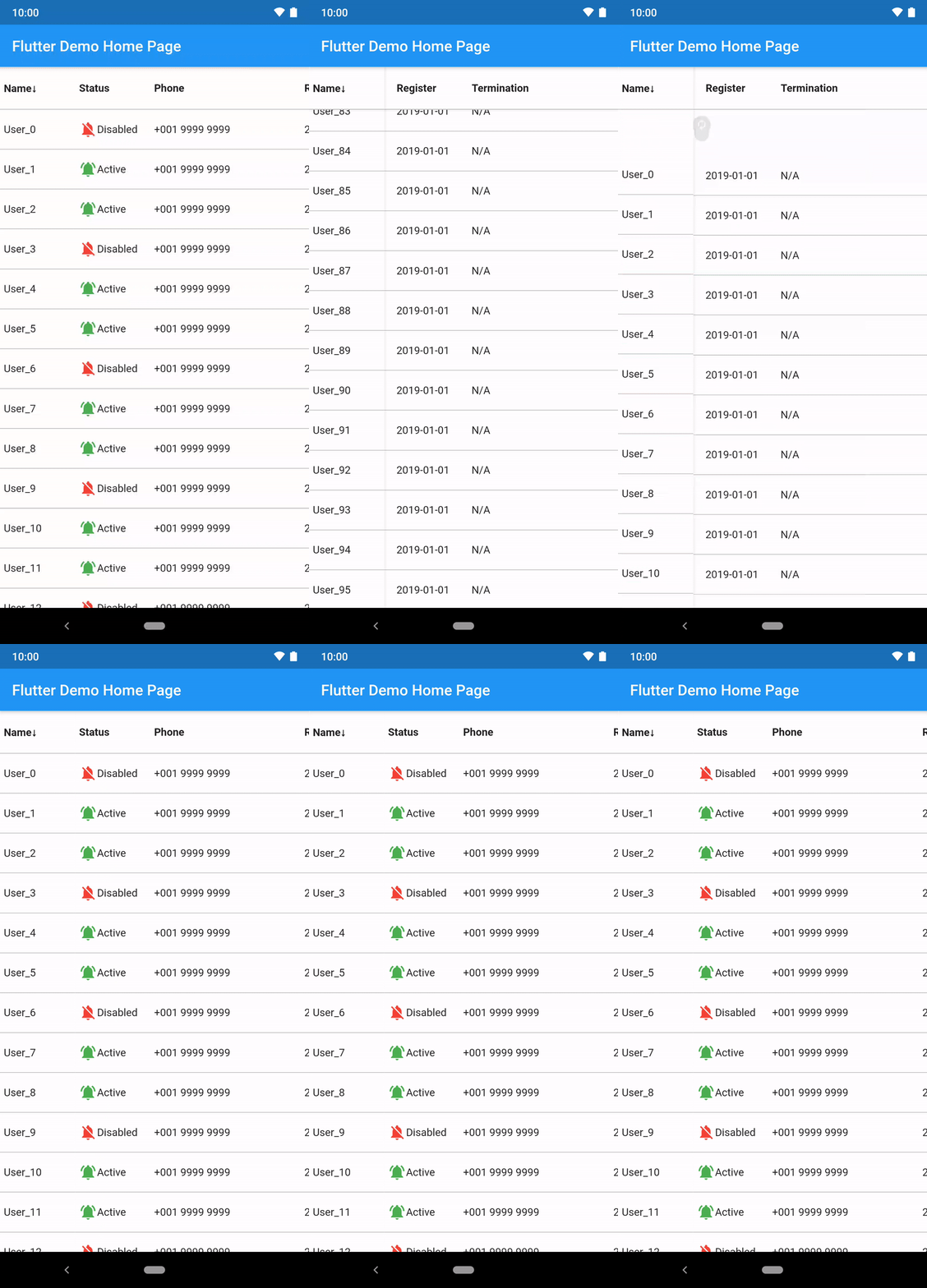
import 'package:flutter/material.dart';
import 'package:horizontal_data_table/horizontal_data_table.dart';

import 'data/user.dart';

class SimpleTablePage extends StatefulWidget {
  const SimpleTablePage({
    Key? key,
    required this.user,
  }) : super(key: key);
  final User user;

  @override
  State<SimpleTablePage> createState() => _SimpleTablePageState();
}

class _SimpleTablePageState extends State<SimpleTablePage> {
  @override
  void initState() {
    widget.user.initData(3000);
    super.initState();
  }

  @override
  Widget build(BuildContext context) {
    return Scaffold(
      appBar: AppBar(title: const Text('Simple Table')),
      body: HorizontalDataTable(
        leftHandSideColumnWidth: 100,
        rightHandSideColumnWidth: 600,
        isFixedHeader: true,
        headerWidgets: _getTitleWidget(),
        isFixedFooter: true,
        footerWidgets: _getTitleWidget(),
        leftSideItemBuilder: _generateFirstColumnRow,
        rightSideItemBuilder: _generateRightHandSideColumnRow,
        itemCount: widget.user.userInfo.length,
        rowSeparatorWidget: const Divider(
          color: Colors.black38,
          height: 1.0,
          thickness: 0.0,
        ),
        leftHandSideColBackgroundColor: const Color(0xFFFFFFFF),
        rightHandSideColBackgroundColor: const Color(0xFFFFFFFF),
        itemExtent: 55,
      ),
    );
  }

  List<Widget> _getTitleWidget() {
    return [
      _getTitleItemWidget('Name', 100),
      _getTitleItemWidget('Status', 100),
      _getTitleItemWidget('Phone', 200),
      _getTitleItemWidget('Register', 100),
      _getTitleItemWidget('Termination', 200),
    ];
  }

  Widget _getTitleItemWidget(String label, double width) {
    return Container(
      width: width,
      height: 56,
      padding: const EdgeInsets.fromLTRB(5, 0, 0, 0),
      alignment: Alignment.centerLeft,
      child: Text(label, style: const TextStyle(fontWeight: FontWeight.bold)),
    );
  }

  Widget _generateFirstColumnRow(BuildContext context, int index) {
    return Container(
      width: 100,
      height: 52,
      padding: const EdgeInsets.fromLTRB(5, 0, 0, 0),
      alignment: Alignment.centerLeft,
      child: Text(widget.user.userInfo[index].name),
    );
  }

  Widget _generateRightHandSideColumnRow(BuildContext context, int index) {
    return Row(
      children: <Widget>[
        Container(
          width: 100,
          height: 52,
          padding: const EdgeInsets.fromLTRB(5, 0, 0, 0),
          alignment: Alignment.centerLeft,
          child: Row(
            children: <Widget>[
              Icon(
                  widget.user.userInfo[index].status
                      ? Icons.notifications_off
                      : Icons.notifications_active,
                  color: widget.user.userInfo[index].status
                      ? Colors.red
                      : Colors.green),
              Text(widget.user.userInfo[index].status ? 'Disabled' : 'Active')
            ],
          ),
        ),
        Container(
          width: 200,
          height: 52,
          padding: const EdgeInsets.fromLTRB(5, 0, 0, 0),
          alignment: Alignment.centerLeft,
          child: Text(widget.user.userInfo[index].phone),
        ),
        Container(
          width: 100,
          height: 52,
          padding: const EdgeInsets.fromLTRB(5, 0, 0, 0),
          alignment: Alignment.centerLeft,
          child: Text(widget.user.userInfo[index].registerDate),
        ),
        Container(
          width: 200,
          height: 52,
          padding: const EdgeInsets.fromLTRB(5, 0, 0, 0),
          alignment: Alignment.centerLeft,
          child: Text(widget.user.userInfo[index].terminationDate),
        ),
      ],
    );
  }
}
Thank you for the contribution!
Thank you for your reporting and suggestion making this package more complete!
Since many developers get in touch with this package in different places (pub.dev, GitHub, and others website recommandation), I have received your voice regarding to feature request, issue report and question via different channels.
To avoid missing of the messages, I have created the issue templates on GitHub which allow our conversations with ease, especially some discussions are complex when they need to talk with the sample code.
MIT

依赖清单 4 项
{"sdk":"flutter"}^6.0.5^6.0.0^6.0.0先按使用场景筛选,再比较项目活跃情况,最后到原始仓库核对使用要求。
“A repository is the most basic element of GitHub.”
GitHub Docs — About repositories ↗