
FLUTTER ECOSYSTEM

NirmalScaria/label_marker

带有文本标签的地图标记的 Flutter 插件

label_marker 项目封面
Stars
7
Forks
8
最近推送(UTC)
2025年7月1日
项目状态
未归档
Nirmal Scaria GitHub avatar
GITHUB User

Nirmal Scaria ↗

SDE @ Amazon . Designer . Developer . Pentester

AmazonIndia官方网站 ↗
语言Dart

技术话题

此仓库发布的插件

使用的依赖

依赖清单 4 项

原始 README

以下为英文项目原文快照,最新内容请访问 GitHub。

展开 / 收起项目 README

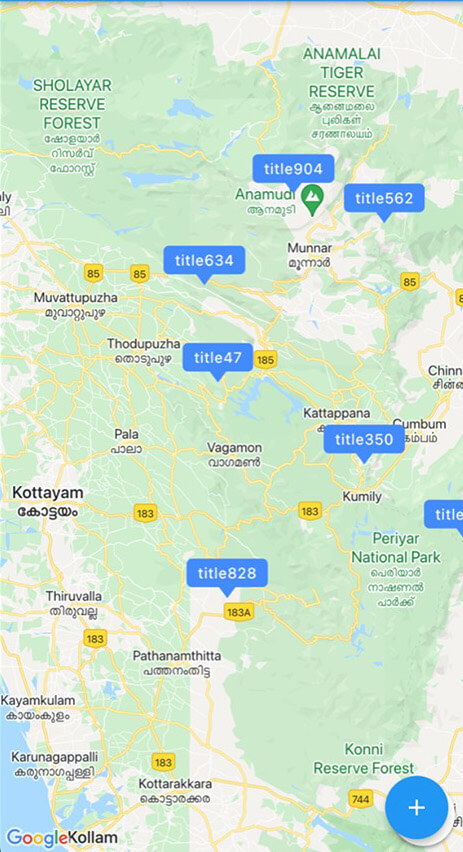
A package to create and use Google Maps marker with label text; the easiest and most efficient way.

Pub Package MIT License

Features

logo

Use this package in your Flutter app to:

  • Include map marker with text in flutter app
  • Customise the background colour of the label
  • Customise the font style of the label
  • Implement any other functionality that you could do with normal markers

Getting started

  1. Do the basic setup for having Google Maps
  2. Create a Set of normal markers ( Set < Marker > ) and set it as markers parameter of Google Maps widget
  3. Import this package; label_marker, and call addLabelMarker() function on the Set of markers when you want to add a label marker.
  4. Pass a LabelMarker widget, (created by giving required parameters, ie, label, position and markerId) to the above function. (See example.)
  5. Remember to call setState using 'then' keyword on the addLabelMarker() function.

Usage

markers.addLabelMarker(LabelMarker(
    label: "TextToShow",
    markerId: MarkerId("idString"),
    position: LatLng(10.0, 11.0),
    backgroundColor: Colors.green,
    )).then((value) {
    setState(() {});
    },
);

Additional information

This was done alone and contributions are absolutely welcome. Any idea or suggestion to remove the need of setState after the function manually called, would be most appreciated.

Enjoy the package. Develop something beautiful.