


v0.0.3
fast_image_compress
一个允许您轻松快速压缩图像的Flutter插件。
44喜欢 726近 30 天下载150Pub 分数
AndroidiOS
一个允许快速、轻松且高效压缩图像的 Flutter 插件。👌🔝🎉

以下为英文项目原文快照,最新内容请访问 GitHub。

A Flutter plugin that allows you to compress images easily and quickly.
Fast Image Compress can do much more (and we are just getting started)
The following bar graph demonstrates the efficiency of our plugin compared to two other existing packages. The comparison was conducted by compressing one image at a time for various image sizes, measuring the time taken in milliseconds (Y-axis) against the image size in MB (X-axis).
Below are the comparison graphs:
| Android | iOS |
|---|---|
 |
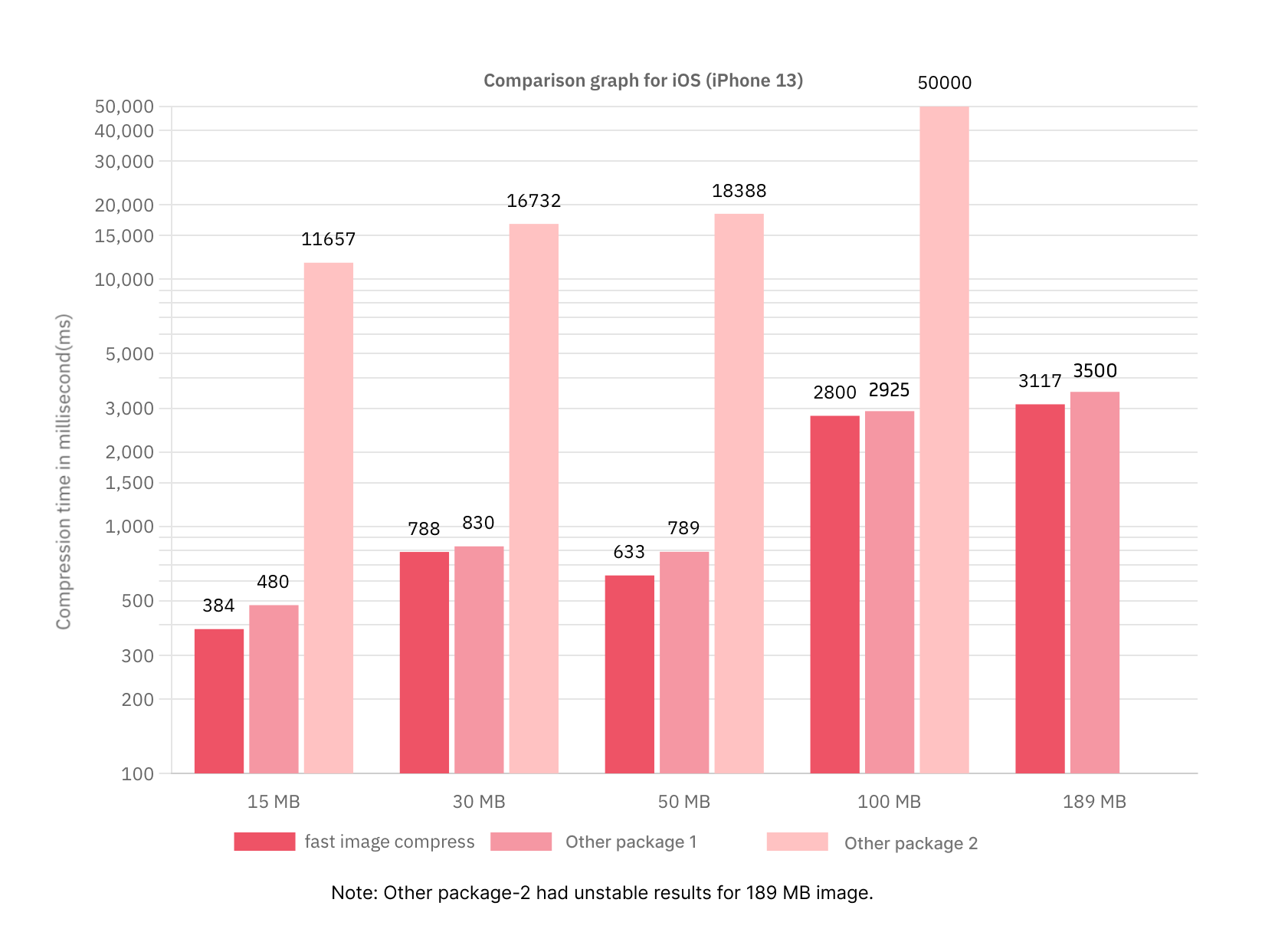 |
This visual representation highlights the better performance of our plugin in terms of compression speed and efficiency across different image sizes.
pubspec.yamldependencies:
fast_image_compress: <latest_version>
or run this command:
flutter pub add fast_image_compress
import 'package:fast_image_compress/fast_image_compress.dart';
Use as:
There are several ways to use the library api.
// 1. Compress an image and get Uint8List
Future<Uint8List> compressImage(Uint8List imageData) async {
  final compressedImage = await fastImageCompress.compressImage(
    imageData: imageData,
    quality: 60,
    targetWidth: 400,
    imageQuality: ImageQuality.low,
  );
  return compressedImage;
}

// 2. Compress list of images and get a list of Uint8List
Future<List<Uint8List>> compressMultipleImages(List<Uint8List> imageList) async {
  final result = await fastImageCompress.compressImageList(
    images: imageList,
    quality: 30,
    targetWidth: 800,
    batchSize: 3,
    imageQuality: ImageQuality.low,
  );
  return result;
}

// 3. Cancel the compression process
Future<void> _cancelCompression() async {
  await fastImageCompress.cancelCompression();
}
compressImage function:| Parameter Name | Data type | Default Value | Description |
|---|---|---|---|
| imageData | Uint8List | - | The image to be compressed |
| quality | int | 60 | The compression quality percentage |
| targetWidth | int? | null | The desired width for the compressed image |
| imageQuality | ImageQuality | ImageQuality.medium | The quality of the image to store after compression |
compressImage function:| Parameter Name | Data type | Default Value | Description |
|---|---|---|---|
| imageData | Uint8List | - | The image to be compressed |
| quality | int | 60 | The compression quality percentage |
| targetWidth | int? | null | The desired width for the compressed image |
| imageQuality | ImageQuality | ImageQuality.medium | The quality of the image to store after compression |
| batchSize | int | 3 | The number of images to process simultaneously in a batch |
The targetWidth parameter allows you to resize the images to a specific width.
Use this parameter when you need all images to have a uniform width. It is particularly useful for optimizing image processing performance. Recommended to use this parameter when image size or image width is large.
The batchSize parameter determines how many images are processed in a single batch.
To dynamically adjust batchSize based on the number of CPU threads available on the device, you can use the following code:
final maxAvailableCPUThreads = Platform.numberOfProcessors;
final batchSize = maxAvailableCPUThreads > 0 ? maxAvailableCPUThreads ~/ 2 : 1;
The imageQuality parameter controls the quality of the processed images. It has three predefined values:
You may need to update Kotlin to version 1.5.20 or higher.
Using this library, the image orientation is maintained.
Only support iOS 11+.
Only support API 28+.
Note: Requires hardware encoder support, so availability is not guaranteed on all devices running API 28 or higher.
 Rashi Shah |
MIT License

Copyright (c) 2021 Simform Solutions

Permission is hereby granted, free of charge, to any person obtaining a copy
of this software and associated documentation files (the "Software"), to deal
in the Software without restriction, including without limitation the rights
to use, copy, modify, merge, publish, distribute, sublicense, and/or sell
copies of the Software, and to permit persons to whom the Software is
furnished to do so, subject to the following conditions:

The above copyright notice and this permission notice shall be included in all
copies or substantial portions of the Software.

THE SOFTWARE IS PROVIDED "AS IS", WITHOUT WARRANTY OF ANY KIND, EXPRESS OR
IMPLIED, INCLUDING BUT NOT LIMITED TO THE WARRANTIES OF MERCHANTABILITY,
FITNESS FOR A PARTICULAR PURPOSE AND NONINFRINGEMENT. IN NO EVENT SHALL THE
AUTHORS OR COPYRIGHT HOLDERS BE LIABLE FOR ANY CLAIM, DAMAGES OR OTHER
LIABILITY, WHETHER IN AN ACTION OF CONTRACT, TORT OR OTHERWISE, ARISING FROM,
OUT OF OR IN CONNECTION WITH THE SOFTWARE OR THE USE OR OTHER DEALINGS IN THE
SOFTWARE.
依赖清单 5 项
{"sdk":"flutter"}^2.0.2{"sdk":"flutter"}^4.0.0—先按使用场景筛选,再比较项目活跃情况,最后到原始仓库核对使用要求。
“A repository is the most basic element of GitHub.”
GitHub Docs — About repositories ↗