
 v0.0.6
country_state_city_pro
一个全新的 Flutter 包,用于获取全球所有国家、州和城市。
65喜欢 258近 30 天下载130Pub 分数
AndroidiOSWebmacOSWindowsLinux
SujitSarkar/Country-State-City-Picker-Pro open-source repository details.

{"sdk":"flutter"}{"sdk":"flutter"}以下为英文项目原文快照,最新内容请访问 GitHub。
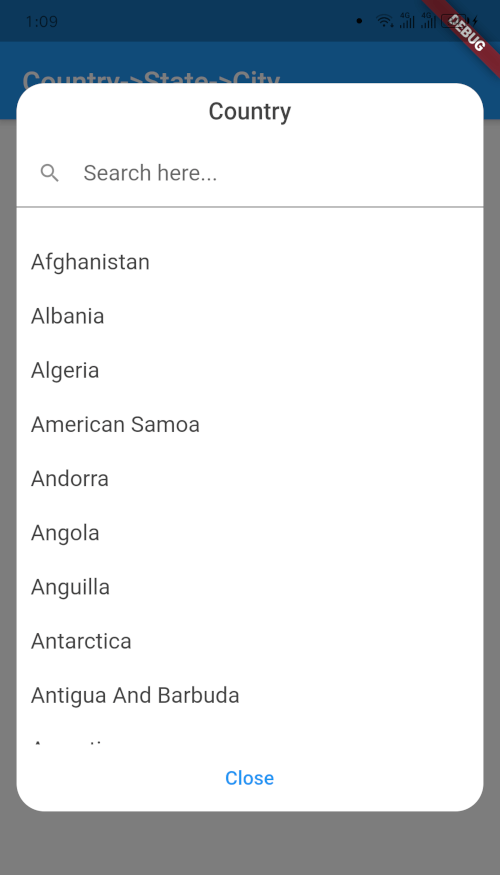
A new Flutter package to get world's all of Country, State, and City. And items are also searchable. In addition if city can't be found then user manually write city on dialog window.
This widget has been successfully tested on iOS, Android and Chrome.
| Outlook | Country Dialog |
|---|---|
| image info | image info |
| Country Searching | State Dialog |
|---|---|
| image info | image info |
| City Dialog | Final Data |
|---|---|
| image info | image info |
import 'package:country_state_city/country_state_city_picker.dart';

///Define Controller
TextEditingController country=TextEditingController();
TextEditingController state=TextEditingController();
TextEditingController city=TextEditingController();

///Widget initialize
CountryStateCityPicker(
                country: country,
                state: state,
                city: city,
                dialogColor: Colors.grey.shade200,
                textFieldDecoration: InputDecoration(
                  fillColor: Colors.blueGrey.shade100,
                  filled: true,
                  suffixIcon: const Icon(Icons.arrow_downward_rounded),
                  border: const OutlineInputBorder(borderSide: BorderSide.none))
            ),
import 'package:flutter/material.dart';
import 'package:country_state_city/country_state_city_picker.dart';

void main() {
  runApp(MyApp());
}
class MyApp extends StatelessWidget {
  @override
  Widget build(BuildContext context) {
    return MaterialApp(
      title: 'Country->State->City',
      theme: ThemeData(
        primarySwatch: Colors.blue,
      ),
      home: HomePage(),
    );
  }
}

class HomePage extends StatefulWidget {
  @override
  _HomePageState createState() => _HomePageState();
}
class _HomePageState extends State<HomePage> {
  TextEditingController country=TextEditingController();
  TextEditingController state=TextEditingController();
  TextEditingController city=TextEditingController();
  @override
  Widget build(BuildContext context) {
    return Scaffold(
      appBar: AppBar(
        title: Text('Country->State->City'),
      ),
      body: Padding(
          padding: EdgeInsets.all(15.0),
          child: Column(
            children: [
              CountryStateCityPicker(
                country: country,
                state: state,
                city: city,
                dialogColor: Colors.grey.shade200,
                textFieldDecoration: InputDecoration(
                   fillColor: Colors.blueGrey.shade100,
                   filled: true,
                   suffixIcon: const Icon(Icons.arrow_downward_rounded),
                   border: const OutlineInputBorder(borderSide: BorderSide.none))
              ),
              SizedBox(height: 20),

              Text("${country.text}, ${state.text}, ${city.text}")
            ],
          )
      ),
    );
  }
}