

 v3.0.0
overlay_tutorial
一个用于在小部件上切割孔洞并显示覆盖教程的Flutter包。它还允许在孔洞旁边添加提示。
69喜欢 1580近 30 天下载130Pub 分数
AndroidiOSWebmacOSWindowsLinux
一个用于显示覆盖教程的Flutter包。

以下为英文项目原文快照,最新内容请访问 GitHub。
A Flutter package for displaying overlay tutorial.
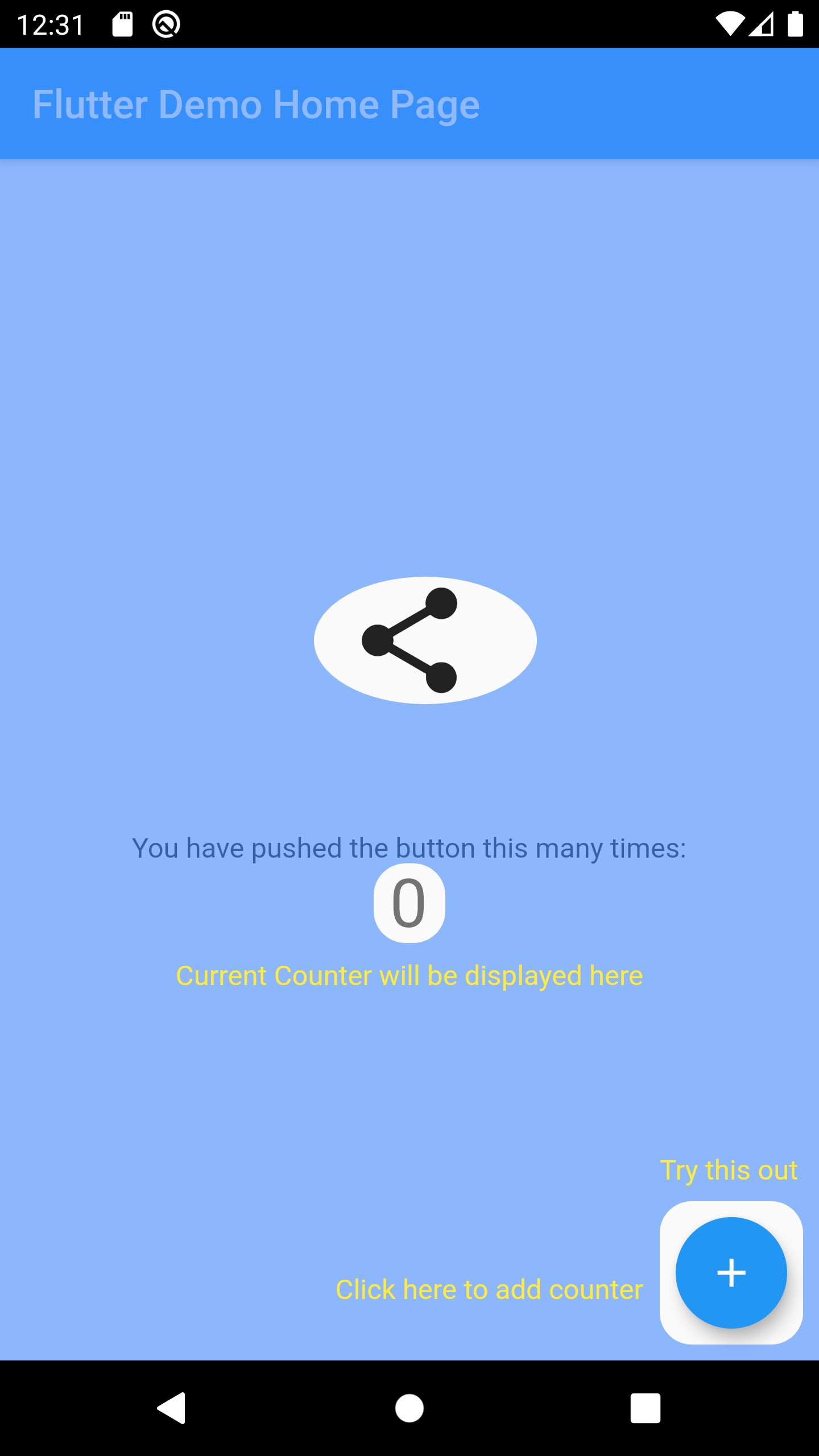
Wrap the widget that you want to create a hole using OverlayTutorialHole. Ensure you have OverlayTutorialScope as a parent of these holes.
OverlayTutorialScope.enabled property to control the visibility of the overlay tutorial. If this is false, the entire overlay tutorial will be hidden.OverlayTutorialHole.enabled property to control the visibility of the holes.
Widget build(BuildContext context) {
  final textTheme = Theme.of(context).textTheme;
  const tutorialColor = Colors.yellow;
  return SafeArea(
    child: Stack(
      children: [
        OverlayTutorialScope(
          enabled: _isTutorialEnabled,
          overlayColor: Colors.blueAccent.withOpacity(.6),
          // Disable all the widgets. All the widgets are now non-interactive.
          child: AbsorbPointer(
            absorbing: _isTutorialEnabled,
            child: Scaffold(
              appBar: AppBar(
                title: Text(widget.title),
              ),
              body: Center(
                child: Column(
                  mainAxisAlignment: MainAxisAlignment.center,
                  children: <Widget>[
                    AnimatedBuilder(
                      animation: _tweenAnimation,
                      builder: (context, child) {
                        return SlideTransition(
                          position: _tweenAnimation,
                          child: child,
                        );
                      },
                      child: OverlayTutorialHole(
                        enabled: true,
                        overlayTutorialEntry: OverlayTutorialCustomShapeEntry(
                          shapeBuilder: (rect, path) {
                            path = Path.combine(
                              PathOperation.difference,
                              path,
                              Path()
                                ..addOval(Rect.fromLTWH(
                                  rect.left - 16,
                                  rect.top,
                                  112,
                                  64,
                                )),
                            );
                            return path;
                          },
                        ),
                        child: const Icon(
                          Icons.share,
                          size: 64,
                        ),
                      ),
                    ),
                    const SizedBox(height: 64),
                    const Text(
                      'You have pushed the button this many times:',
                    ),
                    OverlayTutorialHole(
                      enabled: true,
                      overlayTutorialEntry: OverlayTutorialRectEntry(
                        padding: const EdgeInsets.symmetric(horizontal: 8.0),
                        radius: const Radius.circular(16.0),
                        overlayTutorialHints: <OverlayTutorialWidgetHint>[
                          OverlayTutorialWidgetHint(
                            position: (rect) => Offset(0, rect.bottom),
                            builder: (context, entryRect) {
                              return SizedBox(
                                width: MediaQuery.of(context).size.width,
                                child: Center(
                                  child: Padding(
                                    padding: const EdgeInsets.all(8.0),
                                    child: Text(
                                      'Current Counter will be displayed here',
                                      style: textTheme.bodyText2!
                                          .copyWith(color: tutorialColor),
                                    ),
                                  ),
                                ),
                              );
                            },
                          ),
                        ],
                      ),
                      child: Text(
                        '$_counter',
                        style: Theme.of(context).textTheme.headline4,
                      ),
                    ),
                  ],
                ),
              ),
              floatingActionButton: OverlayTutorialHole(
                enabled: true,
                overlayTutorialEntry: OverlayTutorialRectEntry(
                  padding: const EdgeInsets.all(8.0),
                  radius: const Radius.circular(16.0),
                  overlayTutorialHints: [
                    OverlayTutorialWidgetHint(
                      builder: (context, entryRect) {
                        return Positioned(
                          top: entryRect.rRect!.top - 24.0,
                          left: entryRect.rRect!.left,
                          child: Text(
                            'Try this out',
                            style: textTheme.bodyText2!
                                .copyWith(color: tutorialColor),
                          ),
                        );
                      },
                    ),
                    OverlayTutorialWidgetHint(
                      position: (rect) => Offset(0, rect.center.dy),
                      builder: (context, entryRect) {
                        return SizedBox(
                          width: entryRect.rRect!.left,
                          child: Padding(
                            padding: const EdgeInsets.only(right: 8.0),
                            child: Row(
                              mainAxisAlignment: MainAxisAlignment.end,
                              children: [
                                Flexible(
                                  child: Text(
                                    'Click here to add counter',
                                    style: textTheme.bodyText2!
                                        .copyWith(color: tutorialColor),
                                  ),
                                ),
                              ],
                            ),
                          ),
                        );
                      },
                    ),
                  ],
                ),
                child: FloatingActionButton(
                  onPressed: _incrementCounter,
                  tooltip: 'Increment',
                  child: const Icon(Icons.add),
                ),
              ),
            ),
          ),
        ),
        if (_isTutorialEnabled)
          Align(
            alignment: Alignment.topRight,
            child: GestureDetector(
              onTap: () {
                _isTutorialEnabled = false;
                setState(() {});
              },
              child: Padding(
                padding: const EdgeInsets.all(8.0),
                child: Container(
                  padding: const EdgeInsets.all(16),
                  decoration: const BoxDecoration(
                    shape: BoxShape.circle,
                    color: Colors.black,
                  ),
                  child: const Icon(
                    Icons.close,
                    color: Colors.red,
                  ),
                ),
              ),
            ),
          ),
      ],
    ),
  );
}
OverlayTutorialRectEntry draws a Rectangle shapeOverlayTutorialCircleEntry draws a Circle shapeOverlayTutorialCustomShapeEntry allows to draw a customized shapeDisabling widget is not provided by this package out of the box. You can achieve this using one of the Flutter widget: AbsorbPointer or IgnorePointer. Make sure you do not wrap the OverlayTutorialScope with these widgets as this will disable the widget in OverlayTutorialWidgetHint.

Check Dart Documentation
依赖清单 7 项
{"sdk":"flutter"}^1.15.0^2.5.0^2.0.3^1.11.1{"git":{"url":"https://github.com/TabooSun/dart_taboosun_lints.git","ref":"v1.0.1"}}{"sdk":"flutter"}先按使用场景筛选,再比较项目活跃情况,最后到原始仓库核对使用要求。
“A repository is the most basic element of GitHub.”
GitHub Docs — About repositories ↗