

 v3.2.0
flutter_advanced_segment
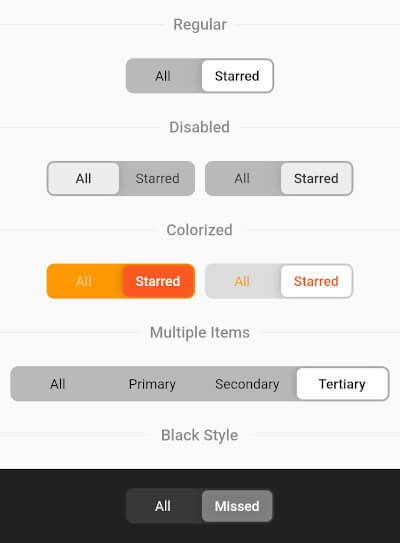
一个高级的分段控件,可以通过大量属性进行完全自定义,快来试试吧,享受其中!
118喜欢 7120近 30 天下载150Pub 分数
AndroidiOSWebmacOSWindowsLinux
https://pub.dev/packages/flutter_advanced_segment

以下为英文项目原文快照,最新内容请访问 GitHub。
An advanced segment widget, that can be fully customized with bunch of properties, just try it and enjoy!

 |
 |
final _controller = ValueNotifier('all');
//...
AdvancedSegment(
  controller: _controller,
  segments: const {
    'all': 'All',
    'starred': 'Starred',
  },
),
AdvancedSegment(
  controller: _controller,
  segments: const {'all': 'All', 'starred': 'Starred'},
  decoration: BoxDecoration(
    color: const Color(0xFFFF6B35),
    borderRadius: BorderRadius.circular(4),
  ),
  sliderColor: const Color(0xFFD63B0E),
  activeStyle: const TextStyle(
    color: Colors.white,
    fontWeight: FontWeight.w600,
  ),
  inactiveStyle: TextStyle(
    color: Colors.white.withValues(alpha: 0.7),
  ),
),
AdvancedSegment(
  controller: _controller,
  segments: const {'all': 'All', 'starred': 'Starred'},
  decoration: BoxDecoration(
    gradient: const LinearGradient(
      colors: [Color(0xFFFF2D55), Color(0xFFFF9500)],
    ),
    borderRadius: BorderRadius.circular(16),
  ),
  sliderColor: Colors.white,
  activeStyle: const TextStyle(
    color: Color(0xFFFF2D55),
    fontWeight: FontWeight.w700,
  ),
  inactiveStyle: TextStyle(
    color: Colors.white.withValues(alpha: 0.85),
  ),
),
AdvancedSegment(
  controller: _controller,
  segments: const {'all': 'All', 'starred': 'Starred'},
  decoration: BoxDecoration(
    color: const Color(0xFF2C2C2E),
    borderRadius: BorderRadius.circular(50),
  ),
  sliderDecoration: BoxDecoration(
    color: const Color(0xFFBF5AF2),
    borderRadius: BorderRadius.circular(50),
    border: Border.all(
      color: const Color(0xFFDA8FFF),
      width: 1.5,
    ),
  ),
  activeStyle: const TextStyle(
    color: Colors.white,
    fontWeight: FontWeight.w700,
  ),
  inactiveStyle: TextStyle(
    color: Colors.white.withValues(alpha: 0.5),
  ),
),
| Parameter | Description | Type | Default |
|---|---|---|---|
controller |
Controls segments selection | ValueNotifier | |
segments |
Map of presented segments | Map<K, V> | required |
activeStyle |
Active segment text style | TextStyle | fontWeight: FontWeight.w600 |
inactiveStyle |
Inactive segment text style | TextStyle | |
decoration |
Layout decoration (color, border, borderRadius, gradient, etc.) | BoxDecoration | color: 0x42000000, borderRadius: 8.0 |
sliderColor |
Color of the slider thumb | Color | Colors.white |
sliderOffset |
Gap between slider and layout | double | 2.0 |
itemPadding |
Padding of each item | EdgeInsets | EdgeInsets.symmetric(h: 15, v: 10) |
animationDuration |
Selection animation duration | Duration | Duration(milliseconds: 250) |
shadow |
Slider shadow | List<BoxShadow> | BoxShadow(blurRadius: 8.0) |
sliderDecoration |
Custom slider decoration (overrides sliderColor, borderRadius, shadow) | BoxDecoration | |
enableDrag |
Whether drag gesture is enabled | bool | true |
依赖清单 2 项
{"sdk":"flutter"}^2.0.0先按使用场景筛选,再比较项目活跃情况,最后到原始仓库核对使用要求。
“A repository is the most basic element of GitHub.”
GitHub Docs — About repositories ↗