
flutter_netflix
Netflix 克隆版,使用 BloC、GoRouter 和 TMDB。

- 星标
- 187
- 复刻
- 48
- 最近推送(UTC)
- 2024年5月20日
- 项目状态
- 未归档
原始 README
以下为英文项目原文快照,最新内容请访问 GitHub。
🚀 Netflix UI Clone in Flutter using BloC
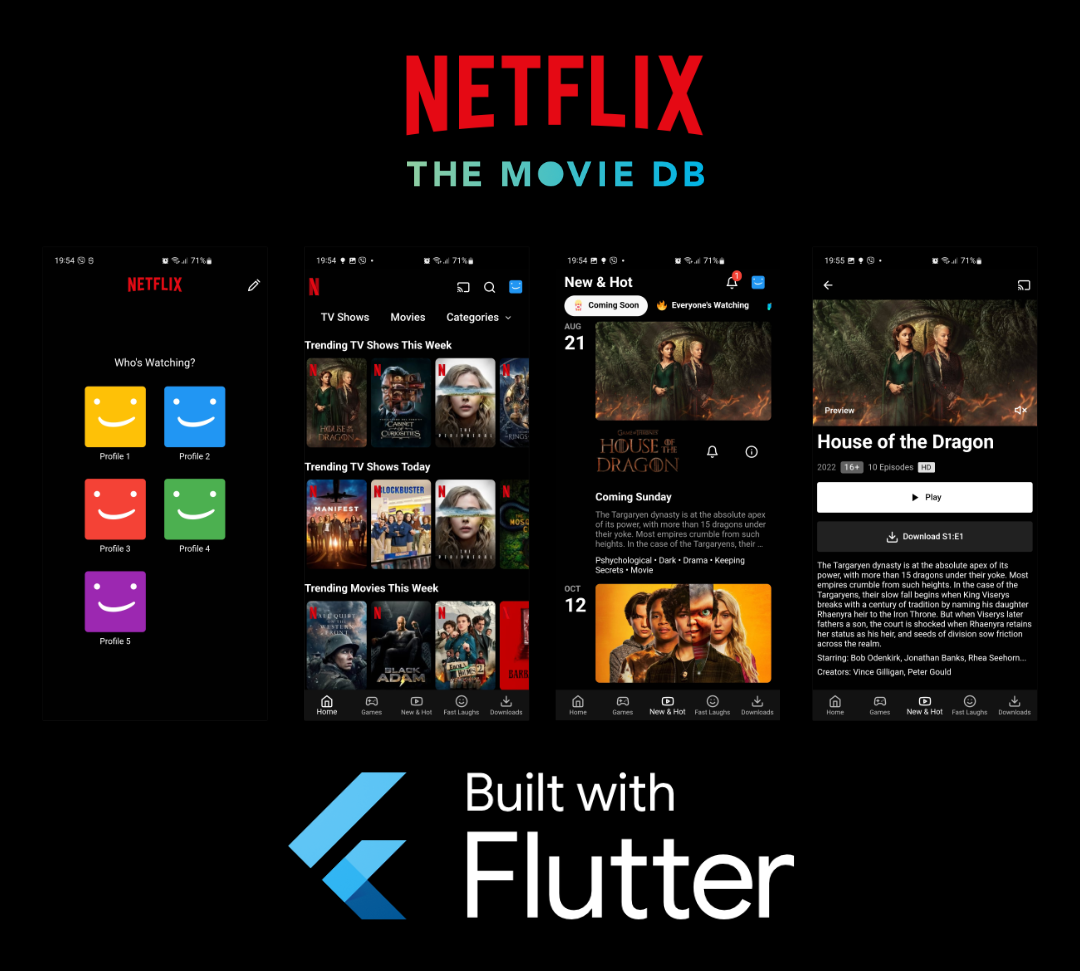
The Project uses BloC package to manage the state and GoRouter for navigation. It use the awesome TMDB API to fetch the needed tv shows and movie data.
The main purpose of this project is to demonstrate the usage of BloC and GoRouter combined but even more to demonstrate Slivers usage in Flutter. It heavily depends on Slivers, like CustomScrollView, SliverList, GridView, SliverAppBar and even SliverPersistentHeader. It also has a BottomBarNavigation nicely implemented with GoRouter's ShellRoute. Apart from that it uses Hero Widgets in order to animate a simple small transition when moving from Home -> Tv Shows and a CustomPainter to replicate the smiley faces on the profiles.
It contains various screens like Profile Selection, Home, New & Hot, Movie and Tv Show Details Page.
Apart from that the project implements custom App Icon and Splash Screen and on Android it uses the new Android 12 API for showing Splash screen.
NOTE: This project is not a complete Netflix UI Clone but I would say it's the most "complete" compared to other on the internet which in their way are awesome as well!
Download
For those that want to have a quick look at the app you can download and install the apk on an android device or emulator from Releases.
Running
- Get Packages
flutter pub get
- Get an API key from TMDB and replace it in
lib/api/api.dart
final apiKey = 'INSERT_YOUR_API_KEY_HERE';
- Run App
flutter run --release
Links
Netflix Clone in Flutter using BloC, GoRouter and TMDB - Medium
Credits


Licence
flutter_netflix is Licenced under the MIT Licence

Angjelko Miloshevski ↗
分类
使用的依赖
依赖清单 13 项
- flutter
{"sdk":"flutter"} - cupertino_icons
^1.0.2 - flutter_bloc
^8.1.2 - shimmer
^2.0.0 - ionicons
^0.2.2 - http
^0.13.5 - cached_network_image
^3.2.3 - lucide_icons
^0.115.0 - intl
^0.18.0 - sliver_tools
^0.2.9 - go_router
^6.0.9 - flutter_test开发依赖
{"sdk":"flutter"} - flutter_lints开发依赖
^2.0.0
所在榜单
如何选择适合项目的代码仓?
先按使用场景筛选,再比较项目活跃情况,最后到原始仓库核对使用要求。
- 通过仓库名、作者或描述搜索,再按技术分类缩小范围。
- 结合星标、复刻与最近推送比较项目;星标反映社区关注,不代表质量保证。
- 使用前在 GitHub 核对 README、许可证与 Issues。
来源与维护
“A repository is the most basic element of GitHub.”
GitHub Docs — About repositories ↗