
 v2.3.2+8
markdown_widget
一个新的 markdown 包。它支持目录(TOC)功能、代码高亮,并且支持所有平台。
411喜欢 6570近 30 天下载160Pub 分数
AndroidiOSWebmacOSWindowsLinux
📖通过flutter渲染markdown!欢迎提交pr和issue。

{"sdk":"flutter"}^7.3.0^0.7.0^0.7.0^6.3.1^0.4.0+2^3.0.1{"sdk":"flutter"}^2.0.1^2.3.3^1.8.2^2.1.1以下为英文项目原文快照,最新内容请访问 GitHub。
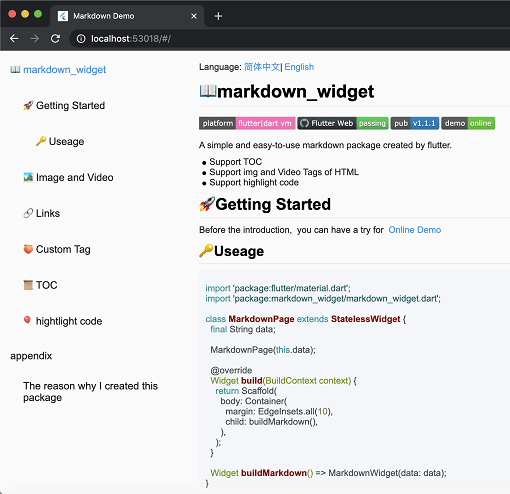
screen
Coverage Status pub package demo
A simple and easy-to-use markdown rendering component.
Before starting, you can try out the online demo by clicking demo
import 'package:flutter/material.dart';
import 'package:markdown_widget/markdown_widget.dart';

class MarkdownPage extends StatelessWidget {
  final String data;

  MarkdownPage(this.data);

  @override
  Widget build(BuildContext context) => Scaffold(body: buildMarkdown());

  Widget buildMarkdown() => MarkdownWidget(data: data);
}
If you want to use your own Column or other list widget, you can use MarkdownGenerator
  Widget buildMarkdown() =>
      Column(children: MarkdownGenerator().buildWidgets(data));
Or use MarkdownBlock
  Widget buildMarkdown() =>
      SingleChildScrollView(child: MarkdownBlock(data: data));
For advanced usage examples, check out the example/lib/markdown_custom folder in the repository:
These examples demonstrate how to extend the package with custom tags and features.
markdown_widget supports night mode by default. Simply use a different MarkdownConfig to enable it.
  Widget buildMarkdown(BuildContext context) {
    final isDark = Theme.of(context).brightness == Brightness.dark;
    final config = isDark
        ? MarkdownConfig.darkConfig
        : MarkdownConfig.defaultConfig;
    final codeWrapper = (child, text, language) =>
        CodeWrapperWidget(child, text, language);
    return MarkdownWidget(
        data: data,
        config: config.copy(configs: [
        isDark
        ? PreConfig.darkConfig.copy(wrapper: codeWrapper)
        : PreConfig().copy(wrapper: codeWrapper)
    ]));
  }
| Default mode | Night mode |
|---|---|
| https://user-images.githubusercontent.com/30992818/211159089-ec4acd11-ee02-46f2-af4f-f8c47eb28410.png | https://user-images.githubusercontent.com/30992818/211159108-4c20de2d-fb1d-4bcb-b23f-3ceb91291661.png |
You can customize the style and click events of links, like this
  Widget buildMarkdown() => MarkdownWidget(
      data: data,
      config: MarkdownConfig(configs: [
        LinkConfig(
          style: TextStyle(
            color: Colors.red,
            decoration: TextDecoration.underline,
          ),
          onTap: (url) {
            ///TODO:on tap
          },
        )
      ]));
Using the TOC is very simple
  final tocController = TocController();

  Widget buildTocWidget() => TocWidget(controller: tocController);

  Widget buildMarkdown() => MarkdownWidget(data: data, tocController: tocController);

  @override
  Widget build(BuildContext context) {
    return Scaffold(
        body: Row(
          children: <Widget>[
            Expanded(child: buildTocWidget()),
            Expanded(child: buildMarkdown(), flex: 3)
          ],
        ));
  }
Highlighting code supports multiple themes.
import 'package:flutter_highlight/themes/a11y-light.dart';

  Widget buildMarkdown() => MarkdownWidget(
      data: data,
      config: MarkdownConfig(configs: [
        PreConfig(theme: a11yLightTheme),
      ]));
Cross-platform support for Select All and Copy function.
image
As the current package only implements the conversion of Markdown tags, it does not support the conversion of HTML tags by default. However, this functionality can be supported through extension. You can refer to the usage in html_support.dart for more details.
Here is the online HTML demo showcase
The example also includes simple support for LaTeX, which can be implemented by referring to the implementation in latex.dart
Here is the online latex demo showcase
The example includes support for Mermaid diagrams, which can render flowcharts, sequence diagrams, state diagrams, and more. Refer to the implementation in mermaid.dart
Features:
Here is the online Mermaid demo showcase
import 'package:markdown_widget/markdown_widget.dart';
import 'markdown_custom/mermaid.dart';

// Basic usage
final isDark = Theme.of(context).brightness == Brightness.dark;
final preConfig = PreConfig(
  wrapper: createMermaidWrapper(
    config: const MermaidConfig(),
    isDark: isDark,
    preConfig: preConfig,
  ),
);

MarkdownWidget(
  data: markdown,
  config: config.copy(configs: [preConfig]),
)

// With custom configuration
final preConfig = PreConfig(
  wrapper: createMermaidWrapper(
    config: MermaidConfig(
      displayMode: MermaidDisplayMode.codeAndDiagram,
      diagramPadding: EdgeInsets.all(16.0),
      showLoadingIndicator: true,
    ),
    isDark: isDark,
    preConfig: preConfig,
  ),
);
By passing a SpanNodeGeneratorWithTag to MarkdownGeneratorConfig, you can add new tags and the corresponding SpanNodes for those tags. You can also use existing tags to override the corresponding SpanNodes.
You can also customize the parsing rules for Markdown strings using InlineSyntax and BlockSyntax, and generate new tags.
You can refer to this issue to learn how to implement a custom tag.
If you have any good ideas or suggestions, or have any issues using this package, please feel free to open a pull request or issue.
Here are the other libraries used in markdown_widget
| Packages | Descriptions |
|---|---|
| markdown | Parsing markdown data |
| flutter_highlight | Code highlighting |
| highlight | Code highlighting |
| url_launcher | Opening links |
| visibility_detector | Listening for visibility of a widget; |
| scroll_to_index | Enabling ListView to jump to an index. |